
Seat Ibiza (6F) 2017-2026 Owner's Manual: Manual gearbox
Changing gears
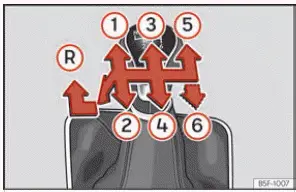
Fig. 86 Gear shift pattern of a 5 or 6-speed
manual gearbox.
Seat Ibiza models equipped with a manual gearbox allow the driver to select the appropriate gear according to road speed, engine speed and driving conditions. The arrangement of the available gears is illustrated on the top of the gear lever, as shown in Fig. 86. Depending on the gearbox version, the vehicle may have five or six forward gears in addition to reverse. Familiarise yourself with the shift pattern before driving, particularly when operating a vehicle with a different gearbox configuration.
- Fully depress the clutch pedal and keep it pressed all the way down while selecting a gear. Completely disengaging the clutch allows the gearbox to change ratios without unnecessary resistance or strain on its internal components.
- Move the gear lever smoothly into the desired position, following the shift pattern marked on the lever. Select a gear appropriate to the vehicle's speed and the current engine operating conditions. Avoid forcing the lever if resistance is encountered.
- Release the clutch pedal progressively after selecting the gear. Coordinate clutch release with the accelerator as necessary to achieve a smooth transition and avoid sudden changes in vehicle movement or excessive strain on the drivetrain.
Engaging reverse gear
Reverse gear must only be selected when the Seat Ibiza has come to a complete standstill. Attempting to engage reverse while the vehicle is still moving forwards can place excessive stress on the transmission and may damage its internal components. Before selecting reverse, make sure the vehicle is stationary and that the clutch pedal is fully depressed.
- Press the clutch pedal completely to the floor and keep it fully depressed throughout the gear selection process. This disengages the engine from the gearbox while reverse gear is being selected.
- With the gear lever initially in neutral, press the lever downwards, move it fully to the left and then push it forwards into the reverse gear position, marked R in Fig. 86. Follow this movement carefully and make sure the lever has reached the intended position before releasing the clutch.
- Release the clutch pedal gradually to begin moving backwards. Control the vehicle's speed carefully and remain attentive to the surroundings, particularly when reversing in confined spaces or near obstacles.
Changing to lower gears
When reducing speed in a Seat Ibiza with a manual gearbox, downshift progressively through the available gears. Under normal driving conditions, select the next lower gear rather than changing directly to a substantially lower ratio, particularly when the vehicle is travelling quickly or the engine is already operating at relatively high revolutions. This helps maintain a suitable relationship between road speed and engine speed while reducing unnecessary mechanical stress during gear changes.
Skipping one or more gears during a downshift at high road speeds or high engine RPM can cause excessive rotational speeds and place considerable strain on the clutch and gearbox. Such damage may occur even when the clutch pedal is fully depressed, because selecting an unsuitable lower gear can subject transmission components to excessive speed differences. Always consider the vehicle's current speed before selecting a lower gear, and avoid any downshift that could cause the engine to operate beyond its permitted speed range.
WARNING When the engine is running, the Seat Ibiza can begin moving as soon as a gear is engaged and the clutch pedal is released. This can happen unexpectedly if the driver releases the clutch without being prepared for the vehicle to move. The risk remains even when the electronic parking brake is activated, as the vehicle may still attempt to move against the applied brake. Always maintain proper control of the clutch, brake and accelerator pedals when selecting a gear.
- Never engage reverse gear while the vehicle is moving. Selecting reverse before the Seat Ibiza has stopped completely can cause an abrupt reaction from the drivetrain, potentially resulting in transmission damage, loss of vehicle control or an accident. Bring the vehicle to a full stop before moving the gear lever into the reverse position.
WARNING Incorrect downshifting can cause the driver to lose control of the Seat Ibiza. Selecting a gear that is too low for the current road speed may produce excessive engine braking, a sudden change in vehicle behaviour or an abrupt increase in engine speed. These effects can compromise stability, particularly on slippery roads or while cornering, and may result in an accident causing serious injuries. Always choose a lower gear that is suitable for the vehicle's speed and the prevailing driving conditions.
NOTICE Selecting an excessively low gear while travelling at high speed or while the engine is operating at high RPM can seriously damage the clutch and gearbox. The difference between the rotational speeds of the transmission components may be too great for the selected gear, resulting in excessive mechanical loading. Damage can occur even if the clutch pedal remains fully depressed and the gear change is not completed. Avoid forcing the gear lever into a lower position when the vehicle's speed is unsuitable for that gear.
NOTICE To protect the manual transmission of your Seat Ibiza from unnecessary wear and mechanical damage, observe the following precautions during everyday driving and manoeuvring. Correct use of the gear lever and clutch helps preserve smooth gear changes and reduces the likelihood of premature component wear.
- Do not leave your hand resting on the gear lever while driving. Even light, continuous pressure can be transmitted through the gear selection mechanism to the gearbox selector forks. Over time, this unnecessary loading may contribute to premature wear. Use the gear lever only when changing gears, and keep your hand away from it during normal driving.
- Never rest your foot on the clutch pedal when you are not changing gears. Even slight pressure may
partially disengage the clutch and cause the clutch disc to slip, producing unnecessary friction and
accelerating wear. The pressure may be too small to notice during driving but can still affect the
clutch mechanism over time.
When no gear change is required, place your left foot on the designated footrest rather than keeping it above or against the clutch pedal. This prevents unintended clutch operation and allows the pedal to remain fully released.
- Always bring the Seat Ibiza to a complete stop before engaging reverse gear. Do not attempt to select reverse while the vehicle is still rolling forwards, even at very low speed. Waiting until the vehicle is stationary reduces the risk of damaging the reverse gear mechanism and other transmission components.
- Fully depress the clutch pedal whenever changing gears. Incomplete clutch disengagement can make gear selection difficult and increase wear on the gearbox synchronisers and related components. Keep the pedal pressed until the new gear has been selected, then release it smoothly.
- Do not hold the vehicle stationary on an uphill slope by allowing the clutch to slip while the engine is running. This practice, commonly known as riding the clutch, generates considerable friction and heat, which can rapidly wear the clutch disc and associated components. Use the appropriate braking system to keep the vehicle stationary on a gradient, and engage the clutch only when you are ready to move away.
 Manually connecting and disconnecting
the Start-Stop system
Fig. 85 Centre console: Start-Stop system
button.
The Start-Stop system in the Seat Ibiza can be deactivated manually whenever the driver does not want the engine
to switch off automaticall ...

See also:
Honda Civic Owners Manual. Switching the Display
Audio
Shows the current audio information.
Clock/Wallpaper
Shows a clock screen or an image you import.
Change display
1. Press the MENU/CLOCK button.
2. Rotate to select Settings,
then press .
3. Rotate to select Display Change,
then press .
4. Rotate to select ...
