
Seat Ibiza (6F) 2017-2026 Owner's Manual: Interior lights
Lighting of the instrument cluster, displays and controls
The brightness of the instrument cluster, displays and illuminated controls in the Seat Ibiza can be adjusted through the Infotainment system. This allows the driver to select a comfortable level of dashboard illumination according to personal preference and the surrounding lighting conditions. Correctly adjusted instrument lighting makes the displayed information easier to read without creating unnecessary brightness inside the passenger compartment, particularly when driving at night.
- Open the Infotainment system menu and select
 > Settings > Lighting > Vehicle
interior lighting. Alternatively, depending on the vehicle version and Infotainment system, select
 > Interior settings > Lighting >
Instrument cluster. Use the available adjustment controls to set the desired brightness of the
instrument and control illumination. The menu arrangement may differ between equipment versions, but both
paths provide access to the relevant interior lighting settings.
Once the desired brightness has been selected, the illumination intensity automatically adapts to changes in ambient light inside the vehicle. This adjustment helps maintain suitable visibility of the instruments and controls as the surrounding brightness changes, for example when moving between brightly illuminated roads and darker areas. The selected setting provides the basis for the automatic adjustment, reducing the need to change the brightness manually during normal driving.
When the automatic dipped beam function  is activated, a light
sensor monitors the ambient brightness and controls the dipped beam headlights accordingly. The same automatic
operation also affects the illumination of the instrument cluster and vehicle controls. As the surrounding light
level changes, the system switches the dipped beam headlights and the associated instrument and control lighting
on or off as required, helping the driver maintain appropriate exterior illumination and dashboard visibility.
Under certain conditions, the instrument cluster illumination may be reduced significantly or even switched off
when the automatic dipped beam function  is not
selected. This can occur, for example, when driving into a tunnel with the headlights set to a mode that does
not automatically activate the dipped beam. The reduction in instrument lighting is intended to alert the driver
that the exterior lighting may be insufficient and that the dipped beam headlights should be switched on
manually. If the Seat Ibiza is equipped with a digital instrument cluster, the message Turn on the
lights appears on the display to provide a more explicit reminder. The driver should respond by
selecting the appropriate exterior lighting setting for the prevailing conditions.
Interior and reading lights
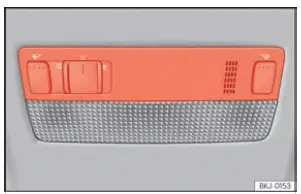
Fig. 73 Detail of headliner: front interior lighting.
 Switching off the interior lights.
Select this control position to turn off the passenger compartment lighting. This setting is useful when
interior illumination is not required, such as when occupants prefer the cabin to remain dark during a journey.
The control allows the interior lights to be switched off independently of the exterior lighting settings.
 Switching on the interior lights. Use
this control to illuminate the passenger compartment manually. The interior lights provide additional visibility
when occupants need to locate belongings, read information or carry out other activities while the vehicle is
stationary. The lighting can be switched off again using the corresponding control.
 Door contact operation.
When this setting is selected, the interior lighting responds automatically to certain vehicle access and
ignition events. The lights switch on when the Seat Ibiza is unlocked, when a door is opened or when the
ignition key is removed, allowing occupants to see inside the passenger compartment while entering or leaving
the vehicle. After all doors have been closed, the interior lights switch off automatically following a short
delay. They also go out when the vehicle is locked or the ignition is switched on. This automatic operation
provides convenient illumination without requiring the driver to operate the roof-mounted light switch each
time.
 Switching the reading light on and
off. The reading light can be operated using its corresponding control in the interior lighting
panel. This allows occupants to activate local illumination when additional light is needed and switch it off
when it is no longer required. The reading light provides a more concentrated source of illumination than the
general passenger compartment lighting.
The arrangement and operation of the interior lighting controls may differ according to the Seat Ibiza model version and installed equipment. The available switches, reading lights and automatic lighting functions should therefore be identified using the controls fitted to the particular vehicle.
Luggage compartment lighting
The luggage compartment light switches on automatically when the rear lid is opened, illuminating the load area and making it easier to see items stored inside. This function operates even when the ignition is switched off and the exterior lights are not in use. As a result, the luggage compartment remains illuminated whenever the rear lid is open, allowing the driver to load or remove belongings without having to switch on the vehicle's main lighting system.
For this reason, make sure that the rear lid is properly closed whenever the luggage compartment is not being used. Leaving it open can cause the luggage compartment light to remain illuminated and consume electrical energy from the vehicle's battery. Closing the rear lid also ensures that the luggage compartment is secured and that the lighting is no longer required.
Background lighting
The background lighting system provides soft illumination in selected areas of the Seat Ibiza passenger compartment. It lights the centre console and the footwell area, improving visibility around these parts of the interior without relying on the main roof-mounted lights. Depending on the vehicle version and equipment, the background lighting may also extend to the front door panels and the air vents. The illuminated areas are integrated into the cabin design and provide subtle orientation lighting for the driver and passengers.
When the vehicle doors are opened, the background lighting operates at full brightness to illuminate the relevant
interior areas as occupants enter or leave the Seat Ibiza. During driving, the system reduces the illumination
intensity to provide a less distracting lighting level. This dimmed operation applies when the exterior lighting
selector is set to  ,
 or
 . The transition between full brightness and
reduced illumination helps maintain a comfortable interior lighting environment while the vehicle is being
driven.
The brightness and colour of the background lighting can be customised through the Infotainment system, where
supported by the vehicle's equipment. To access these settings, select the function button  >
Settings > Background lighting. On other Infotainment system versions, the relevant settings
may be available directly under Background lighting. The available controls allow the driver to
adjust the lighting intensity and colour to suit the desired interior atmosphere, while the system continues to
manage the brightness automatically according to door operation and driving conditions.
Note If one or more vehicle doors remain open, the interior lights switch off automatically after approximately 10 minutes, provided that the ignition is switched off and the door contact lighting function is selected. This automatic shut-off limits the amount of time the passenger compartment lights can remain illuminated while the vehicle is stationary with a door open. Its purpose is to reduce unnecessary electrical consumption and help prevent the Seat Ibiza battery from becoming discharged.
 Headlight range control
Fig. 72 Next to the steering wheel: headlight range control regulator.
The headlight range control shown in Fig. 72 allows the dipped beam headlights to be adjusted according to the
load car ...
 Visibility
...
See also:
Honda Civic Owners Manual. Switching the Display
Audio
Shows the current audio information.
Clock/Wallpaper
Shows a clock screen or an image you import.
Change display
1. Press the MENU/CLOCK button.
2. Rotate to select Settings,
then press .
3. Rotate to select Display Change,
then press .
4. Rotate to select ...
