
Honda Civic Owners Manual: How the System Works. How the System Activates
How the System Works
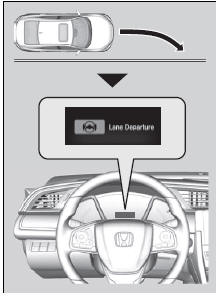
The front camera behind the rearview mirror monitors left and right lane markings (in white or yellow). If your vehicle is getting too close to detected lane markings without a turn signal activated, the system, in addition to a visual alert, applies steering torque and alerts you with rapid vibrations on the steering wheel, to help you remain within the detected lane.
As a visual alert, the Lane Departure message appears on the driver information interface.
If the system determines that its steering input is insufficient to keep your vehicle on the roadway, it may apply braking.
- Braking is applied only when the lane markings are solid continuous lines.
The system cancels assisting operations when you turn the steering wheel to avoid crossing over detected lane markings.
If the system operates several times without detecting driver response, the system beeps to alert you.
How the System Activates
The system becomes ready to start searching for lane markings when all the following conditions are met:
- The vehicle is traveling between about 45 and 90 mph (72 and 145 km/h).
- The vehicle is on a straight or slightly curved road.
- The turn signals are off.
- The brake pedal is not depressed.
- The wipers are not in continuous operation.
- The system makes a determination that the driver is not actively accelerating, braking or steering.
|
How the System Activates The RDM system may automatically shut off and the
RDM system function can be impacted when the vehicle is:
|
 indicator comes and stays
on.
 Road Departure Mitigation (RDM) System
Alerts and helps to assist you when the system detects a possibility of your
vehicle
►nintentionally crossing over detected lane markings.
Road Departure Mitigation (RDM) System
...
 RDM On and Off. RDM Conditions and Limitations
RDM On and Off
Press the RDM button to turn the system on
and off.
The indicator in the button comes on and
the message appears on the driver
information interface when the system i ...
See also:
Honda Civic Owners Manual. Switching the Display
Audio
Shows the current audio information.
Clock/Wallpaper
Shows a clock screen or an image you import.
Change display
1. Press the MENU/CLOCK button.
2. Rotate to select Settings,
then press .
3. Rotate to select Display Change,
then press .
4. Rotate to select ...
