Honda Civic Service Manual: Front Door Glass Adjustment (4-door)

Removal
| 1. |
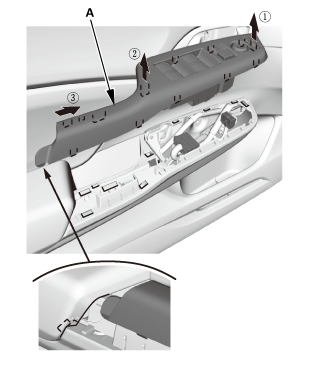
Front Door Power Window Switch Panel (4-door) |
|
|
|
1.
|
Remove the power window switch panel
(A).
|
|
| 2. |
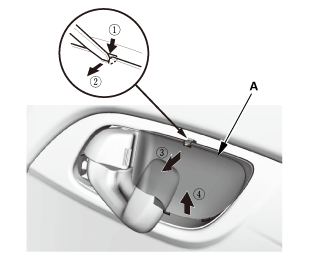
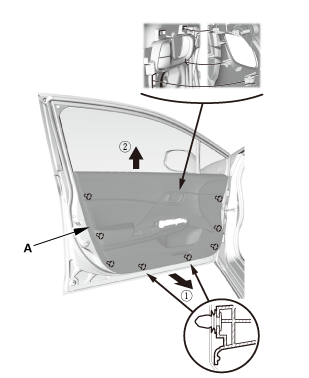
Front Door Panel - Driver's Side (4-Door) |
|
|
|
1.
|
Remove the inner handle cap (A).
|
|
|
|
|
4.
|
Remove the door panel (A).
|
|
| 3. |
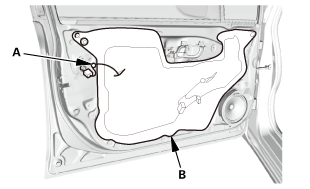
Front Door Plastic Cover As Needed (4-door) |
|
|
|
1.
|
Detach the harness clip (A).
|
|
2.
|
Remove the plastic cover (B) as needed.
|
|
 Adjustment
| 1. |
Front Door Glass - Adjustment |
|
|
|
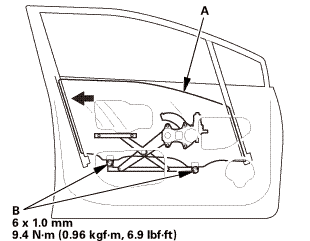
NOTE: Check the door weatherstrip and
the glass run channel for damage or deterioration,
and replace them if necessary.
|
|
1.
|
Place the vehicle on a firm, level surface
when adjusting the door glass.
|
|
2.
|
Carefully lower the glass (A) until you
can see the glass mounting bolts (B), then
loosen them.
|
|
3.
|
Push the glass against the glass run
channel, then tighten the glass mounting
bolts.
|
|
4.
|
Check that the glass moves smoothly.
|
|
|
|
|
5.
|
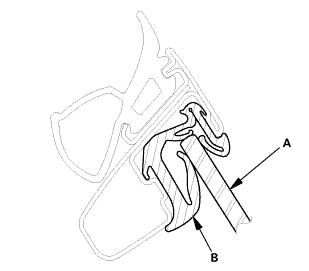
Raise the glass fully, and check for
gaps. Also make sure that the glass (A)
contacts the glass run channel (B) evenly.
|
|

Installation
| 1. |
Front Door Plastic Cover as Needed (4-door) |
|
|
|
1.
|
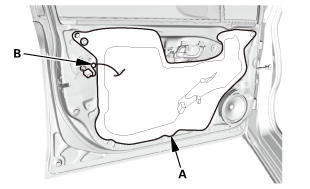
Install the plastic cover (A).
|
|
2.
|
Attach the harness clip (B).
|
|
| 2. |
Front Door Panel - Driver's Side (4-Door) |
|
|
|
1.
|
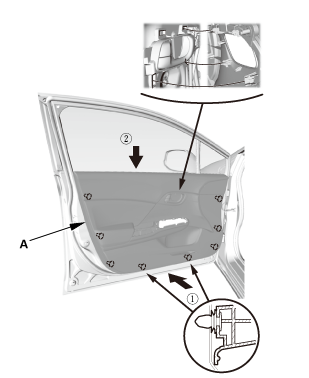
Install the door panel (A).
|
|
|
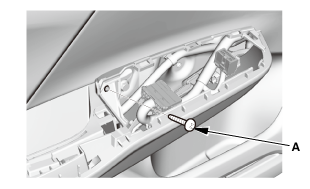
|
|
2.
|
Install the screw (A).
|
|
|
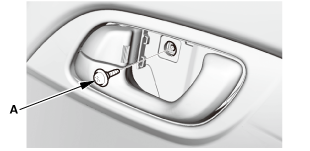
|
|
3.
|
Install the screw (A).
|
|
|
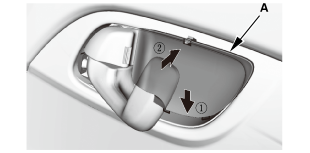
|
|
4.
|
Install the inner handle cap (A).
|
|
| 3. |
Front Door Power Window Switch Panel (4-door) |
|
|
|
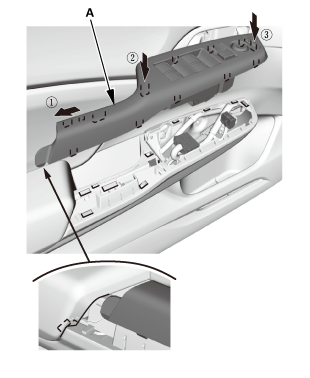
1.
|
Install the power window switch panel
(A).
|
|
| 4. |
Power Window Control Unit - Reset |
|
Resetting the power window is required when any
of the following have occurred:
|
|

|
Power window regulator replacement or
repair
|
|
|
|
Power window motor replacement or repair
|
|
|
|
Glass run channel replacement
|
|
|
|
Driver's door glass replacement
|
|
|
|
Power window master switch replacement
|
|
|
1.
|
Turn the ignition switch to ON (II).
|
|
2.
|
Move the driver's window all the way down with
the driver's window DOWN switch.
|
|
3.
|
Open the driver's door.
|
|
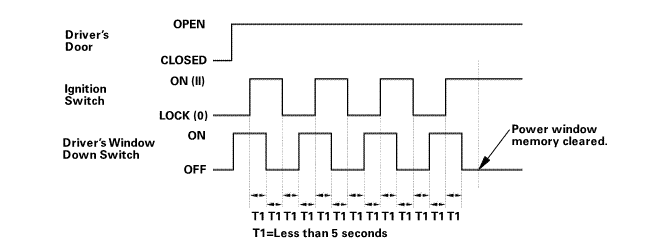
NOTE: Steps 4-7 must be done within 5 seconds
of each other.
|
|
4.
|
Turn the ignition switch to LOCK (0).
|
 armounupnwlrwindnwdawdawnswiich
|
5.
|
Push and hold the driver's window DOWN switch.
|
|
6.
|
Turn the ignition switch to ON (II).
|
|
7.
|
Release the driver's window DOWN switch.
|
|
8.
|
Repeat step 4-7 three more times.
|
|
9.
|
Wait at least 1 second.
|
|
10.
|
Confirm that AUTO UP and AUTO DOWN do not work.
If AUTO UP and DOWN work, go back to step 1.
|
|
11.
|
Move the driver's window all the way down with
the driver's window DOWN switch.
|
|
12.
|
Pull up and hold the driver's window UP switch
until the window reaches the fully closed position,
then continue to hold the switch for at least 1
second.
|
|
13.
|
Confirm that the power window control unit is
reset by using the driver's window AUTO UP and AUTO
DOWN functions:
|
|
|
If the window still does not
work in AUTO, repeat the procedure
several times, paying close attention
to the 5 second time limit between
steps.
|
|
|
|
If the window still does not
work, refer to the master switch
input test.
|
|
|
8351A4 LEFT INNER
8361A4 RIGHT INNER
Removal
1.
Front Door Panel (2-Door)
...

 Side Windows
 Front Door Glass Inner Weatherstrip Removal and Installation
(2-door)
Front Door Glass Inner Weatherstrip Removal and Installation
(2-door)