Honda Civic manuals

Honda Civic Service Manual: Drive Belt Auto-Tensioner Air Bleeding (Except K24Z7)

Honda Civic Service Manual / Powertrain / Engine / Pulleys and Belts / Drive Belt Auto-Tensioner Air Bleeding (Except K24Z7)

1. Drive Belt


1.

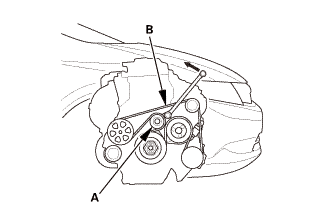
Move the auto-tensioner (A) counterclockwise to relieve tension from the drive belt (B).


2.

Remove the drive belt.


1. Drive Belt Auto Tensioner - Air Bleeding

1.

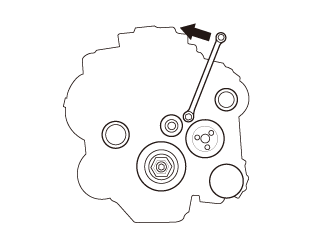
From the top of the engine. Set a socket wrench on the drive belt auto-tensioner. Take at least 3 seconds to complete a full stroke to compress the auto-tensioner in the direction of the arrow. Then take 3 seconds to complete a full stroke to move the auto-tensioner in the opposite direction (decompressing it). Repeat the full compress/decompressing action three more times.


1. Drive Belt


1.

Move the auto-tensioner (A) counterclockwise.


2.

Install the drive belt (B).


Pulleys and Belts
...

Drive Belt Auto-Tensioner Inspection (Except K24Z7)
1. Drive Belt Auto-Tensioner -Position Check 1. Turn the ignition switch to ON (II), and make sure to turn the ...

See also:

Honda Civic Owners Manual. Accessories
When installing accessories, check the following:  Do not install accessories on the windshield. They can obstruct your view and delay your reaction to driving conditions.  Do not install accessories over areas marked SRS AIRBAG, on the sides or backs of the front seats, on ...

Nissan Kicks - OM - Seats - Wheels and tires - Audio system -
© 2016-2026 Copyright www.hocivic.com

0.0239