
Honda Civic Owners Manual: Displaying the Maintenance Minder Information. Maintenance Minder Messages on the Information Display
Displaying the Maintenance Minder Information
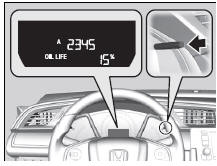
- Turn the ignition switch to ON
 .
- Press the
 (TRIP) knob
repeatedly until
the engine oil life appears on the
information display.
The Maintenance Minder indicator ( ) stays
on in the instrument panel after the engine oil
life becomes 0%. Have the indicated
maintenance done by a dealer immediately.
*1: Models with the smart entry system have an ENGINE START/STOP button instead of an ignition switch.
|
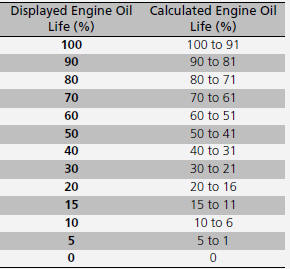
Displaying the Maintenance Minder Information Based on the engine operating conditions and oil age, the remaining engine oil life is calculated and displayed as a percentage.
|
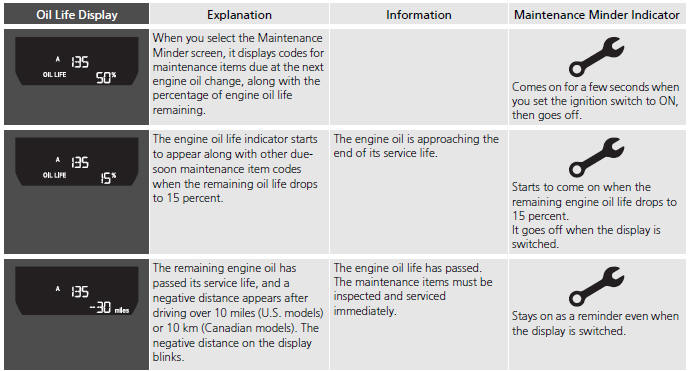
Maintenance Minder Messages on the Information Display
To switch the display, press the
(TRIP) knob.

 Maintenance Service Items
Inspect idle speed every 160,000 miles (256,000
km).
Adjust the valves during services A, B, 1, 2, or 3 if they
are noisy.
...
See also:
Honda Civic Owners Manual. Displaying the Maintenance Minder Information
Turn the ignition switch to ON
.
Press the (TRIP) knob
repeatedly until
the engine oil life appears on the
information display.
The Maintenance Minder indicator (
) stays
on in the instrument panel after the engine oil
life becomes 0%. Have the indicated
maintenance ...
