
Honda Civic Owners Manual: Checking the Engine. If the Smart Entry Remote Battery is Weak
Checking the Engine
If the engine does not start, check the starter.
|
Checking the Engine If you must start the vehicle immediately, use an assisting vehicle to jump start it. |
|
Starter condition |
Checklist |
| Starter doesn't turn or turns
over slowly. The battery may be dead. Check each of the items on the right and respond accordingly. |
Check for a message on the driver information interface.
►Make sure the smart entry remote is in its operating range Check the brightness of the interior lights. Turn on the interior lights and check the brightness
|
| The starter turns over normally
but the engine doesn't start. There may be a problem with the fuse. Check each of the items on the right and respond accordingly. |
Review the engine start procedure.
Follow its instructions, and try to start the engine again. Check the immobilizer system indicator. When the immobilizer system indicator is blinking, the engine cannot be started. Check the fuel level. There should be enough fuel in the tank. Check the fuse. Check all fuses, or have the vehicle checked by a dealer. If the problem continues |
If the Smart Entry Remote Battery is Weak
Models with smart entry system
If the beeper sounds, the To Start, Hold Remote Near Start Button message appears on the driver information interface, the ENGINE START/STOP button flashes, and the engine won't start. Start the engine as follows:
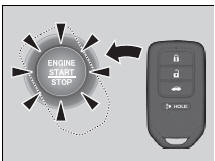
- Touch the center of the ENGINE START/
STOP button with the H logo on the smart
entry remote while the ENGINE START/
STOP button is flashing. The buttons on
the smart entry remote should be facing
you.
► The button flashes for about 30 seconds.
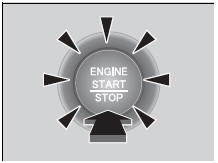
- Depress the brake pedal (continuously
variable transmission) or clutch pedal
(manual transmission) and press the
ENGINE START/STOP button within 10
seconds after the beeper sounds and the
ENGINE START/STOP button changes
from flashing to on.
► If you don't depress the pedal, the mode will change to ACCESSORY.

 Emergency Engine Stop
Models with smart entry system
The ENGINE START/STOP button may be used to stop the engine due to an
emergency situation even while driving. If you must stop the engine, do either
of the
followin ...
See also:
Honda Civic Service Manual. Thermostat Housing Removal and Installation (R18A9)
1.
Radiator Cap
1.
Wait until the engine is cool, then carefully remove the radiator
cap.
2.
Vehicle Lift
1.
Raise th ...
