
Seat Ibiza (6F) 2017-2026 Owner's Manual: Button for the assistant systems
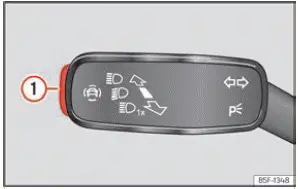
Fig. 92 On the turn light and main beam lever:
key for driver assistance systems (depending on
the version).
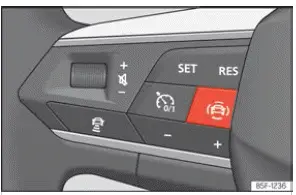
Fig. 93 Left side of the multifunction steering
wheel: button for driver assistance systems
(depending on the version).
The Seat Ibiza provides a dedicated control for accessing and managing its driver assistance systems. Depending on the vehicle's equipment and version, this button is located either on the turn signal and main beam lever or on the left-hand side of the multifunction steering wheel, as illustrated in Figs. 92 and 93. The button provides direct access to the Assistants menu, where the driver can review the available assistance functions and activate or deactivate individual systems. The range of functions displayed depends on the driver assistance equipment installed in the vehicle.
- Press the
 button to open the
Assistants menu. This menu provides access to the driver assistance functions that can be controlled through
the vehicle's settings.
- Navigate to the assistance system you want to adjust and select the required setting to switch it on or off. A check mark beside the corresponding function indicates that the system is currently activated. If the mark is absent, the function is switched off.
- After choosing the desired setting, confirm your selection by pressing the
 button on the multifunction steering wheel. The selected setting is then applied to the corresponding
assistance function.
Driver assistance systems can also be activated or deactivated through the infotainment system. Open the vehicle settings menu and access the relevant assistance system options to make the required changes. This provides an alternative to using the dedicated control button, allowing the driver to manage supported functions directly through the Seat Ibiza infotainment interface.
 Safety advice
WARNING
The driver remains responsible for operating the Seat Ibiza safely at all times, regardless of which
driver assistance systems are installed or activated. These systems are designed to ...

See also:
Honda Civic Service Manual. Passenger's Center Vent Removal and Installation (With Navigation)
8411E6 RIGHT CENTER
1.
Driver's Dashboard Lower Cover
1.
Remove the driver's dashboard lower cover (A).
2.
Dashboard Subdisplay Visor
...
