
Honda Civic Owners Manual: Battery. Remote Transmitter Care
Battery
Checking the Battery
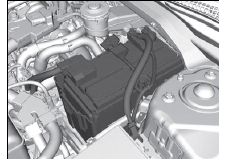
Check the battery terminals for corrosion monthly.
If your vehicle's battery is disconnected or goes dead:
- The audio system is disabled.
- The clock* resets.
- The navigation system* is disabled.
- Canadian models only The immobilizer system needs to be reset.
|
Battery WARNING
The battery gives off explosive hydrogen
gas during normal operation.
A spark or flame can cause the battery to
explode with enough force to kill or
seriously hurt you.
When conducting any battery
maintenance, wear protective clothing and
a face shield, or have a skilled technician do
it. WARNING: Battery post, terminals, and related accessories contain lead and lead compounds. Wash your hands after handling. |
Disconnect both battery cables to prevent damaging your vehicle's electrical system.
Always disconnect the negative (-) cable first, and reconnect it last.
*1: Models with the smart entry system have an ENGINE START/STOP button instead of an ignition switch.
|
Battery When you find corrosion, clean the battery terminals by applying a baking powder and water solution. Clean the terminal with a damp towel. Cloth/towel dry the battery. Coat the terminals with grease to help prevent future corrosion. When replacing the battery, the replacement must be of the same specifications. Please consult a dealer for more information.
The VSA and CMBSTM* indicators may come on
when your turn the ignition switch to ON
Drive a short distance at 12 mph (20 km/h). Each indicator should go off. If either or both do not, have your vehicle checked by a dealer. |
 *1 after
re-connecting a battery.
Remote Transmitter Care
Replacing the Button Battery
If the indicator does not come on when the button is pressed, replace the battery
|
Replacing the Button Battery NOTICE An improperly disposed of battery can damage the environment. Always confirm local regulations for battery disposal. Replacement batteries are commercially available or at a dealer. |
Master Keys with Remote Transmitter
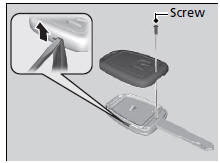
| Battery type: CR1620 |
- Unscrew the cover with a small Phillipshead screwdriver.
- Open the remote transmitter.
► Wrap the small flat-tip screwdriver with a cloth to prevent scratching the transmitter.
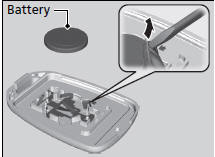
- Remove the button battery with the small flat-tip screwdriver.
- Make sure to replace the battery with the correct polarity.
Smart Entry Remote
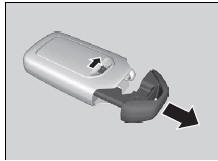
| Battery type: CR2032 |
- Remove the built-in key.
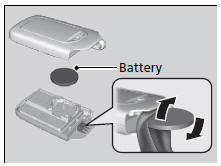
- Remove the upper half of the cover by
carefully prying on the edge with a coin.
► Remove carefully to avoid losing the buttons.
► Wrap a coin with a cloth to prevent scratching the smart entry remote.
- Make sure to replace the battery with the correct polarity.
 Winter Tires
If driving on snowy or frozen roads, mount all season marked M+S tires, snow
tires,
or tire chains; reduce speed; and maintain sufficient distance between vehicles
when
driving.
Be particular ...
 Heating System*/Climate Control
System* Maintenance
Air Conditioning
To ensure proper and safe operation, the Society of Automotive Engineers (SAE
J2845) recommends that the refrigerant system only be serviced by trained and
certified technicians.
...
See also:
Honda Civic Service Manual. Front Emblem Removal and Installation
Removal
1.
Front Emblem
1.
To remove the front ‘‘H’’ emblem or the front
‘‘Si’’ emblem, remove the front bumper.
...
