
Honda Civic Owners Manual: To Adjust the Vehicle Speed
Honda Civic Owners Manual / Driving / When Driving / Adaptive Cruise Control (ACC) with Low Speed Follow (LSF) / To Adjust the Vehicle Speed
Increase or decrease the vehicle speed using the RES/+ or -/SET button on the steering wheel.
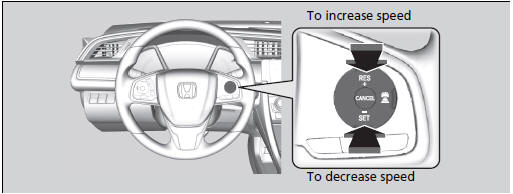
- Each time you press the RES/+ or -/SET button, the vehicle speed is increased or decreased by about 1 mph or 1 km/h accordingly.
- If you keep pressing the RES/+ or -/SET button, the vehicle speed increases or decreases by about 5 mph or 5 km/h accordingly.
|
To Adjust the Vehicle Speed If a vehicle detected ahead is going at a speed slower than your increased set speed, ACC with LSF may not accelerate your vehicle. This is to maintain the set interval between your vehicle and the vehicle ahead. |
 ACC with LSF Conditions and Limitations
The system may automatically shut off and the ACC indicator will come on
under
certain conditions. Some examples of these conditions are listed below. Other
conditions may reduce some of the ACC f ...
 To Set or Change Following Interval
Press the (interval) button to
change the
ACC with LSF following interval.
Each time you press the button, the followinginterval
(the interval behind a vehicle detected
ahead of you) sett ...
See also:
Honda Civic Owners Manual. Legal Information on Apple CarPlay/Android Auto
Models with Display Audio
OWNER'S MANUAL LICENSE/LIABILITY STATEMENTS
USE OF APPLE CARPLAY IS SUBJECT TO YOUR AGREEMENT TO THE CARPLAY TERMS OF
USE, WHICH ARE INCLUDED AS PART OF THE
APPLE iOS TERMS OF USE. IN SUMMARY, THE CARPLAY TERMS OF USE DISCLAIM APPLE AND
ITS SERVICE PROVIDERS' LIABILI ...
© 2016-2026 Copyright www.hocivic.com

0.0109