
Honda Civic Owners Manual: Replay Function
The system starts storing broadcast in memory when the power mode is turned ON. You can go back to the program from that point.
You can no longer replay any program once the power mode is turned off as it erases memory.
You can check how long the program has been stored in memory from the audio/information screen.
After 30 or 60 minutes of recording the system will
automatically start deleting the oldest data.
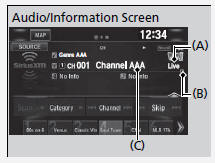
(A): Shows how much time the replayed segment is behind the real-time broadcast
(B): Replayed segment
(C): Length stored in memory
When you listen a multi-channel preset while at the playback mode, the replayed segment is not displayed.
Returning to real-time broadcast
1. Select .
2. Select Go to Live.
 Preset Memory
To store a channel:
1. Tune to the selected channel.
2. Press and hold the preset number for the station you want to store.
3. Select OK.
You can also store a channel by the following procedur ...
 Live Sports Alert
While listening to other channels, you can receive sports alerts such as
scores from
the games of your favorite teams.
To set up a favorite team
1. Select .
2. Select Settings.
3 ...
See also:
Honda Civic Service Manual. Front Accessory Power Socket Removal and Installation ('13-'14)
1.
M/T Shift Lever Knob
Except K24Z7 engine
1.
Except K24Z7 engine: Lower the shift lever boot (A) to release
the hooks from the boot.
2.
Exce ...
