
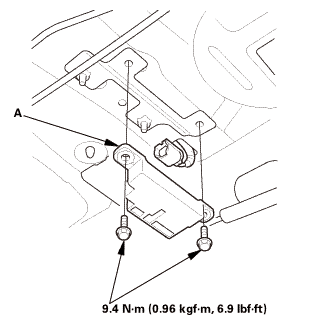
Honda Civic Service Manual: Keyless Access LF Antenna (Rear Interior) Removal and Installation
Honda Civic Service Manual / Accessories / Security & Keyless Entry / Keyless Access LF Antenna (Rear Interior) Removal and Installation

| 1. | Rear Interior LF Antenna |
|
|
|
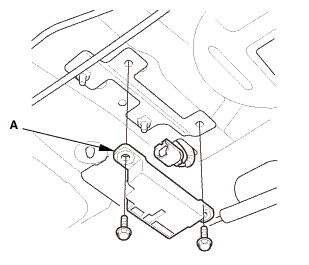

| 1. | Rear Interior LF Antenna |
|
|
|
 Steering Lock Removal and Installation
SRS components are located in this area. Review the SRS component locations,
and the precautions and procedures before doing repairs or service.
1.
Battery Ter ...
 Keyless Buzzer Removal and Installation (With Keyless Access System)
1.
Rear Bumper
1.
Remove the screws (A), the bolts (B), and the clips (C, D) securing
the rear bu ...
See also:
Honda Civic Service Manual. Rear Door Quarter Glass Removal and Installation (4-door)
Removal
1.
Rear Door Power Window Switch Panel
1.
Remove the power ...
© 2016-2026 Copyright www.hocivic.com

0.0072