Honda Civic Service Manual: ECON Switch Removal and Installation ('13-'14)

|
|
|
1.
|
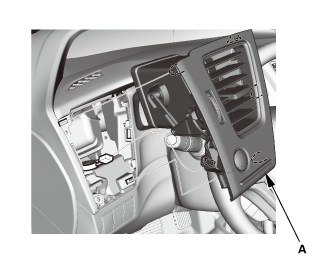
Remove the driver's outer vent (A).
|
|
|
|
|
2.
|
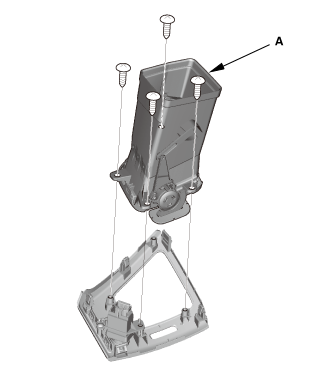
If necessary, remove the duct (A).
|
|
|
|
|
1.
|
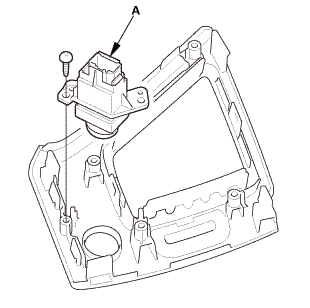
Remove the ECON switch (A).
|
|
|
|
|
1.
|
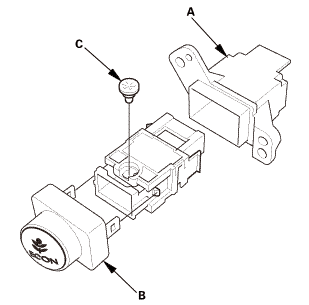
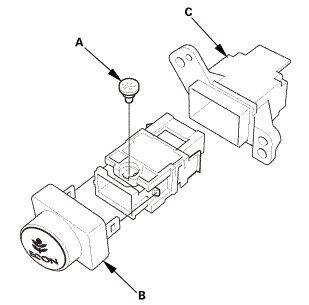
Remove the rear cover (A).
|
|
2.
|
Remove the front cover (B).
|
|
3.
|
Remove the ECON switch bulb (C).
|
|

|
|
|
1.
|
Install the ECON switch bulb (A).
|
|
2.
|
Install the front cover (B).
|
|
3.
|
Install the rear cover (C).
|
|
|
|
|
1.
|
Install the ECON switch (A).
|
|
|
|
|
2.
|
Install the driver's outer vent (A).
|
|
NOTE: Do not wipe off the special grease applied to the area of the shift
lever marked with an asterisk (*) when you disassemble it.
1.
Center Console Panel As ...
754104
NOTE: SRS components are located in this area. Review the SRS component
locations and the precautions and procedures before doing repairs or service.
1.
...
See also:
Honda Civic Owners Manual. To Adjust the Vehicle Speed
Increase or decrease the vehicle speed using the RES/+ or -/SET buttons on
the
steering wheel.
Each time you press the button, the vehicle speed is increased or
decreased by
about 1 mph (1.6 km/h).
If you keep the button pressed, the vehicle speed increases or decreases
until yo ...

 A/T Gear Position Indicator Panel Light Harness Removal and Installation (A/T,
CVT)
A/T Gear Position Indicator Panel Light Harness Removal and Installation (A/T,
CVT) Front Passenger's Airbag Cutoff Indicator Removal and Installation