
Honda Civic Owners Manual: To Set the Vehicle Speed
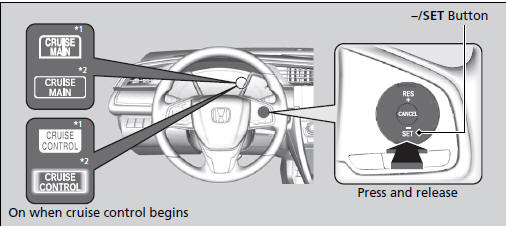
Take your foot off the pedal and press the -/SET button when you reach the desired speed.
The moment you release the -/SET button, the set speed is fixed, and cruise control begins. The CRUISE CONTROL indicator comes on.
During cruise control, Straight Driving Assist Function is activated. This control function is an EPS function and it helps reduce the steering effort to keep the steering angle on a straight road with cants.
*1: Models with information display
*2: Models with driver information interface
 Cruise Control
Maintains a constant vehicle speed without having to keep your foot on the
accelerator. Use cruise control on freeways or open roads where you can travel
at a
constant speed with little accelerati ...
 To Adjust the Vehicle Speed
Increase or decrease the vehicle speed using the RES/+ or -/SET buttons on
the
steering wheel.
Each time you press the button, the vehicle speed is increased or
decreased by
about 1 mp ...
See also:
Honda Civic Owners Manual. Audio Remote Controls
Allow you to operate the audio system while driving
SOURCE Button
Cycles through the audio modes as follows:
FM AM
USB iPod
Bluetooth’ Audio
+ - (Volume) Buttons
Press +: To increase the volume.
Press -: To decrease the volume.
Buttons
When listening to the radio
Press ...
