
Honda Civic Owners Manual: Playing an iPod
Connect the iPod using your USB connector to the USB port, then select the iPod mode.
USB Port(s)

*1:Some or all of the lists may not be displayed.
How to Select a Song from the Music Search List
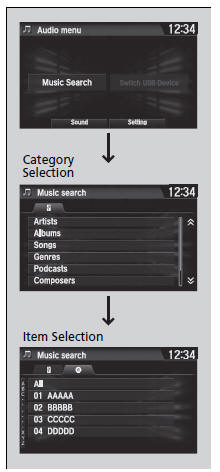
1. Select  and select Music
Search.
2. Select the items on that menu.
Playing an iPod
Available operating functions vary on models or versions. Some functions may not be available on the vehicle’s audio system.
If there is a problem, you may see an error message on the audio/information screen.
iPod/USB Flash Drive
If you operate any music app on your iPhone/iPod while the phone is connected to the audio system, you may no longer be able to operate the same app on the audio/information screen.
Reconnect the device if necessary.
Select Switch USB Device in the Audio menu screen to switch to another USB device.
If an iPhone is connected via Apple CarPlay, the iPod/ USB source is unavailable and audio files on the phone can only be played within Apple CarPlay.
How to Select a Play Mode
You can select shuffle and repeat modes when playing a file.
Select a play mode.

To turn off a play mode
Select the mode you want to turn off.
How to Select a Play Mode
Play Mode Menu Items Shuffle All Songs: Plays all available files in a selected list (playlists, artists, albums, songs, podcasts, genres, composers, or audiobooks) in random order.
Shuffle Albums: Plays all available albums in a selected list (playlists, artists, albums, songs, podcasts, genres, composers, or audiobooks) in random order.
Repeat Song: Repeats the current track.
 Scan
Sample each channel on the selected mode for 10 seconds.
1. Select Scan.
2. Select Scan Channels.
You can select the desired channel by songs using Scan Songs in Preset.
To turn off scan, ...
 Song By VoiceTM (SBV)
Use SBV to search for and play music from your USB flash drive or iPod using
voice
commands.
To enable SBV
1. Select .
2. Select Settings.
3. Select System.
4. Select the Voice Reco ...
See also:
Honda Civic Service Manual. Right Headlight (Low Beam) Bulb Removal and Installation ('12-'13)
7121E7 RIGHT
1.
Washer Filler Neck
1.
Remove the washer filler neck (A) from the washer reservoir.
2.
Right Headlight Bulb (Low Beam)
...
