
Honda Civic Owners Manual: Locking/Unlocking the Doors Using a Key
If the keyless remote battery or the vehicle battery is dead, use the key instead of the keyless remote.
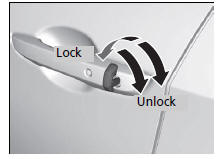
Fully insert the key and turn it.
Locking/Unlocking the Doors Using a Key
When you lock the driver’s door with a key, all the other doors lock at the same time. When unlocking, the driver’s door unlocks first. Turn the key a second time within a few seconds to unlock the remaining doors.
Models with driver information interface
You can customize the door unlock mode setting.
Customized Features
 Using the Remote Transmitter
Locking the doors
Press the lock button.
Once:
Some exterior lights flash, all the doors
and fuel fill door lock, and the security
system sets.
Twice (within five seconds after the fi ...
 Locking a Door Without Using a Key
Locking the driver’s door
Push the lock tab forward or
push the
master door lock switch in the lock direction
, and close the door.
Locking the passenger’s doors
Push the lock tab forw ...
See also:
Honda Civic Owners Manual. Wireless Charger
To use the wireless charger, the power mode must be in ACCESSORY or ON.
Charge a compatible device on the area indicated by the
mark as follows:
1. To turn the system on and off, press and
hold the (power) button.
When the system is activated, the green
indicator light comes on.
...
