Honda Civic manuals

Honda Civic Service Manual: Rear License Trim Removal and Installation ('13-'14)

Honda Civic Service Manual / Body / Body Exterior / Garnish/Finishers/License / Rear License Trim Removal and Installation ('13-'14)

1. Trunk Lid Trim Panel

1.

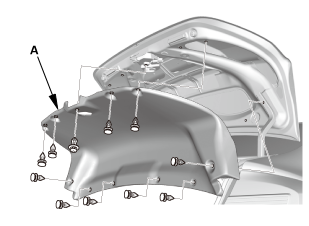
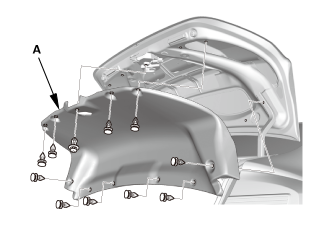
For some models: Remove the trunk lid trim panel (A).

2. Inner Taillight Both

1.

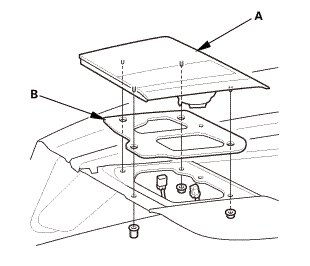
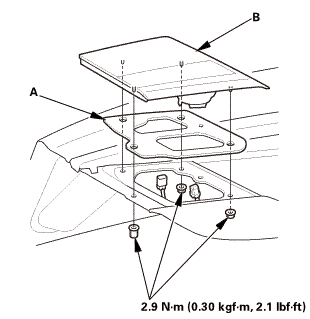
Disconnect the connectors.

2.

Remove the inner taillight (A).

3.

Remove the gasket (B) from the inner taillight.

3. Rear License Trim

1.

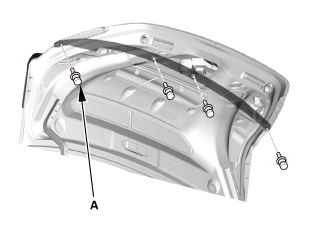
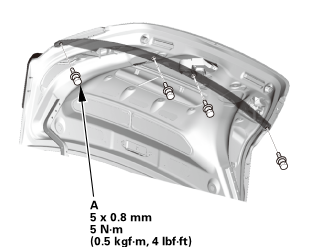
Remove the bolts (A).

2.

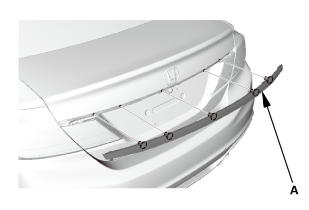
Remove the rear license trim (A).

1. Rear License Trim

1.

Install the rear license trim (A).

2.

Install the bolts (A).

2. Inner Taillight Both

1.

Install the gasket (A) to the inner taillight (B).

NOTE: Inspect the gasket, replace it if it is distorted or stays compressed.

2.

Install the inner taillight.

3.

Connect the connectors.

3. Trunk Lid Trim Panel

1.

For some models: Install the trunk lid trim panel (A).

Garnish/Finishers/License
...

Panels
...

See also:

Honda Civic Owners Manual. Display Setup
You can change the brightness or color theme of the audio/information screen. Changing the Screen Brightness 1. Select . 2. Select Settings. 3. Select System. 4. Select the Display tab. 5. Select Display Settings. 6. Select the setting you want. 7. Select OK. Changing the Sc ...

Nissan Kicks - OM - Seats - Wheels and tires - Audio system -
© 2016-2026 Copyright www.hocivic.com

0.0229