


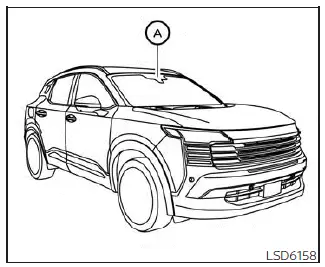
The Traffic Sign Recognition (TSR) system in the Nissan Kicks helps inform the driver about the most recently detected speed limit sign. The system reads road sign information through the multi-sensing front camera unit A, which is mounted on the windshield ahead of the inside rearview mirror. Detected sign information is shown in the vehicle information display. TSR information is continuously shown at the top of the display and, when selected, can also appear in the main central area of the screen.
WARNING
The TSR system is designed only as a driver support feature. It does not replace the driver's responsibility to watch road signs, monitor traffic conditions, and drive safely. The system cannot prevent accidents caused by inattention, careless driving, or failure to follow road rules. The driver must remain alert and in control of the Nissan Kicks at all times.
System operation
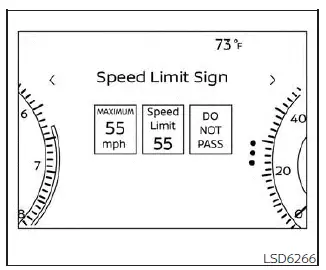
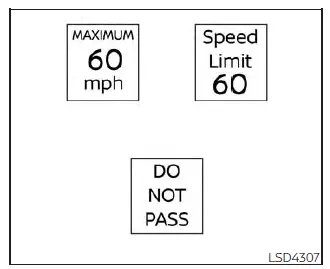
The Traffic Sign Recognition (TSR) system can display several types of road signs detected while driving the Nissan Kicks.
CAUTION
- The TSR system is intended to assist careful driving, not replace it. The driver is responsible for staying alert, obeying road regulations, and visually confirming traffic signs and posted speed limits.
- The TSR system may not operate correctly under the following conditions:
- When a road sign is difficult to see because it is damaged, dirty, faded, blocked, or affected by weather.
- When rain, snow, frost, mud, or dirt is attached to the windshield area in front of the multi-sensing camera unit.
- When the headlights are not bright enough, such as when the lenses are dirty or the headlight aim is not adjusted correctly.
- When strong light enters the camera, for example when sunlight shines directly toward the front of the Nissan Kicks at sunrise or sunset.
- When brightness changes suddenly, such as when entering or leaving a tunnel, parking structure, or shaded area under a bridge.
- When navigation-based information does not match the actual road, such as after changes in road layout, temporary construction routes, or updated traffic patterns.
- When passing buses, trucks, or other vehicles that display speed stickers or sign-like markings.
Turning the Traffic Sign Recognition (TSR) system on and off
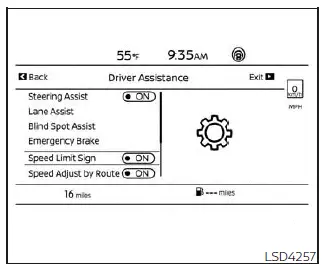
Use the following procedure to enable or disable the TSR system in the Nissan Kicks.
1. Press the
 button until
"Settings" appears
in the vehicle information display.
button until
"Settings" appears
in the vehicle information display.
Use the scroll dial to select "Driver Assistance." Then press the OK button.
2. Select "Speed Limit Sign" and press the OK button to switch the system on or off.
System temporarily unavailable
If the Nissan Kicks is parked in direct sunlight during high-temperature conditions, above approximately 104ºF (40ºC), and then started, the TSR system may temporarily turn off automatically. The "Unavailable: High Cabin Temperature" warning message will appear in the vehicle information display.
Action to take:
Once the cabin temperature decreases, the TSR system will resume operation automatically.
System malfunction
If the TSR system detects a malfunction, it will turn off automatically and a "Malfunction" warning message will appear in the vehicle information display.
Action to take:
If the TSR "Malfunction: See Owner's Manual" message appears, move the Nissan Kicks off the road to a safe location and stop the vehicle. Turn the engine off, then restart it. If the message continues to appear, have the system inspected. It is recommended that you visit a NISSAN dealer for this service.
System maintenance
The TSR system uses the same multi-sensing front camera unit used by the Lane Departure Warning (LDW) system. This camera is located in front of the inside rearview mirror.
Keep the windshield area around the camera clean and free from stickers, film, snow, ice, condensation, or dirt. Clear camera visibility helps the Nissan Kicks recognize traffic signs more accurately and supports stable operation of driver assistance features.