



WARNING
- Radio frequency signals emitted by electronic devices may affect certain types of medical equipment. Individuals using pacemakers or other implanted medical devices should consult the manufacturer of their medical equipment regarding possible radio wave interference before using the Nissan Kicks Intelligent Key system.
- The Nissan Intelligent Key transmits radio signals whenever its buttons are pressed.
The FAA advises that radio transmissions may affect aircraft navigation and communication systems. Do not operate the Intelligent Key while onboard an aircraft.
Before boarding a flight, make sure the Intelligent Key is stored securely and that its buttons cannot be pressed accidentally.
- Before leaving the Nissan Kicks, always shift the transmission into the P (Park) position and verify that
the electronic parking brake warning light is illuminated, confirming that the electronic parking brake
has been applied correctly.
The electronic parking brake warning light may remain illuminated for a short period after the driver's door has been locked.
- Always place the transmission in P (Park) and apply the parking brake before parking the Nissan Kicks,
entering or exiting the vehicle, or loading and unloading cargo.
Failure to follow these precautions may allow the vehicle to move unexpectedly, which could result in serious personal injury, death, or property damage.
The Nissan Intelligent Key system allows convenient operation of the vehicle without removing the key from your pocket, bag, or purse. Depending on vehicle equipment, the system can lock or unlock the doors using the remote-control buttons or by pressing the request switch located on the vehicle.
The operating environment and surrounding conditions may affect the performance of the Nissan Kicks Intelligent Key system. Understanding these conditions can help ensure reliable operation.
Be sure to review the following information before using the Nissan Intelligent Key.
CAUTION
- Always carry the Nissan Intelligent Key with you whenever operating the vehicle.
- Never leave the Intelligent Key inside the Nissan Kicks when exiting the vehicle.
The Intelligent Key continuously communicates with the Nissan Kicks through low-power radio signals. Because of this constant communication, certain environmental conditions may interfere with normal operation.
The Nissan Intelligent Key may not function correctly under the following circumstances:
- When operating near sources of strong radio transmissions, such as television towers, power stations, radio broadcasting facilities, or communication transmitters.
- When carrying wireless devices such as cellular phones, two-way radios, transceivers, or CB radios near the Intelligent Key.
- When the Intelligent Key is touching or covered by metallic materials.
- When another radio-frequency remote-control device is being used nearby.
- When the Intelligent Key is placed close to electronic devices such as personal computers, tablets, or similar equipment.
- When the Nissan Kicks is parked close to certain parking meters or electronic access-control systems.
If any of these conditions affect operation, adjust the environment when possible or use the mechanical key until normal Intelligent Key operation is restored.
Although actual battery life depends on operating conditions and frequency of use, the battery inside the Nissan Kicks Intelligent Key typically lasts approximately two years. When battery performance decreases, replace it with a new battery of the correct type.
When the Intelligent Key battery becomes weak, the NISSAN Intelligent Key warning light (if equipped) may flash green for approximately 30 seconds after the ignition switch is placed in the ON position.
Because the Intelligent Key continuously receives radio signals, leaving it near equipment that emits strong electromagnetic waves, such as televisions, wireless routers, computers, or audio systems, may reduce battery life.
If the Intelligent Key battery becomes discharged, firmly depress the brake pedal and touch the ignition switch with the Intelligent Key. Then, within 10 seconds after the confirmation chime sounds, press the ignition switch while continuing to depress the brake pedal. This procedure allows the Nissan Kicks to recognize the key even when the battery is weak or discharged.
Up to four Intelligent Keys can be registered and used with a single Nissan Kicks vehicle.
For information regarding the purchase, programming, replacement, or registration of additional Nissan Intelligent Keys, it is recommended that you contact an authorized NISSAN dealer.
Additional note: Keeping the Nissan Kicks Intelligent Key clean, dry, and protected from impacts will help ensure reliable long-term operation and consistent communication with the vehicle's security and access systems.
Operating range Nissan Kicks 2026
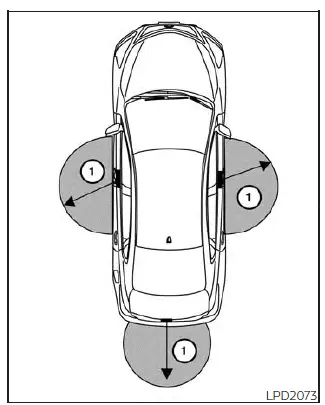
The Nissan Kicks Intelligent Key functions are available only when the Intelligent Key is within the specified operating range of the request switch, if so equipped 1.
If the Intelligent Key battery is weak or discharged, or if strong radio waves are present near the vehicle, the operating range may become shorter. In these conditions, the Nissan Kicks Intelligent Key system may respond slowly, work intermittently, or may not operate as expected.
The normal operating range is approximately 31.5 in (80 cm) from each request switch, if so equipped 1.
If the Intelligent Key is positioned too close to the door glass, door handle, or rear bumper, the request switches, if so equipped, may not recognize the key correctly.
When the Intelligent Key is within the operating range, anyone near the Nissan Kicks may be able to press the request switch, if so equipped, to lock or unlock the doors, even if that person is not carrying the key.
Door locks/unlocks precaution
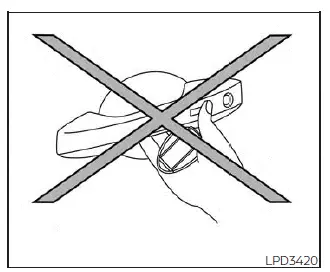
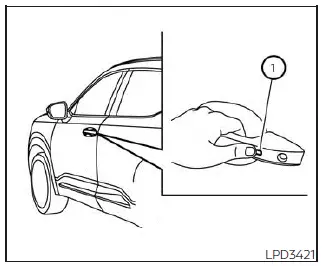
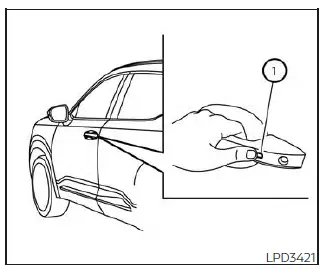
- Do not press the door handle request switch, if so equipped, while holding the Intelligent Key in your hand as shown. When the key is too close to the door handle, the Nissan Kicks Intelligent Key system may have difficulty determining whether the key is outside the vehicle.
- After locking the doors with the door handle request switch, if so equipped, always check the doors by gently pulling the handles to confirm that they are securely locked.
- To avoid accidentally locking the Intelligent Key inside the Nissan Kicks, make sure the key is with you before locking the doors.
- Do not pull the door handle before pressing the door handle request switch, if so equipped. The door may unlock but not open. Release the handle once, then pull it again to open the door properly.
Additional note: For the most reliable Nissan Kicks Intelligent Key operation, keep the key away from metal objects, mobile phones, and other electronic devices when approaching or locking the vehicle.
NISSAN Intelligent Key Operation Nissan Kicks Owner's Manual
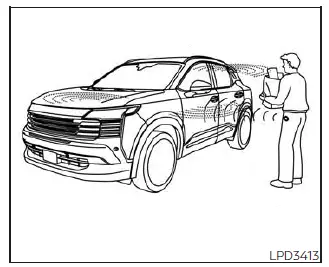
The Nissan Kicks Intelligent Key system allows you to lock or unlock the doors without removing the Intelligent Key from your pocket, purse, or bag. This makes everyday entry and exit more convenient, especially when your hands are full.
When you are carrying the Intelligent Key and standing within the proper operating range, all doors can be locked or unlocked by pressing the door handle request switch, if so equipped.
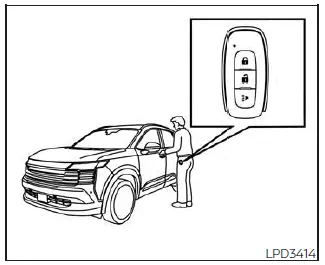
Locking doors and fuel-filler door
1. Move the shift lever to the P (Park) position, place the ignition switch in the LOCK position, and make sure the Nissan Kicks Intelligent Key is with you.
2. Close all doors securely.
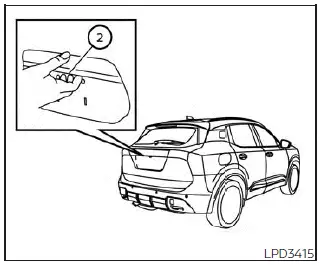
3. Press the door handle request switch, if so equipped 1, or the liftgate request switch, if so equipped 2.
4. All doors, the fuel-filler door, and the rear liftgate will lock.
5. The hazard indicator lights will flash twice and the chime will sound twice to confirm locking.
NOTE:
- The request switches, if so equipped, for all doors and the liftgate can be deactivated by switching the "Ext. Door Switch" setting to OFF in "Vehicle Settings" on the Nissan Kicks vehicle information display.
- The doors will not lock by pressing the door handle request switch, if so equipped, while any door is open. However, the doors can still be locked with the mechanical key even if a door is open.
- The doors will not lock with the door handle request switch, if so equipped, if the Intelligent Key is inside the Nissan Kicks. A warning beep will sound to alert you. However, if one Intelligent Key is inside the vehicle, the doors can still be locked using another Intelligent Key from outside the vehicle.
WARNING
After locking the doors with the request switch, if so equipped, always confirm that the Nissan Kicks doors are securely locked by gently operating the door handles.
Failure to confirm the locked condition may result in the doors being left unintentionally unlocked, reducing vehicle safety and security.
CAUTION
- When locking the doors with the request switch, if so equipped, make sure the Intelligent Key is in your possession before pressing the switch. This helps prevent the Intelligent Key from being left inside the Nissan Kicks.
- The request switch, if so equipped, operates only when the Intelligent Key has been detected by the Nissan Kicks Intelligent Key system.
Lockout protection
The Nissan Kicks Intelligent Key system includes lockout protection to help prevent the Intelligent Key from being accidentally locked inside the vehicle.
If any door is open, the doors are locked, the Intelligent Key is then placed inside the vehicle, and all doors are closed, a chime will sound and the doors will automatically unlock.
NOTE:
The doors may not lock if the Intelligent Key is held in the same hand that is pressing the request switch, if so equipped. For better recognition, place the Intelligent Key in a pocket, purse, bag, or your other hand before pressing the switch.
Additional note: For reliable Nissan Kicks Intelligent Key operation, always listen for the confirmation chime and check the hazard light flash before walking away from the vehicle.
CAUTION
The lockout protection function in the Nissan Kicks may not operate correctly under the following conditions:
- When the Intelligent Key is placed on top of the instrument panel.
- When the Intelligent Key is stored inside the glove box or in a closed storage compartment.
- When the Intelligent Key is placed inside one of the door pockets.
- When the Intelligent Key is placed inside or very close to metallic materials, which may interfere with key detection.
Unlocking doors and fuel-filler door
Unlocking from doors:
1. Carry the Nissan Kicks Intelligent Key with you.
2. Press the door handle request switch, if so equipped 1.
- When unlocking from the driver's door handle, the driver's door and the fuel-filler door will unlock first.
- To unlock all doors, press the door handle request switch, if so equipped 1, again within 60 seconds.
- When unlocking from the front passenger door, all Nissan Kicks doors will unlock.
- To allow both the driver's door and passenger doors to unlock at the same time from the driver's door handle, turn off the Selective Unlock feature in the vehicle settings menu of the vehicle information display.
3. The hazard indicator lights flash once and the outside chime sounds once to confirm unlocking.
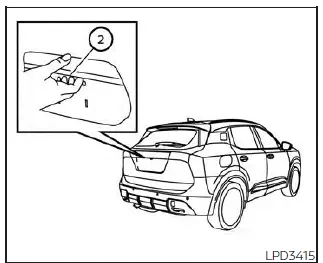
Unlocking from liftgate:
1. Carry the Intelligent Key with you.
2. Press the liftgate request switch, if so equipped 2. The liftgate will unlock.
Press the liftgate request switch 2 again within 60 seconds to unlock all doors.
3. The hazard indicator lights flash once and the outside chime sounds once.
NOTE:
- The request switches, if so equipped, for all doors and the liftgate can be deactivated when the "Ext. Door Switch" setting is switched to OFF in "Vehicle Settings" on the Nissan Kicks vehicle information display.
If a door handle is pulled at the same time the doors are being unlocked, that door may not unlock immediately.
Return the door handle to its original position to allow the door to unlock. If the door still does not unlock after the handle returns, press the door handle request switch, if so equipped, again.
All doors and the liftgate will automatically lock again unless one of the following actions is performed within 60 seconds after pressing the request switch, if so equipped:
- Opening any door or the liftgate.
- Pressing the ignition switch.
Using the interior lights
The interior lights in the Nissan Kicks illuminate for a limited period when a door is unlocked and the interior light switch is set to the DOOR position.
The lights can be turned off before the timer expires by performing one of the following actions:
- Placing the ignition switch in the ON position.
- Locking the doors with the Intelligent Key.
- Moving the interior light switch to the OFF position.
Additional note: After unlocking the Nissan Kicks with the request switch, open a door or the liftgate within 60 seconds if you want the vehicle to remain unlocked.
How to use the remote keyless entry function Nissan Kicks P16
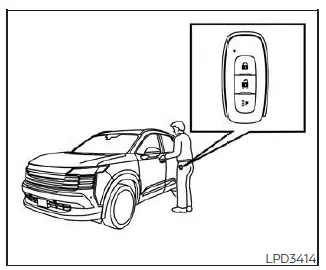
The remote keyless entry function of the Nissan Kicks allows convenient control of the vehicle’s locking system through the Intelligent Key. Using the remote transmitter, you can lock or unlock the doors and access several vehicle functions without inserting a key into a lock cylinder.
The remote keyless entry system can normally operate at a distance of up to 33 ft (10 m) from the Nissan Kicks. Actual operating range may vary depending on surrounding environmental conditions, nearby electronic devices, and sources of radio interference.
The remote keyless entry function may not operate under the following conditions:
- When the Intelligent Key is outside the specified operating range.
- When the battery inside the Intelligent Key is discharged or extremely weak.
CAUTION
When locking the Nissan Kicks using the Intelligent Key, always verify that the key remains in your possession and has not been left inside the vehicle.
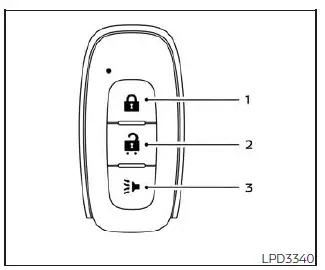
Type A (if so equipped)
-
 (lock) button
-
 (unlock) button
-
 (panic) button
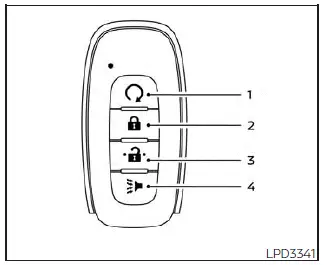
Type B (if so equipped)
-
 (remote engine start) button
-
 (lock) button
-
 (unlock) button
-
 (panic) button
Locking doors and fuel-filler door
1. Place the ignition switch in the LOCK position.
2. Close all doors securely.
3. Press the
 button on the Intelligent Key.
4. The hazard indicator lights will flash twice and the horn will sound once.
5. All doors, the fuel-filler door, and the liftgate of the Nissan Kicks will lock.
WARNING
After locking the doors using the Intelligent Key, always verify that the doors are securely locked by operating the door handles. Failure to do so may result in unintentionally leaving the vehicle unlocked, reducing the security of the Nissan Kicks.
Unlocking doors and fuel-filler door
1. Press the
 button on the Intelligent Key to unlock the driver's door.
2. The hazard indicator lights will flash once, and the driver's door together with the fuel-filler door will unlock.
3. Press the
 button again within 30 seconds to unlock all doors and the liftgate.
NOTE:
If Selective Unlock is disabled in the "Vehicle Settings" menu of the Nissan Kicks vehicle information
display, all doors will unlock with the first
 press of the key fob.
All doors and the liftgate will automatically relock unless one of the following actions is performed within one
minute after pressing the
 button.
- Opening any door or the liftgate.
- Turning the ignition switch from the LOCK position.
Using the interior lights
When a door is unlocked and the interior light switch is set to the DOOR position, the interior lights of the Nissan Kicks will illuminate for a limited period.
The lights can be turned off before the timer expires by performing one of the following actions:
- Placing the ignition switch in the ON position.
- Locking the doors with the Intelligent Key.
- Moving the interior light switch to the OFF position.
Using the panic alarm
If you are near your Nissan Kicks and feel threatened or need to attract attention, press and hold the
 button on the Intelligent Key for longer than one second.
The headlights will flash and the panic alarm will sound for a specified period.
The panic alarm will stop when:
- The alarm cycle has completed.
- Any button on the Intelligent Key is pressed.
- The request switch, if equipped, on the driver's or passenger's door is pressed while the Intelligent Key is within operating range.
- The liftgate request switch, if equipped, is pressed while the Intelligent Key is near the liftgate.
Horn beeps on lock feature
If preferred, the horn confirmation feature can be disabled using the Nissan Kicks Intelligent Key. When
disabled, pressing the
 button causes only the hazard indicator lights to flash twice.
When the
 button is pressed, neither the hazard lights nor the horn will provide confirmation.
NOTE:
If the horn confirmation mode is changed using the Intelligent Key, the Nissan Kicks vehicle information display will show the current setting after the ignition switch has been cycled from OFF to ON. The same setting can also be adjusted through the vehicle information display menu.
To deactivate:
Press and hold the
 and
and
 buttons simultaneously for at least six seconds. The hazard indicator lights will flash three times, confirming
that the horn confirmation feature has been disabled.
buttons simultaneously for at least six seconds. The hazard indicator lights will flash three times, confirming
that the horn confirmation feature has been disabled.
To activate:
Press and hold the
 and
and
 buttons simultaneously for at least six seconds again. The hazard indicator lights will flash once and the horn
will sound once, confirming that the feature has been reactivated.
buttons simultaneously for at least six seconds again. The hazard indicator lights will flash once and the horn
will sound once, confirming that the feature has been reactivated.
Disabling the horn confirmation feature does not disable the vehicle security alarm. If the alarm system is triggered, the horn will continue to operate normally.
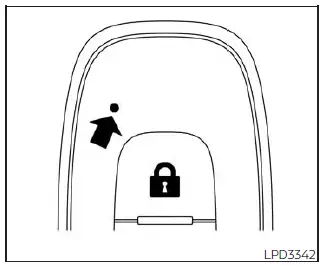
Intelligent Key button operation light
The indicator light flashes whenever a button on the Nissan Kicks Intelligent Key is pressed. The light only confirms that a signal has been transmitted from the key fob.
Always observe the vehicle response or listen for confirmation sounds to verify that the intended operation has actually been completed.
If the indicator light does not flash when a button is pressed, the Intelligent Key battery may be too weak to communicate properly with the Nissan Kicks.
In this situation, battery replacement may be required.
Approach unlock function
When approaching the Nissan Kicks with the Intelligent Key, the vehicle can automatically unlock through the Approach Unlock function.
This feature is disabled by default and can be enabled through the vehicle information display settings.
NOTE:
When the Approach Unlock function is activated, the Selective Unlock feature is automatically disabled.
Walk away lock function
When you walk away from the Nissan Kicks while carrying the Intelligent Key, the vehicle can automatically lock itself using the Walk Away Lock function.
This feature is disabled by default and may be enabled through the vehicle information display.
NOTE:
- When the Nissan Kicks is locked by the Walk Away Lock function, the hazard indicator lights flash twice. Always confirm that the vehicle has locked before leaving the area.
- The Walk Away Lock function may not operate under the following conditions:
- If any door or the liftgate is not fully closed.
- If the engine is running.
- If the Intelligent Key remains inside the vehicle.
- If the Intelligent Key is left outside the vehicle for an extended period. Opening and closing a door reactivates the function.
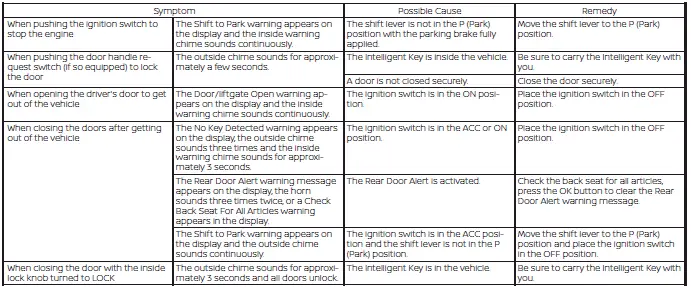
Warning signals
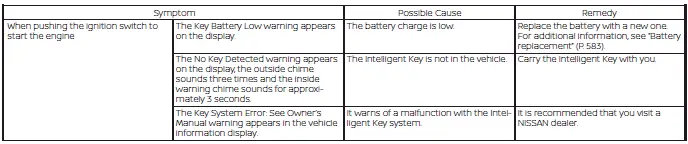
To help prevent unintended vehicle movement, improper Intelligent Key operation, or possible theft, the Nissan Kicks uses warning messages, chimes, and buzzers both inside and outside the vehicle.
If a warning message appears or a chime sounds, inspect both the vehicle and the Intelligent Key to determine the cause before continuing operation.
Troubleshooting guide
Always verify the location of every Intelligent Key programmed to the Nissan Kicks. If another registered Intelligent Key is inside the vehicle or within operating range, system behavior may differ from normal expectations.
The Nissan Kicks Intelligent Key system combines convenience, security, and advanced wireless communication technology, allowing everyday vehicle access and operation without the need to remove the key from a pocket or bag.