



NISSAN Intelligent Key
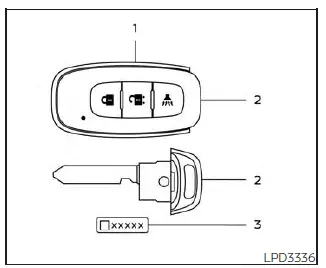
- Intelligent Keys (two sets)
- Mechanical key
- Key number plate (one plate)
The Nissan Kicks can be driven only with Intelligent Keys that have been properly registered to the vehicle’s Intelligent Key System. Each registered key communicates with the vehicle electronically, allowing the system to recognize authorized access and starting functions.
Never leave the keys inside the vehicle.
Up to four Intelligent Keys can be registered and used with one Nissan Kicks. Any new Intelligent Key must be registered by a NISSAN dealer before it can operate with the vehicle’s Intelligent Key System. Because the registration process may erase the memory of previously stored Intelligent Keys, take all existing keys with you when visiting the NISSAN dealer for programming.
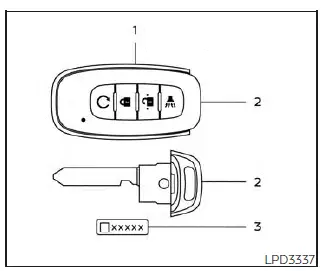
Type B (if so equipped)
A key number plate is supplied with the keys for your Nissan Kicks. Record this key number and keep it in a secure location, such as your wallet or personal records, but not inside the vehicle. If all keys are lost, it is recommended that you visit a NISSAN dealer to obtain duplicates using the key number.
NISSAN does not keep a record of individual key numbers, so it is very important to protect and retain the key number plate.
A key number is usually needed only if all keys have been lost and there is no remaining key available for duplication. If you still have at least one working key, a duplicate may often be made without using the key number.
CAUTION
The following conditions or actions may damage the Nissan Kicks Intelligent Key or interfere with its operation:
- Do not allow the Intelligent Key, which contains sensitive electronic components, to come into contact with water, saltwater, or excessive moisture. Liquid exposure may affect system function.
- Do not drop the Intelligent Key or subject it to strong impact.
- Do not strike the Intelligent Key sharply against another object.
- Do not modify, disassemble, or alter the Intelligent Key in any way.
- Moisture may damage the Intelligent Key. If the Intelligent Key becomes wet, wipe it immediately and allow it to dry completely before use.
- Do not leave the Intelligent Key for an extended period in places where temperatures may exceed 140ºF (60ºC), such as on a dashboard in direct sunlight.
- Do not attach the Intelligent Key to a key holder or accessory that contains a magnet.
- Do not place the Intelligent Key near equipment that produces a magnetic field, such as televisions, audio equipment, speakers, laptops, or personal computers.
Practical key care tip: Keep one Nissan Kicks Intelligent Key in regular use and store the spare key in a safe, dry place away from electronics and heat. This helps reduce the risk of losing both keys or damaging them at the same time.
If an Intelligent Key for the Nissan Kicks is lost or stolen, NISSAN recommends having the ID code for that specific key erased from the vehicle’s memory. This can help prevent unauthorized use of the lost or stolen Intelligent Key and reduce the risk of someone operating the vehicle without permission. For information about the correct erasing procedure, it is recommended that you visit a NISSAN dealer.
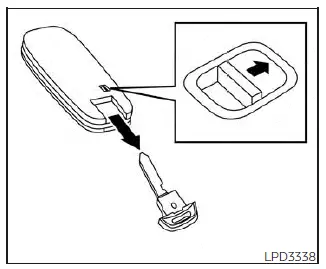
Mechanical key
The Nissan Kicks Intelligent Key includes a removable mechanical key for situations where manual locking or unlocking is needed.
To remove the mechanical key, release the lock knob located on the back of the Intelligent Key.
To reinstall the mechanical key, insert it firmly back into the Intelligent Key body until the lock knob returns to the locked position.
Use the mechanical key to lock or unlock the driver's door when electronic key operation is unavailable or not convenient.
CAUTION
Always keep the mechanical key installed in the Intelligent Key slot so it is available when needed.
NISSAN Vehicle Immobilizer System keys
Additional or replacement keys:
If you still have at least one working key for your Nissan Kicks, the key number is usually not required when requesting additional NISSAN Vehicle Immobilizer System keys. The existing key can be duplicated without using the key number.
Up to four NISSAN Vehicle Immobilizer System keys can be registered for one Nissan Kicks. When registering new or replacement keys, bring all existing NISSAN Vehicle Immobilizer System keys to the NISSAN dealer. This is necessary because the registration process erases all key codes previously stored in the immobilizer system memory.
After registration is completed, the Nissan Kicks immobilizer system will recognize only the keys that were programmed during that registration process. Any virtual key accessories, if equipped, must also be registered again. Any key that is not provided to the dealer at the time of registration will no longer be able to start the vehicle.
CAUTION
Do not allow the immobilizer system key, which contains an electronic transponder, to come into contact with water, salt water, or excessive moisture. Liquid exposure may affect the immobilizer system function and may prevent the Nissan Kicks from recognizing the key correctly.
Practical key security tip: If a Nissan Kicks key is missing, do not wait until the situation becomes urgent. Have the lost key removed from the vehicle memory and confirm that all remaining keys operate correctly.