



WARNING
Failure to follow the warnings and instructions for proper use of the I-LI system could result in serious injury or death.
- The I-LI system does not steer the vehicle for the driver and cannot prevent loss of control. The driver is always responsible for remaining alert, driving safely, keeping the Nissan Kicks within the travel lane, and maintaining full control of the vehicle at all times.
- The I-LI system is mainly designed for use on well-developed freeways and highways. It may not detect lane markers correctly in some road, weather, traffic, or driving conditions.
The I-LI system must be turned on with the ProPILOT Assist switch on the steering wheel each time the ignition is placed in the ON position.
The I-LI system operates when the Nissan Kicks is driven at approximately 37 mph (60 km/h) or higher, and only when lane markings are clearly visible on the road.
When the vehicle begins to move away from the center of the traveling lane, the I-LI system warns the driver with an indicator and steering wheel vibration. It may also help the driver return the Nissan Kicks toward the center of the lane by briefly applying braking force to the left or right wheels individually.
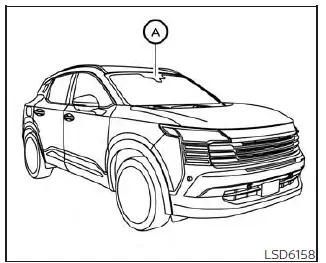
The I-LI system monitors lane markings using camera unit A, which is located above the inside mirror.
I-LI system operation
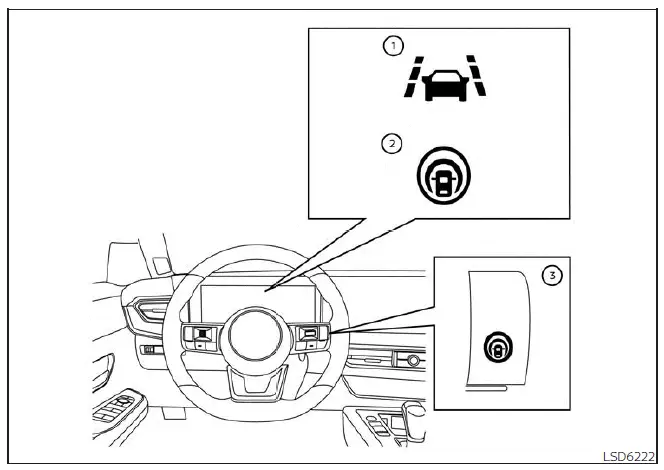
- Lane Departure Warning (LDW) indicator
- Intelligent Lane Intervention (I-LI) indicator (if so equipped)
- ProPILOT Assist switch
The I-LI system operates above approximately 37 mph (60 km/h). If the Nissan Kicks approaches the left or right side of the travel lane, the steering wheel vibrates and the LDW indicator (orange) on the instrument panel blinks to alert the driver. Then, the I-LI system may automatically apply the brakes briefly to help guide the vehicle back toward the center of the lane.
To turn on the I-LI system, push the ProPILOT Assist switch on the steering wheel after starting the engine/motor. The I-LI indicator on the instrument panel will illuminate.
Push the ProPILOT Assist switch again to turn the I-LI system off. The I-LI indicator will turn off.
The strength of steering wheel vibration can be adjusted through the settings menu in the vehicle information display.
How to enable/disable the I-LI system
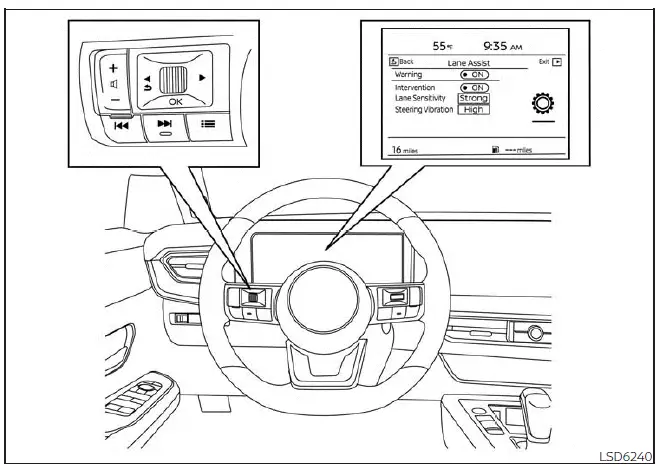
Use the following steps to enable or disable the I-LI system in the Nissan Kicks.
1. Press the
 button until
"Settings" appears
in the vehicle information display.
button until
"Settings" appears
in the vehicle information display.
Use the scroll dial to select "Driver Assistance." Then press the OK button.
2. Select "Lane Assist" and press the OK button.
3. Select "Intervention" and press the OK button.
4. Select "Lane Sensitivity" to change the lane sensitivity to "Strong", "Normal", or "Mild".
5. Push the ProPILOT Assist switch to turn the system on or off.
NOTE:
- Turning on the ProPILOT Assist system will also activate the I-LI and I-BSI systems, if equipped, at the same time. If the I-LI system is disabled in the settings menu, I-LI will automatically turn on when Steering Assist is active.
- When the system is enabled or disabled, the Nissan Kicks retains the current setting even after the engine is restarted.
The I-LI system is most effective when lane markings are clean, continuous, and clearly visible. It should be treated as driver assistance only, while the driver remains responsible for steering, speed control, and lane position at all times.
I-LI system limitations
WARNING
The limitations listed below apply to the I-LI system. Failure to understand and follow these warnings and instructions may result in serious injury or death.
- The I-LI system may activate if you change lanes without first using the turn signal. It may also react in situations such as construction zones where traffic is directed across existing lane markings. If this happens, the driver may need to apply corrective steering input to complete the intended lane change safely.
- Because the I-LI system may not operate under certain road, weather, and lane-marking conditions described in this section, it may not activate every time the Nissan Kicks begins to move out of its lane. The driver must always be ready to steer the vehicle correctly.
- When the I-LI system is operating, avoid sudden or excessive steering movements. Abrupt steering may cause loss of vehicle control.
- The I-LI system will not operate at speeds below approximately 37 mph (60 km/h), or when lane markers cannot be detected.
- Do not rely on the I-LI system under the following conditions, because the system may not function
properly:
- During poor weather, such as rain, fog, snow, or similar low-visibility conditions.
- When driving on slippery roads, including roads covered with ice or snow.
- When driving on winding, rough, or uneven roads.
- When a lane is closed because of road repairs or construction work.
- When driving in a temporary or makeshift lane.
- When the lane is too narrow for stable detection.
- When the Nissan Kicks is not equipped with normal tire conditions, such as when tires are worn, tire pressure is low, a spare tire is installed, tire chains are fitted, or nonstandard wheels are used.
- When the vehicle is equipped with non-original brake parts or suspension parts.
- On roads with multiple parallel lane markers, faded lane markers, unclear lane paint, yellow lane markings, non-standard lane markings, or lane markings covered with water, dirt, snow, or debris.
- On roads where old or discontinued lane markers are still visible and may be detected by the camera.
- On roads with sharp curves.
- On roads with strong visual contrasts, such as shadows, snow patches, standing water, wheel ruts, pavement seams, or lines left after road repairs. The I-LI system may recognize these objects as lane markers.
- On roads where the traveling lane merges, splits, or changes shape.
- When the vehicle's direction of travel is not aligned with the lane marker.
- When driving close behind another vehicle that blocks the lane camera unit's detection range.
- When rain, snow, dirt, frost, or another object adheres to the windshield in front of the lane camera unit.
- When the headlights are dim because the lenses are dirty or the headlight aim is not adjusted correctly.
- When strong light enters the lane camera unit, such as direct sunlight shining toward the front of the Nissan Kicks at sunrise or sunset.
- When brightness changes suddenly, such as when the vehicle enters or exits a tunnel, underpass, bridge shadow, or similar area.
While the I-LI system is operating, a brake operation sound may be heard. This is normal and indicates that the Nissan Kicks Intelligent Lane Intervention system is applying brief brake control as designed.
System temporarily unavailable
Condition A:
The warning and assist functions of the I-LI system are not designed to operate under the following conditions:
- When the lane change signal is used and the Nissan Kicks changes lanes in the direction of the signal. The I-LI system will be deactivated for approximately 2 seconds after the lane change signal is turned off.
- When vehicle speed drops below approximately 37 mph (60 km/h).
After these conditions are no longer present and all operating requirements are satisfied, the I-LI system will become available again. Clear lane markings, steady steering, and proper use of turn signals help the Nissan Kicks support smoother lane assistance operation.
After the conditions above have ended and all required operating conditions are satisfied again, the warning and assist functions of the Nissan Kicks I-LI system will resume automatically.
Condition B:
The assist function of the I-LI system is not designed to operate under the following conditions, although the warning function may still remain available:
- When the brake pedal is depressed.
- When the steering wheel is turned enough for the Nissan Kicks to change lanes.
- When the vehicle is accelerated while the I-LI system is operating.
- When the Intelligent Cruise Control (ICC) approach warning occurs.
- When the hazard warning flashers are operating.
- When driving through a curve at high speed.
After these conditions are no longer present and the necessary operating requirements are satisfied, brake application by the I-LI system will resume.
Condition C:
If the following messages appear in the vehicle information display, the I-LI system will turn off automatically.
- "Not Available Poor Road Conditions"
This may appear when the VDC system, except the Traction Control System (TCS) function, or ABS is operating. - "Currently not available":
- When the VDC system is turned off.
- When SNOW mode is selected on AWD models.
Action to take:
When the conditions above no longer exist, turn the I-LI system off. Then push the ProPILOT Assist switch on the steering wheel again, for vehicles equipped with ProPILOT Assist, to turn the I-LI system back on.
Temporary disabled status at high temperature:
If the Nissan Kicks is parked in direct sunlight during high-temperature conditions, above approximately 104ºF (40ºC), and the I-LI system is then turned on, the system may deactivate automatically. The message "Unavailable: High Cabin Temperature" will appear in the vehicle information display, and a chime will sound.
When the cabin temperature decreases, turn the I-LI system off. Then press the ProPILOT Assist switch again to turn the system back on.
System malfunction
If the I-LI system malfunctions, it will cancel automatically. The LDW indicator (orange), the "Not Available System Malfunction" warning message, and a chime will alert the driver. If the LDW indicator and warning message appear, move the Nissan Kicks off the road to a safe location and stop the vehicle. Turn the engine/motor off, then restart the engine/motor. If the indicator and warning message continue to appear, have the I-LI system inspected. It is recommended that you visit a NISSAN dealer for this service.
System maintenance
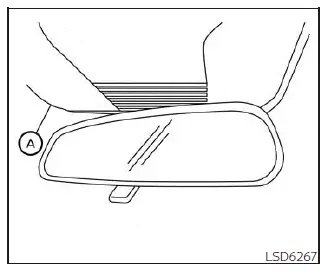
The lane camera unit A used by the I-LI system is located above the inside mirror. To help maintain proper I-LI operation and reduce the chance of system malfunction, observe the following care instructions:
- Always keep the windshield clean, especially the area in front of the lane camera unit.
- Do not attach stickers, transparent film, decals, or accessories near the camera unit.
- Do not place reflective materials such as white paper, glossy objects, or mirrors on the instrument panel. Reflected sunlight may interfere with the camera unit and reduce its ability to detect lane markers.
- Do not strike, damage, or apply pressure to the area around the camera unit. Do not touch the camera lens or remove the screw located on the camera unit. If the camera unit is damaged in an accident, it is recommended that you visit a NISSAN dealer.
Consistent camera visibility, a clean windshield, and clear lane markings help the Nissan Kicks I-LI system provide more stable lane assistance during normal highway driving.