



WARNING
Failure to follow the warnings and instructions regarding the proper use of the Intelligent Driver Alertness (I-DA) system may result in a collision, serious injury, or death.
- The I-DA system is designed only to provide a warning when signs of reduced driver attention or possible fatigue are detected. It does not steer the Nissan Kicks, apply corrective steering input, or prevent loss of vehicle control.
- The I-DA system cannot detect every instance of driver distraction, drowsiness, or reduced alertness. System performance may vary depending on driving conditions and driver behavior.
- The driver remains fully responsible for:
- remaining attentive at all times,
- operating the Nissan Kicks safely,
- keeping the vehicle within the travel lane,
- maintaining full control of the vehicle under all driving conditions,
- avoiding driving when tired or fatigued,
- minimizing distractions such as texting, using mobile devices, or other activities that may divert attention from the road.
The Intelligent Driver Alertness system helps monitor driver behavior and can provide a warning if signs of reduced attention or fatigue are detected during a trip.
To accomplish this, the system evaluates driving patterns and steering inputs over time. The Nissan Kicks continuously analyzes normal driving behavior and looks for changes that may indicate decreased concentration or growing fatigue. If the system determines that the driver's attention level may be declining, it provides both visual and audible alerts suggesting that the driver consider taking a break.
Intelligent Driver Alertness system operation
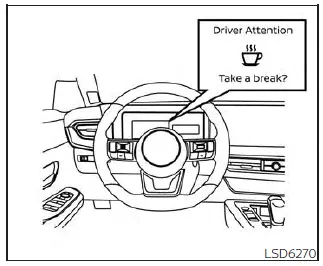
For vehicles with the 7 inch (18 cm)
display
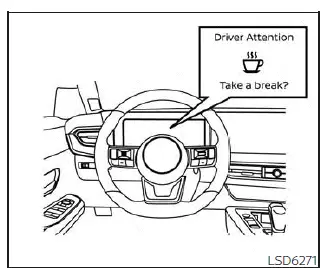
For vehicles with the 12.3 inch (31.2 cm)
display
If the system detects indications of driver fatigue or determines that driver attention may be decreasing, the message "Take a break?" appears in the vehicle information display and an audible chime sounds when the Nissan Kicks is traveling at speeds above approximately 37 mph (60 km/h).
The system continuously evaluates driving behavior throughout the journey and may provide more than one warning during a single trip if the conditions that triggered the alert continue to be detected.
Whenever the ignition switch is turned from ON to OFF and then back ON again, the system resets and begins a new assessment of steering inputs and overall driving behavior.
How to enable/disable the Intelligent Driver Alertness (I-DA) system
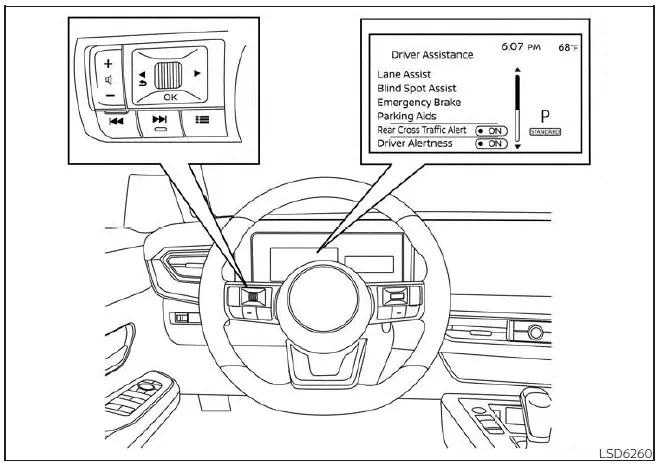
Perform the following steps to enable or disable the I-DA system.
For vehicles equipped with the 7 inch (18 cm) display:
1. Press the
 button until
"Settings" displays
in the vehicle information display
and press the OK button. Use the
button until
"Settings" displays
in the vehicle information display
and press the OK button. Use the
 button to select "Driver Assistance." Then
press the OK button.
button to select "Driver Assistance." Then
press the OK button.
2. Select "Driver Alertness" and press the OK button to switch the feature on or off.
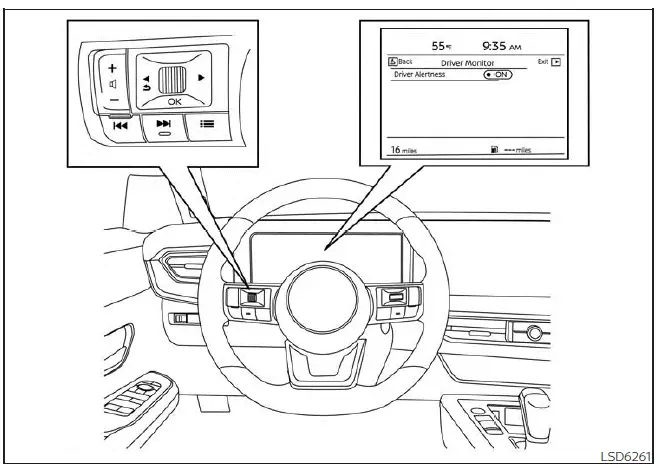
For vehicles with the 12.3 inch (31.2 cm) display
For vehicles equipped with the 12.3 inch (31.2 cm) display:
1. Press the
 button until
"Settings" displays
in the vehicle information display
and press the OK button. Use the
button until
"Settings" displays
in the vehicle information display
and press the OK button. Use the
 button to select "Driver Assistance." Then
press the OK button.
button to select "Driver Assistance." Then
press the OK button.
2. Select "Driver Monitor" and press the OK button.
3. Select "Driver Alertness" and press the OK button to enable or disable the system.
NOTE:
The selected setting remains stored in the vehicle memory and will be retained even after the engine has been turned off and restarted.
Intelligent Driver Alertness (I-DA) system limitations
WARNING
The following limitations apply to the Intelligent Driver Alertness system. Failure to understand and operate the Nissan Kicks within these limitations could increase the risk of an accident, serious injury, or death.
- The I-DA system may not function correctly or may fail to provide a warning under the following
circumstances:
- Poor road conditions, including uneven pavement, rough surfaces, potholes, or damaged roadways.
- Strong crosswinds or persistent side winds that affect vehicle movement.
- Driving in a sporty or aggressive manner with higher cornering speeds, rapid steering inputs, or frequent acceleration.
- Frequent lane changes, repeated changes in vehicle speed, or driving patterns that differ significantly from normal steady-state driving.
- The I-DA system will not provide an alert under the following conditions:
- When vehicle speed is below approximately 37 mph (60 km/h).
- During brief or momentary lapses of attention.
- For sudden distractions, such as dropping an object or briefly looking away from the road.
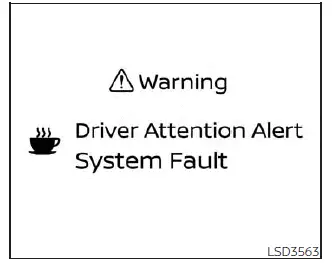
System malfunction
If the Intelligent Driver Alertness system detects an internal malfunction, a warning message will appear in the vehicle information display and the function will automatically stop operating. When this occurs, the Nissan Kicks will no longer be able to provide driver alertness monitoring until the issue has been corrected.
Action to take
Safely stop the vehicle, place the shift selector in the P (Park) position, turn the engine off, and then restart it. If the warning message remains visible after restarting the vehicle, have the system inspected by qualified technicians. It is recommended that you visit a NISSAN dealer for diagnosis and service.
Break-in schedule
CAUTION
During the first 1,200 miles (2,000 km), follow these recommendations to help achieve optimum engine performance, long-term reliability, and fuel efficiency for your new Nissan Kicks. Ignoring these recommendations may contribute to increased engine wear and reduced overall performance.
- Avoid driving for extended periods at a constant speed, whether fast or slow, and avoid operating the engine above 4,000 rpm during the break-in period.
- Do not use full-throttle acceleration in any gear.
- Avoid rapid starts and aggressive launches from a standstill.
- Minimize hard braking whenever possible to allow braking components to wear in gradually and evenly.