



Headlight control switch Nissan Kicks crossover
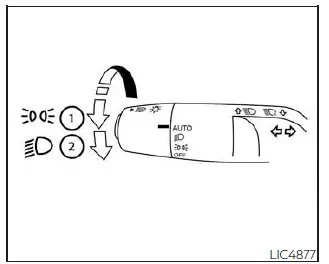
Type A (if so equipped)
Lighting
-
Rotate the switch to the
 position. The front parking lights, tail lights, license plate lights, and instrument panel illumination
will turn on.
position. The front parking lights, tail lights, license plate lights, and instrument panel illumination
will turn on.
-
Rotate the switch to the
 position. The headlights will turn on, while the front
parking lights, tail lights, license plate lights, and instrument panel lights remain illuminated.
position. The headlights will turn on, while the front
parking lights, tail lights, license plate lights, and instrument panel lights remain illuminated.
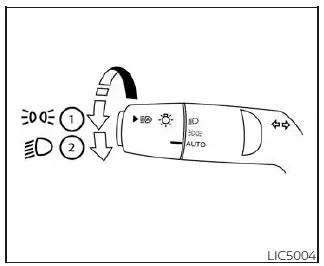
Type B (if so equipped)
CAUTION
Use the headlights while the Nissan Kicks engine is running whenever possible. Leaving the headlights on for an extended time with the engine off can discharge the vehicle battery.
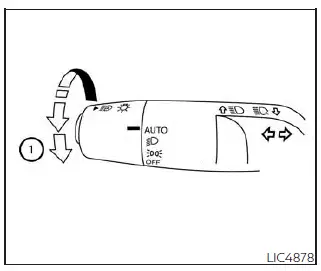
Type A (if so equipped)
Autolight system
The autolight system in the Nissan Kicks can turn the exterior lights on and off automatically according to surrounding brightness. This feature adds convenience during dusk, tunnels, shaded roads, parking garages, and changing weather conditions.
The autolight system can perform the following functions:
- Automatically turn on the headlights, front parking lights, tail lights, license plate lights, and instrument panel lights when it becomes dark.
- Automatically turn off all lights, except the Daytime Running Lights, when the surrounding area becomes bright.
- Keep the lights on for a set period after the ignition switch is placed in the OFF position and all doors are closed.
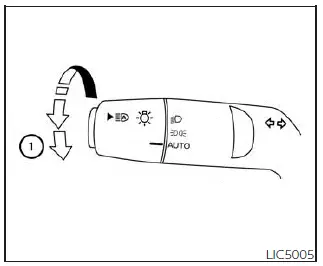
Type B (if so equipped)
NOTE:
Autolight activation sensitivity, if equipped, and the delay time before the autolights turn off may be adjusted depending on Nissan Kicks equipment and vehicle settings.
To turn on the autolight system:
1. Turn the headlight switch to the AUTO position 1.
2. Place the ignition switch in the ON position.
3. The autolight system will automatically turn the headlights on or off based on outside light conditions.
If the ignition switch is placed in the OFF position and a door is opened and left open, the headlights may remain on for a set period of time. If another door is opened while the headlights are still on, the timer is reset.
To turn the autolight system off, turn the switch to the OFF position, if equipped,
 ,
or
,
or
 position.
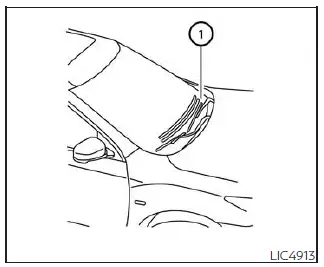
Do not place objects on top of the autolight sensor located on the upper side 1 of the instrument panel. This sensor controls the Nissan Kicks autolight system. If the sensor is covered, it may detect darkness even in daylight and turn the headlights on unnecessarily. If this happens while the vehicle is parked, the engine is off, and the ignition switch is in the ON position, the battery may become discharged.
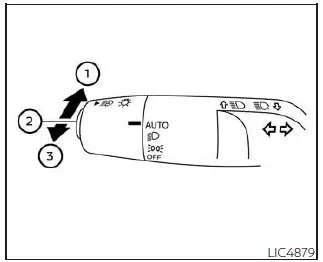
Headlight beam select
-
To select high beam operation, push the lever forward. The high beam headlights will turn on and the
 light
will illuminate.
light
will illuminate.
- Pull the lever back to return to low beam operation.
- Pull and release the lever to flash the high beams on and off.
High Beam Assist
The High Beam Assist system in the Nissan Kicks operates when the vehicle is driven at approximately 25 mph (40 km/h) or higher.
When high beams are active and the system detects an oncoming vehicle or a vehicle ahead, it can automatically switch the headlights to low beam to help reduce glare for other drivers.
WARNING
- The High Beam Assist system is a convenience feature and is not a substitute for attentive, safe driving. The driver must remain alert, watch the road, and manually switch between high beam and low beam headlights whenever necessary.
-
The system may not automatically switch between high beam and low beam correctly under the following
conditions. In these situations, operate the headlights manually.
- During poor weather such as rain, fog, snow, strong wind, or heavy road spray.
- When a light source similar to a headlight or tail light is near the vehicle.
- When the headlights of an oncoming or leading vehicle are turned off, when light color is affected by dirt or foreign material on the lamps, or when the light beam is misaligned.
- When there is a sudden or continuous change in brightness.
- When driving on roads with rolling hills, dips, crests, or noticeable elevation changes.
- When driving on roads with many curves.
- When a sign, barrier, wet surface, mirror-like object, or reflective surface sends strong light toward the front of the Nissan Kicks.
- When a container, trailer, or other object being towed by a vehicle ahead reflects strong light.
- When a headlight on your Nissan Kicks is dirty, damaged, blocked, or not aimed correctly.
- When the vehicle is leaning because of a punctured tire, towing condition, heavy load, or similar situation.
-
The timing of automatic switching between low beam and high beam may vary depending on the following
situations.
- The brightness of the headlights on an oncoming vehicle or a vehicle ahead.
- The movement, distance, and direction of the oncoming vehicle or leading vehicle.
- When only one light on an oncoming or leading vehicle is illuminated.
- When the oncoming or leading vehicle is a motorcycle, bicycle, or another two-wheeled vehicle.
- Road conditions, including curves, slopes, surface changes, and uneven pavement.
- The number of passengers and the amount of luggage inside the Nissan Kicks.
For best nighttime visibility, keep the Nissan Kicks headlights clean and properly aimed, and do not rely only on automatic lighting functions in complex traffic, bad weather, or poorly marked road environments.
High Beam Assist operation
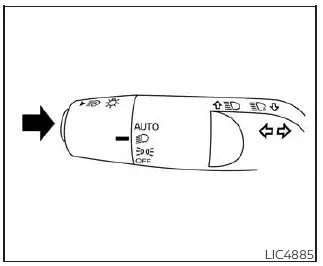
To activate the High Beam Assist system in the Nissan Kicks, turn the headlight switch to the AUTO position and
push the switch as shown while the engine is running. When the headlights are on and the system is active, the
 High Beam Assist indicator light in the meter will
illuminate.
High Beam Assist indicator light in the meter will
illuminate.
If the High Beam Assist indicator light does not come on under these conditions, the system may not be operating correctly. Have the Nissan Kicks inspected as soon as possible. It is recommended that you visit a NISSAN dealer for this service.
When vehicle speed drops below approximately 16 mph (25 km/h), the headlights automatically switch to low beam operation.
To turn off the High Beam Assist system, push the switch again.
Ambient image sensor maintenance
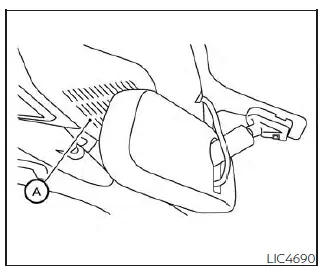
The ambient image sensor A for the Nissan Kicks High Beam Assist system is located in front of the inside rearview mirror. This sensor monitors surrounding light and traffic conditions to help the system decide when to switch between high beam and low beam operation. To keep the system working properly and reduce the chance of malfunction, observe the following precautions:
- Always keep the windshield clean, especially in the area in front of the sensor.
- Do not attach stickers, transparent films, decals, dash camera mounts, or other accessories near the ambient image sensor.
- Do not strike, press, scratch, or damage the area around the ambient image sensor. Do not touch the sensor lens located on the sensor unit.
If the ambient image sensor is damaged in an accident or by impact, it is recommended that you have the Nissan Kicks inspected by a NISSAN dealer.
Battery saver system
The battery saver system automatically turns off the ignition after a certain period of time if the ignition switch is left in the ON position.
The Nissan Kicks battery saver system also turns off the following lights automatically after a period of time when the ignition switch is placed in the OFF position:
-
Headlights, when the headlight switch is in the
 or
or
 position.
- Interior lights, when they are left in the ON position.
CAUTION
Although the battery saver feature can automatically turn off the headlights after a period of time, you should still turn the headlight switch to the OFF position, if equipped, whenever the Nissan Kicks engine is not running. This helps prevent unnecessary battery discharge and ensures the vehicle is ready to start later.
For dependable lighting performance, check the Nissan Kicks exterior lights regularly and avoid leaving electrical accessories operating longer than necessary when the engine is off.
LED Daytime Running Lights (DRL) system (Type A) Nissan Kicks 2026
The LED Daytime Running Lights portion of the Nissan Kicks headlight assembly illuminates automatically when the engine is started and the parking brake is released. The LED DRL system operates when the headlight switch is in the OFF or AUTO position.
Turn the headlight switch to the
 position for full exterior lighting when driving at night. When the headlights are fully illuminated, the LED
DRL will turn off. If the parking brake is applied before the engine is started, the LED Daytime Running Lights
will not illuminate.
position for full exterior lighting when driving at night. When the headlights are fully illuminated, the LED
DRL will turn off. If the parking brake is applied before the engine is started, the LED Daytime Running Lights
will not illuminate.
The LED DRL turn on once the parking brake is released. They remain illuminated until the ignition switch is placed in the OFF position.
At dusk or in low-light conditions, turn the headlight switch on manually so the interior controls, switches, and full exterior lighting are properly illuminated. These controls may remain off while the switch is in the OFF or AUTO position.
WARNING
When the Nissan Kicks LED DRL system is active, the tail lights are not illuminated. At dusk, in rain, fog, tunnels, or other reduced-visibility conditions, it is necessary to turn on the headlights.
Failure to use the proper lighting could reduce vehicle visibility and may lead to an accident, causing injury to you or others.
LED Daytime Running Lights (DRL) system (Type B) (if so equipped)
The LED Daytime Running Lights mounted in the front bumper fascia automatically illuminate when the Nissan Kicks
engine is started and the parking brake is released. The LED DRL operate when the headlight switch is in the OFF
or AUTO position. Turn the headlight switch to the
 position for full illumination
when driving at night. When the headlights are fully on, the LED DRL will turn off. If the parking brake is
applied before the engine is started, the LED DRL will not illuminate.
position for full illumination
when driving at night. When the headlights are fully on, the LED DRL will turn off. If the parking brake is
applied before the engine is started, the LED DRL will not illuminate.
Once the parking brake is released, the LED DRL illuminate automatically. They remain on until the ignition switch is placed in the OFF position.
At dusk, it is important to turn the headlight switch on so that the Nissan Kicks interior controls and switches illuminate properly, because they may stay off while the headlight switch is in the OFF or AUTO position.
WARNING
When the LED DRL system is operating, the tail lights on the Nissan Kicks are not on. Always turn on the headlights at dusk or whenever visibility is reduced.
Failure to turn on the correct exterior lights could make the vehicle harder to see and may result in an accident involving serious injury.
Instrument brightness control
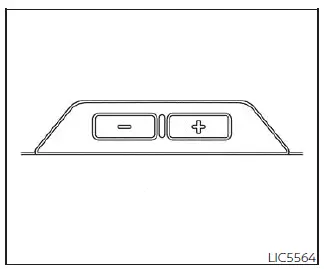
Press the “+” button to increase the brightness of the Nissan Kicks instrument panel lights.
Press the “-” button to reduce the brightness of the instrument panel lights. Adjust the brightness so the display is clear without being distracting during night driving.
Turn signal switch
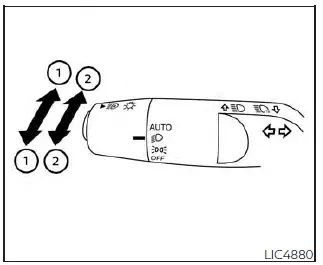
Turn signal
- Move the lever up or down to signal the intended turning direction. After the turn is completed, the turn signal cancels automatically.
Lane change signal
-
Move the lever up or down until the turn signal begins to flash, but do not push it far enough for the lever
to latch.
Hold the lever in this position until the lane change is completed.
You may also move the lever up or down until the signal begins flashing, then release it before the lever latches. The turn signal will automatically flash three times, which is useful for a brief lane change signal.
Choose the most appropriate signaling method based on traffic, road conditions, and the space available around your Nissan Kicks.
NOTE:
The 3-flash pass feature may be disabled depending on vehicle settings, equipment, or market specification.
Horn
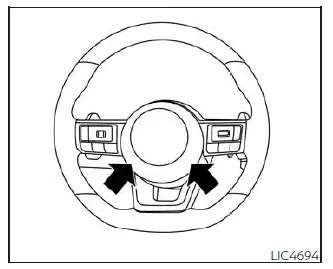
To sound the horn, press the center pad area of the Nissan Kicks steering wheel.
WARNING
Do not disassemble or modify the horn assembly. Doing so may affect the proper operation of the supplemental front air bag system.
Tampering with the supplemental front air bag system in the Nissan Kicks may cause malfunction and could result in serious personal injury.