



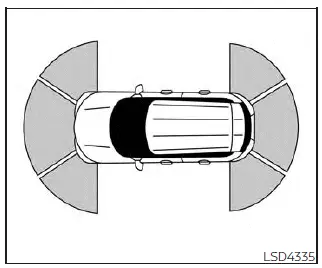
The Front and Rear Sonar System helps the driver detect obstacles around the Nissan Kicks by using ultrasonic sensors integrated into the front and rear bumpers. When an object is detected within the monitoring area, the system provides audible and visual alerts to help the driver judge distance while maneuvering.
When the sonar system is activated, the sonar view automatically appears in the vehicle information display, providing additional visual assistance during parking and low-speed maneuvers.
WARNING
- The sonar system is designed as a driving aid and convenience feature. It is not a substitute for proper parking procedures or attentive driving.
- The driver is always responsible for the safe operation of the vehicle during parking and
maneuvering.
Always check the surrounding area carefully and confirm that it is safe before moving the Nissan Kicks.
- Read and understand all limitations of the sonar system. The corner sonar indicators use different colors to represent the vehicle's distance from detected objects.
- Adverse weather conditions or external ultrasonic sources, such as automatic car washes, air brake systems on large trucks, pneumatic tools, or other ultrasonic equipment, may affect system performance. These conditions can reduce detection accuracy or cause unintended alerts.
- The sonar system is primarily intended to assist in detecting larger stationary objects and help reduce the risk of vehicle damage during low-speed maneuvers.
- The system is not designed to prevent contact with small, low, or moving objects. Always drive slowly and carefully. Objects located below the bumper, extremely close to the vehicle, or resting on the ground may not be detected.
- The sonar sensors may have difficulty detecting certain types of objects, including soft materials such as snow, fabric, cotton, insulation, or similar materials; thin objects such as ropes, wires, or chains; and wedge-shaped objects.
- The front and rear sonar sensors determine distance by analyzing reflected ultrasonic sound waves. External sounds such as vehicle horns or ultrasonic signals generated by nearby vehicles may interfere with object detection and reduce system effectiveness.
If the Nissan Kicks sustains damage to the front or rear bumper fascia, causing the bumper to become bent, misaligned, or deformed, the sensor detection area may change. This can result in inaccurate distance measurements, missed detections, or unnecessary warning alerts.
CAUTION
- Excessive background noise, including high audio system volume levels or open windows, may make the warning tones difficult to hear.
- Keep the sonar sensors located in the bumper fascia clean and free of snow, ice, mud, and heavy dirt
buildup.
Do not use sharp tools or abrasive objects when cleaning the sensors. If the sensors become obstructed, the accuracy and performance of the sonar system may be reduced.
System operation
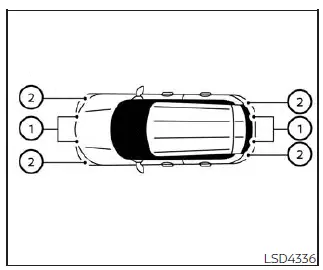
- Center sonar sensors
- Corner sonar sensors
The system provides both visual and audible notifications for:
- Obstacles located in front of the Nissan Kicks when the shift lever is in the D (Drive) position.
- Obstacles located both in front of and behind the vehicle when the shift lever is in the R (Reverse) position.
How the system alerts of obstacles:
The sonar system automatically deactivates at vehicle speeds above approximately 6 mph (10 km/h). Once the vehicle slows below this speed threshold, the system becomes active again.
When an obstacle is detected only by the center sensor, the intermittent warning tone will stop after several seconds. The tone will also stop when the detected object moves out of the sensing area or increases its distance from the vehicle.
As an object enters the detection range, a green indicator appears and begins flashing while an intermittent warning tone sounds. As the Nissan Kicks moves closer to the obstacle, the indicator changes from green to yellow and the flashing frequency increases, providing a more urgent warning.
When the vehicle approaches very close to the detected object, the indicator stops flashing and illuminates red continuously. At the same time, the warning tone changes from intermittent beeps to a continuous sound, indicating that immediate attention is required to avoid contact with the obstacle.
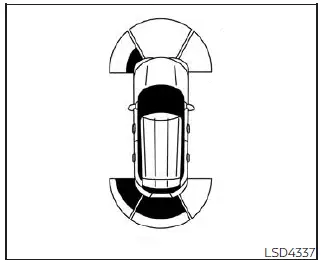
As the Nissan Kicks approaches an obstacle, the sonar detection indicator appears within the vehicle information display to help the driver visually identify the monitored area and estimate the distance to nearby objects.
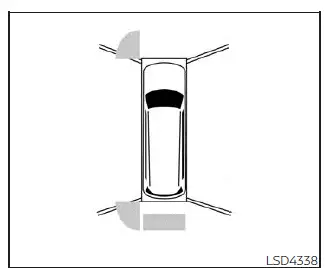
The sonar detection indicator is also integrated into the center display camera view, providing additional visual assistance while maneuvering, reversing, or parking in confined spaces.
How to enable/disable the front and rear sonar system
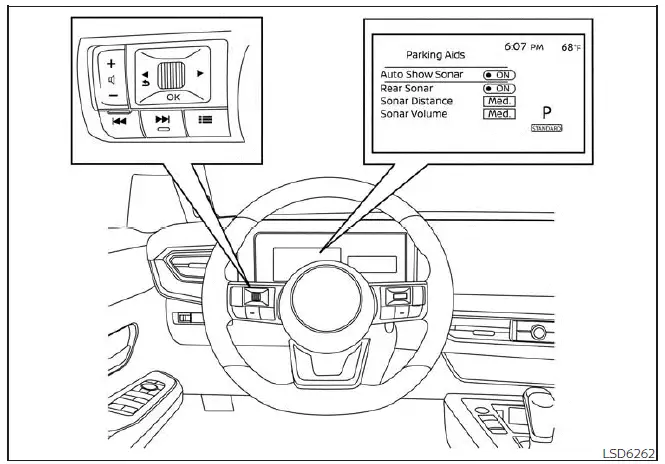
For vehicles with the 7 inch (18 cm) display
The sonar system is automatically activated whenever the push-button ignition switch is in the ON position and the shift lever is moved into the R (Reverse) position.
To customize or enable/disable the sonar settings, follow the steps below:
For vehicles equipped with 7 inch (18 cm) display:
1. Press the
 button until "Settings" appears in the vehicle information display, then press the OK button. Use the scroll
dial to highlight "Driver Assistance" and press OK.
button until "Settings" appears in the vehicle information display, then press the OK button. Use the scroll
dial to highlight "Driver Assistance" and press OK.
2. Select "Parking Aids" and press the OK button.
- Select "Auto Show Sonar" and press the OK button to enable or disable automatic sonar screen display whenever the system becomes active.
- Select "Rear Sonar" and press the OK button to turn only the rear sonar sensors on or off.
- Select "Sonar Distance" to adjust the detection range setting between "Long," "Medium," and "Short."
- Select "Sonar Volume" to customize the alert volume by choosing "High," "Medium," or "Low."
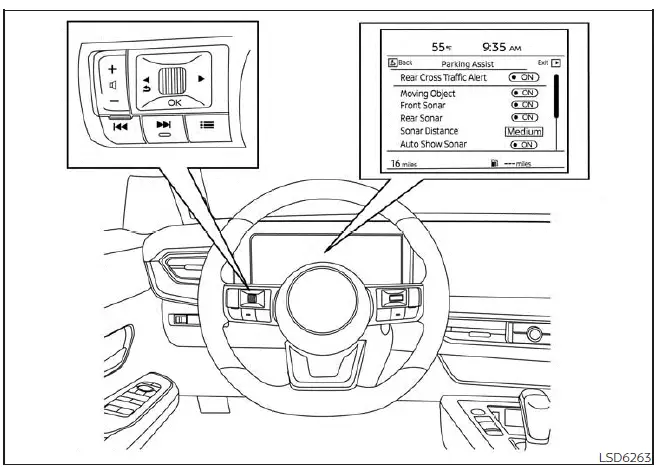
For vehicles with the 12.3 inch (31.2 cm) display
For vehicles equipped with 12.3 inch (31.2 cm) display:
1. Press the
 button until "Settings" appears in the vehicle information display, then press OK. Use the scroll dial to select
"Driver Assistance" and press the OK button.
button until "Settings" appears in the vehicle information display, then press OK. Use the scroll dial to select
"Driver Assistance" and press the OK button.
2. Select "Parking Assist" and press the OK button.
- Select "Auto Show Sonar" and press the OK button to activate or deactivate automatic sonar display when the system detects nearby obstacles.
- Select "Front Sonar" and press the OK button to turn only the front sonar sensors on or off.
- Select "Rear Sonar" and press the OK button to turn only the rear sonar sensors on or off.
- Select "Sonar Distance" to choose between "Long," "Medium," or "Short" detection ranges.
- Select "Sonar Volume" to adjust the audible warning volume to "High," "Medium," or "Low."
NOTE:
The sonar system automatically returns to the ON position whenever the engine is restarted, ensuring that parking assistance remains available during normal operation of the Nissan Kicks.
Sonar limitations
The following limitations apply to the front and rear sonar system. Failure to understand and operate the Nissan Kicks within these limitations may increase the risk of a collision, property damage, serious injury, or death.
- Carefully review and understand the operating limitations of the sonar system. Weather conditions and environmental factors can affect sensor performance, resulting in reduced detection capability or unexpected activations.
- The sonar system automatically deactivates at vehicle speeds above approximately 6 mph (10 km/h) and reactivates when speed decreases below that threshold.
- External ultrasonic sources, including automatic vehicle washes, compressed-air braking systems on trucks, pneumatic tools, and similar equipment, may interfere with sonar operation and generate inaccurate readings or false warnings.
- The sonar system is not designed to prevent contact with small, low-profile, or moving objects. Always operate the Nissan Kicks at low speed when parking or maneuvering in confined areas. Objects positioned below the bumper or resting on the ground may not be detected.
- The system may have difficulty detecting certain objects, including soft materials such as snow, fabric, cotton, insulation, or similar materials; thin objects such as ropes, wires, or chains; wedge-shaped objects; complex-shaped obstacles; or multiple closely positioned objects.
- The sonar system may not reliably detect obstacles when the vehicle is moving faster than approximately 3 mph (5 km/h), and some angular or moving objects may not be recognized.
- The sonar system may not function correctly under the following conditions:
- When rain, snow, mud, ice, or dirt accumulates on the sonar sensors.
- When loud environmental noises are present around the vehicle.
- When the surface of the detected object is positioned diagonally relative to the front or rear of the Nissan Kicks.
- When the sensors or surrounding areas are exposed to extremely high or extremely low temperatures.
- The sonar system may unintentionally activate under the following conditions:
- When tall grass or dense vegetation is located near the vehicle.
- When driving over bumps, raised road surfaces, protrusions, or manhole covers.
- When passing through hanging objects such as flags, banners, curtains, or similar materials.
- When snow or ice has accumulated behind the vehicle.
- When driving on steep inclines or declines where sensor angles may be affected.
System temporarily unavailable
If the Nissan Kicks sonar system detects that one or more sensors are blocked, the feature will automatically deactivate to prevent inaccurate distance measurements and false warnings.
The system will remain unavailable until the condition causing the blockage has been removed and normal sensor operation can be restored.
In many cases, the sonar sensors may be temporarily obstructed by environmental factors such as splashing water, heavy mist, dense fog, or road spray. The condition can also occur when ice, frost, snow, mud, or dirt accumulates on the sensor surfaces and interferes with their ability to detect surrounding objects accurately.
Action to take:
Once the blocking condition has cleared and the sonar sensors are no longer obstructed, the system will automatically resume normal operation without requiring additional driver intervention.
System maintenance
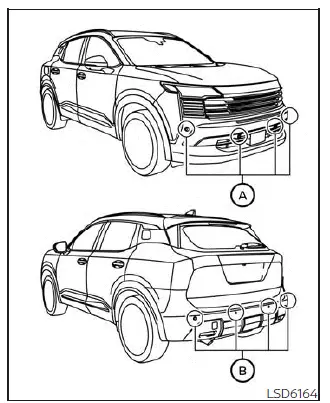
The sonar sensors A and B are installed in the front and rear bumpers of the Nissan Kicks and should be kept in good condition to ensure reliable obstacle detection performance.
- Always keep the areas around the sonar sensors clean and free from dirt, debris, snow, ice, or other contaminants that could interfere with sensor operation.
- If the sonar sensors become dirty, gently clean them using a soft cloth. Take care not to scratch, damage, or apply excessive pressure to the sensor surfaces.
- The sensors may become temporarily blocked by environmental conditions such as water spray, fog, mist, frost, snow, or mud. Sensor obstruction may also occur when dirt or foreign objects accumulate around the sensor area. Regularly inspect the sensors and remove any material that could interfere with proper operation.
- Do not expose the areas around the sonar sensors to strong impacts. In addition, do not attempt to remove, modify, or disassemble the sensors.
- Do not apply stickers, including transparent films, install accessories, or add extra paint to the sonar sensors or the surrounding bumper surfaces. Doing so may interfere with sensor performance and lead to incorrect operation or system malfunction.
- When cleaning the vehicle with a high-pressure washer, avoid directing high-pressure water streams directly at the sonar sensors.
If the sonar sensors or surrounding bumper areas become damaged, bent, or deformed due to an accident or other impact, have the Nissan Kicks inspected by a NISSAN dealer to verify proper sensor operation.
Excessive water pressure may damage the sensors or affect their ability to function correctly, resulting in reduced performance or system malfunction.