
Honda Civic Owners Manual: Playing an iPod
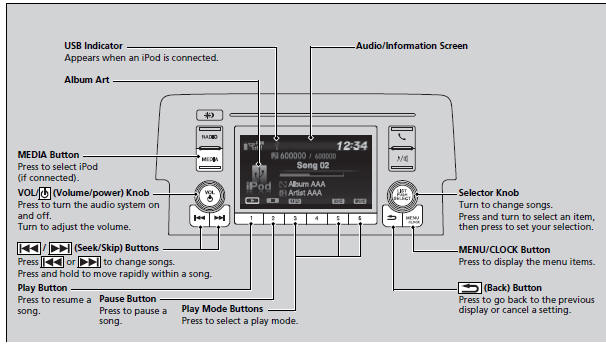
Connect the iPod using your USB connector to the USB port, then press the MEDIA button.
USB Port(s)
 Playing the AM/FM Radio
Radio Data System (RDS)
Provides text data information related to your selected RDS capable FM
station.
To find an RDS station from Station List
1. Press while listening
to an FM stat ...
 How to Select a Song from the iPod Music List with the Selector Knob
1. Press to display the iPod
music list.
2. Rotate to select a category.
3. Press to display a list of
items in the
category.
4. Rotate to select an item, then
press .
Press&n ...
See also:
Honda Civic Service Manual. Front Individual Map Light Removal, Installation, and Test (Without Moonroof)
Removal
1.
Front Individual Map Light (without moonroof)
1.
Turn the front individual map light switch OFF.
2.
Carefully pry off the lenses (A) with ...
© 2016-2026 Copyright www.hocivic.com

0.0112