
Honda Civic Owners Manual: Light Switches
Manual Operation
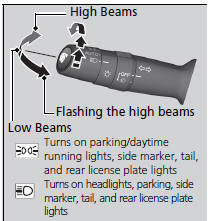
Rotating the light switch turns the lights on and off, regardless of the power mode setting or position of the ignition switch.
High beams
Push the lever forward until you hear a click.
Low beams
When in high beams, pull the lever back to return to low beams.
Flashing the high beams
Pull the lever back, and release it.
*1: Models with the smart entry system have an ENGINE START/STOP button instead of an ignition switch.
Models with smart entry system
If you leave the power mode in VEHICLE OFF (LOCK) while the lights are on, a chime sounds when the driver’s door is opened.
Models without smart entry system
If you remove the key from the ignition switch while the lights are on, a chime sounds when the driver’s door is opened.
When the lights are on, the lights on indicator in the instrument panel will be on
Lights On Indicator
Do not leave the lights on when the engine is off because it will cause the battery to discharge.
If you sense that the level of the headlights is abnormal, have the vehicle inspected by a dealer.
Automatic Operation (automatic lighting control)
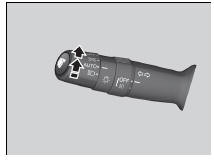
Automatic lighting control can be used when
the ignition switch is in ON  *1.
When you turn the light switch to AUTO, the headlights and other exterior lights will switch on and off automatically depending on the ambient brightness.
Models with driver information interface
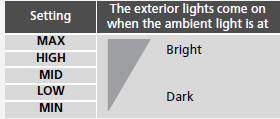
- You can change the auto light sensitivity setting.
Customized Features
*1: Models with the smart entry system have an ENGINE START/STOP button instead of an ignition switch.
* Not available on all models
Automatic Operation (automatic lighting control)*
We recommend that you turn on the lights manually when driving at night, in a dense fog, or in dark areas such as long tunnels or parking facilities.
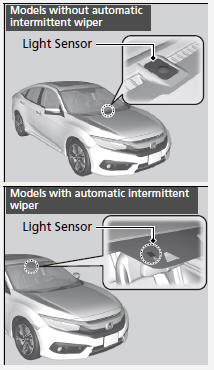
The light sensor is in the location shown below.
Do not cover this light sensor with anything; otherwise, the automatic lighting system may not work properly.
Headlight Integration with Wipers*
The headlights automatically come on when the wipers are used several times within a certain number of intervals with the headlight switch in AUTO.
The headlights automatically go off a few minutes later if the wipers are stopped.
Automatic Lighting Off Feature
The headlights, all other exterior lights, and the instrument panel lights turn off 15 seconds after you remove the key or set the power mode to VEHICLE OFF (LOCK), take the remote with you, and close the driver’s door.
You can change the headlight auto off timer setting.
Customized Features
If you turn the ignition switch to LOCK 0*1 with the headlight switch on, but do not open the door, the lights turn off after 10 minutes (3 minutes, if the switch is in the AUTO position).
The lights turn on again when you unlock or open the driver’s door. If you unlock the door, but do not open it within 15 seconds, the lights go off. If you open the driver’s door, you will hear a lights on reminder chime.
Adjust the auto light sensitivity as follows:
Customized Features
Headlight Integration with Wipers*
This feature activates while the headlights are off in AUTO.
The instrument panel brightness does not change when the headlights come on.
At dark ambient light levels, the automatic lighting control feature turns on the headlights, regardless of the number of wiper sweeps.
 Ignition Switch and Power Mode Comparison. Turn Signals
Ignition Switch and Power Mode Comparison
Ignition Switch
Position
LOCK (0)
(with/without
the key)
ACCESSORY (I)
ON (II)
START (III)
Without Smart Entry
System
...
 Fog Lights. Daytime Running Lights
Fog Lights
When the low beam headlights are on, turn
the fog light switch on to use the fog lights.
Fog Lights*
When the fog lights are on, the indicator in the
instrument panel will be on.
T ...
See also:
Honda Civic Owners Manual. Parking Your Vehicle
When Stopped
Depress the brake pedal firmly.
With the brake pedal depressed, pull up the electric parking brake
switch slowly,
but fully.
Continuously variable transmission models
Move the shift lever from D to P.
Manual transmission models
Move the shift lever to R or ...
