



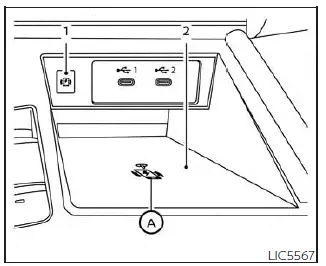
- Indicator
- Charging pad
The wireless charger in the Nissan Kicks is located at the front of the center console. To use it, place a compatible smartphone flat on the charging pad. When the phone is positioned correctly and the required conditions are met, charging starts automatically. The smartphone will continue charging while the ignition switch is in the ON position.
NOTE:
The Nissan Kicks wireless charging pad requires the vehicle doors to be closed before charging can begin. If any door is opened, the wireless charging function will not operate.
WARNING
- Never place metallic objects between the wireless charger and the smartphone. Metal items may heat up and could cause burns, damage, or system malfunction.
- People who use a pacemaker or other medical device should consult the medical equipment manufacturer before using the Nissan Kicks wireless charger to confirm whether wireless charging may affect the device.
- Never cover the smartphone with cloth, paper, or other material while it is charging. Heat may build up during the charging process.
- Never charge a smartphone while it is wet. Moisture can damage the phone or the charging system.
- Do not place metallic materials or small items such as an Intelligent Key, USB memory device, coins, or similar objects on the charging pad.
CAUTION
- Do not place an RFID card, NFC card, credit card, or similar item between the wireless charger and the smartphone. The magnetic field may damage or corrupt stored card data.
- Do not use the wireless charger when dust, dirt, sand, or debris has accumulated on the charging pad.
- Do not strike, press heavily, or damage the surface of the wireless charging pad.
- Do not spill water, drinks, or other liquids onto the charging pad.
- Do not clean the charging pad with grease, oil, alcohol, thinner, or harsh chemicals.
Wireless charger indicator
The indicator (1) illuminates orange when the charging process has started.
When charging is complete, the indicator illuminates green.
If a malfunction occurs or charging stops unexpectedly, the indicator blinks orange for approximately 8 seconds and then turns off.
Wireless charger operation
To use the Nissan Kicks wireless charger correctly, place the smartphone fully within the charging pad area. For the best charging performance, position the smartphone in the center of the pad over the “Qi” logo A. Because the location of the wireless power receiver differs depending on the smartphone model, you may need to adjust the phone slightly to find the most effective charging position.
Some smartphone cases, metal plates, magnetic holders, thick covers, pop-up grips, or other accessories may interfere with wireless charging. Remove these items before placing the smartphone on the charging pad.
Turn off the smartphone vibration function before wireless charging. If the phone vibrates and moves out of position, charging may slow down or stop.
NOTE:
- Only Qi-compatible smartphones can be used with the Nissan Kicks wireless charging system.
- The smartphone may become warm during charging, and charging may stop temporarily because of the
wireless charger protection function. This is not a malfunction.
If this occurs, allow the smartphone to cool down, then place it back on the charging pad and restart charging.
For stable charging in the Nissan Kicks, keep the charging pad clean, place the phone flat, and avoid leaving cards, keys, coins, or other small objects near the wireless charging area.
The indicator may flash orange briefly and then turn off. This is a normal response in certain wireless charging conditions and does not always indicate a malfunction in the Nissan Kicks wireless charger.
If the smartphone is placed on the Nissan Kicks wireless charger while a USB cable is still connected, the indicator may illuminate orange or flash. However, wireless charging is not actually being performed in this condition.
This device complies with Part 15 of the FCC Rules and RSS-Gen of IC Rules.
Operation is subject to the following two conditions:
(1) This device may not cause harmful interference, and
(2) This device must accept any interference received, including interference that may cause undesired operation.
Changes or modifications that are not expressly approved by the party responsible for compliance may void the user’s authority to operate this equipment.
RF Radiation Exposure Statement: This equipment complies with FCC RF radiation exposure limits established for an uncontrolled environment.
This device and its antenna must not be co-located or operated together with any other antenna or transmitter.
This equipment should be installed and operated with a minimum distance of 15 cm between the radiator and your body.
ISED Compliance Statement
This device complies with RSS-Gen of IC Rules.
Operation is subject to the following two conditions:
(1) This device may not cause harmful interference, and
(2) This device must accept any interference received, including interference that may cause undesired operation.
Changes or modifications made to this device, unless expressly approved by LG Vehicle Components Company, may void the user’s authority to operate the equipment.
ISED RF Radiation Exposure Statement: This equipment complies with ISED RF radiation exposure limits established for an uncontrolled environment. This device and its antenna must not be co-located or operated together with any other antenna or transmitter. For safe use in the Nissan Kicks, this equipment should be installed and operated with a minimum distance of 15 cm between the radiator and the end user’s body and arms.