


Apple Siri Eyes Free personal assistant can be used from the Nissan Kicks to help reduce distraction while
driving. In Siri Eyes Free mode, interaction is handled mainly by voice control, allowing the driver to request
certain functions without manually operating the phone. After a compatible Apple device is connected through
Bluetooth, Siri Eyes Free can be activated using the
 button on the steering
wheel.
button on the steering
wheel.
Siri is a trademark of Apple Inc., registered in the U.S. and other countries.
- Some Siri Eyes Free functions, including displaying pictures or opening certain apps, may not be available while the Nissan Kicks is being driven.
- For reliable operation, keep the connected device updated to the latest available software version.
- Keep the cabin as quiet as possible. Closing the windows can reduce traffic noise, wind noise, vibration sounds, and other background sounds that may interfere with voice command recognition.
- For details about supported Siri Eyes Free functions, refer to the Apple website.
Requirements
Siri is available only on iPhone 4S or later. Devices released before iPhone 4S are not supported by the Siri Eyes Free system. Visit www.apple.com/ios/siri for details about device compatibility.
Siri must be enabled on the phone. Check the phone settings before attempting to use Siri Eyes Free in the Nissan Kicks.
If the device uses a lock screen, Siri must be allowed to operate from the lock screen. Confirm this option in the phone settings.
For smoother response and better compatibility, keep your device updated to the latest software version.
Operating Siri Eyes Free
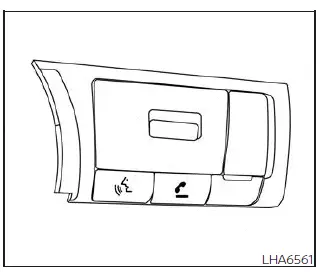
1. Press
 button for more than
1.5 seconds.
button for more than
1.5 seconds.
2. Speak your command clearly, then listen to the Siri Eyes Free response through the vehicle audio system.
After Siri Eyes Free starts, press the
 button again within 5 seconds after the Siri Eyes Free announcement ends to extend the session.
Example 1 - Playing music
1. Press
 button for more than
1.5 seconds.
button for more than
1.5 seconds.
2. Say "Play (artist name, song name, etc.)".
3. The Nissan Kicks will automatically switch to Bluetooth Audio or iPod mode when music begins playing. The selected mode depends on the phone connection.
* If the iPhone is also connected with the USB cable.
If the audio track does not start automatically after Siri Eyes Free ends, change the track or select the audio source manually to resume playback.
NOTE:
For more consistent music control, use the native music app on the iPhone. Performance may vary when controlling Podcasts, Audiobooks, or third-party music apps, because those functions are managed by the iPhone.
Example 2 - Replying to text messages
1. If a compatible iPhone is connected and "Show Notifications" is enabled in the iPhone settings, the Nissan Kicks can display a notification when a new text message arrives.
2. After reading the message, press or press and hold the
 button to reply
using Siri Eyes Free.
button to reply
using Siri Eyes Free.
3. After the beep, say "Text message" or a similar command to create a reply through Siri Eyes Free.
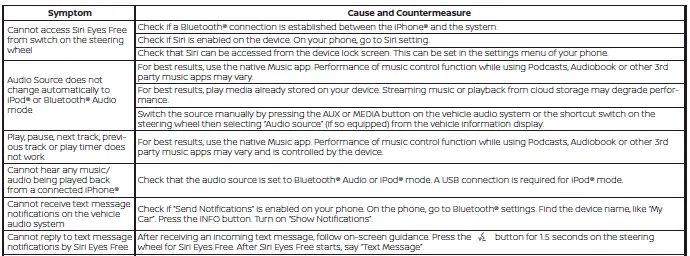
Troubleshooting guide