



WARNING
Failure to carefully follow all warnings, precautions, and operating instructions related to the ProPILOT Assist system may result in a loss of vehicle control, increasing the risk of a collision that could cause serious injury or death.
- ProPILOT Assist is not a self-driving technology. The system is designed solely to support the driver during certain highway driving situations and should never be considered a substitute for active driver involvement. The driver of the Nissan Kicks must remain fully engaged and prepared to take immediate control of the vehicle at all times.
- The ProPILOT Assist system is not intended to replace safe and attentive driving practices. It is not designed to compensate for distracted, careless, fatigued, or inattentive driving behavior. The system may not always provide steering assistance sufficient to keep the Nissan Kicks centered within its lane, and it is not intended to prevent loss of vehicle control. The driver remains responsible for monitoring traffic, maintaining lane position, and safely operating the vehicle.
- ProPILOT Assist has operational limitations. The system may not function as intended under all traffic, road, weather, or environmental conditions. Regardless of system status, the driver must stay alert, maintain awareness of surrounding traffic, keep the vehicle within the travel lane, and remain ready to intervene whenever necessary.
- The ProPILOT Assist system is a driver-assistance feature only. It is not a collision warning system, crash avoidance device, or emergency driving system.
- ProPILOT Assist is designed primarily for highway driving environments. It is not intended for city streets, urban intersections, complex traffic patterns, or other low-speed driving situations. Failure to steer or apply the brakes when required may result in a serious accident.
- Always obey posted speed limits and traffic regulations. Never set the cruise speed above the legal speed limit or beyond what road and traffic conditions safely allow.
- Always keep both hands on the steering wheel while driving. Even when ProPILOT Assist is active, the Nissan Kicks requires continuous driver supervision and steering input when necessary.
- Never unfasten your seat belt while using ProPILOT Assist. Releasing the seat belt automatically causes the system to cancel operation.
- The ProPILOT Assist system is not designed to respond to stationary objects or certain slow-moving vehicles. Drivers must remain attentive and be prepared to brake or steer whenever conditions require.
- Always operate the Nissan Kicks carefully and attentively when using ProPILOT Assist. Read and fully understand the Owner's Manual before using the system. Do not rely on ProPILOT Assist to prevent accidents or to control vehicle speed during emergency situations. The system should only be used under appropriate roadway, traffic, and weather conditions.
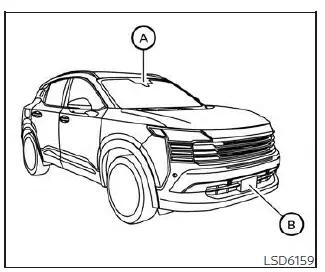
The ProPILOT Assist system is designed to enhance the driving experience in the Nissan Kicks by helping the driver maintain a selected following distance from a vehicle traveling ahead in the same lane and direction. The system combines adaptive speed control and steering assistance to reduce driver workload during suitable highway driving conditions.
To perform these functions, ProPILOT Assist uses a multi-sensing front camera A mounted behind the windshield along with a radar sensor B located at the front of the vehicle. Together, these components continuously monitor the roadway, detect lane markings, and measure the distance to vehicles traveling ahead within the same lane.
When the system detects a slower-moving vehicle in front of the Nissan Kicks, it can automatically reduce vehicle speed in order to maintain the driver-selected following distance. This allows for smoother speed adjustments while helping the driver manage changing traffic flow on highways and similar roads.
In addition to controlling following distance, ProPILOT Assist can provide steering assistance to help keep the Nissan Kicks centered within its lane when clearly visible lane markings are detected. The system continuously monitors lane boundaries and can apply steering support to assist the driver in maintaining proper lane positioning.
Although ProPILOT Assist can assist with both speed control and lane-centering functions, the driver remains responsible for monitoring the road, steering when necessary, and safely operating the vehicle at all times. The system is designed to supplement driver awareness rather than replace it.
- ProPILOT Assist system operation
- Operating ProPILOT Assist
- How to enable/disable the Steering Assist
- Intelligent Cruise Control (ICC) (for vehicles with ProPILOT Assist)
- Steering Assist
- Conventional (fixed speed) cruise control mode
ProPILOT Assist system operation Nissan Kicks P16
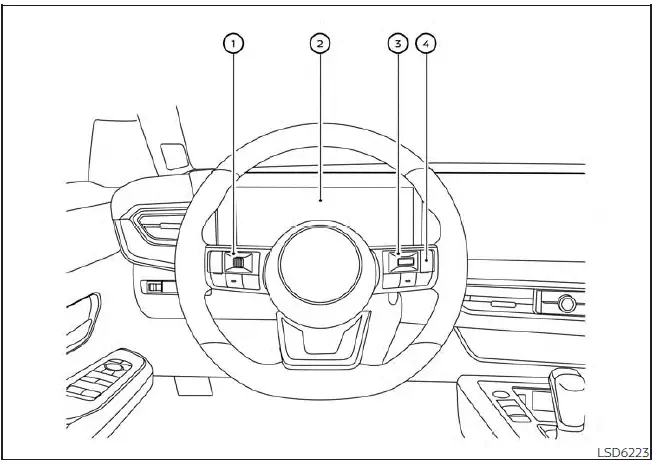
- Steering-wheel-mounted control (left)
- Vehicle information display
- Steering-wheel-mounted control (right)
- ProPILOT Assist switch
The Nissan Kicks ProPILOT Assist system combines advanced cruise control and lane guidance technologies to support the driver during highway travel. The system is designed to reduce driving workload by helping maintain a selected speed, monitor traffic ahead, and assist with lane positioning when appropriate driving conditions are present.
The ProPILOT Assist system incorporates the following two primary functions:
1. Intelligent Cruise Control (ICC)
The ICC system can be operated in one of two available cruise control modes, allowing the driver to select the level of assistance best suited to current driving conditions.
- Conventional (fixed speed) cruise control mode: This mode maintains a preset vehicle speed selected by the driver and does not automatically adjust speed in response to surrounding traffic.
NOTE:
Steering Assist is not available while the Nissan Kicks is operating in conventional (fixed speed) cruise control mode.
-
Vehicle-to-vehicle distance control mode: In this mode, the ICC system automatically helps
maintain a selected following distance from the vehicle traveling ahead while operating within a speed range
of 0 to 90 mph (0 to 144 km/h), up to the speed selected by the driver.
The desired cruising speed can be selected between 20 and 90 mph (32 and 144 km/h). When traffic ahead slows, the Nissan Kicks automatically reduces speed to help maintain the chosen following distance. If the vehicle ahead comes to a complete stop, the system can gradually decelerate the vehicle until it reaches a standstill. Once stopped, the ICC system continues to apply braking force to help keep the vehicle stationary.
NOTE:
If your vehicle remains stopped for less than approximately 3 seconds and the vehicle ahead begins moving, the Nissan Kicks will automatically resume following the vehicle ahead without additional driver input.
- If the vehicle remains stopped for more than 3 seconds and the vehicle ahead starts moving again, press the RES+ switch or lightly depress the accelerator pedal. The ICC system will then resume following the vehicle ahead.
- When no vehicle is detected within the selected following distance, the Nissan Kicks will travel at the speed chosen by the driver. To use this feature, vehicle speed must be above 20 mph (32 km/h).
NOTE:
Even if the Automatic Emergency Braking (AEB) with Pedestrian Detection feature has been turned off through the Settings menu in the vehicle information display, the system will automatically reactivate when Intelligent Cruise Control is being used.
2. Steering Assist
The Steering Assist function works in conjunction with ProPILOT Assist to provide steering support that helps keep the Nissan Kicks positioned within clearly marked travel lanes. By monitoring lane markings and vehicle position, the system can provide steering assistance to help reduce driver workload during highway driving.
When no vehicle is detected ahead, Steering Assist is not available at vehicle speeds below 37 mph (60 km/h). The driver must remain attentive and maintain control of the steering wheel regardless of system operation.
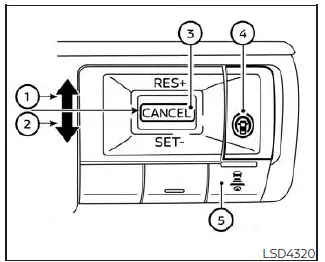
ProPILOT Assist switches
-
RES+ switch:
Resumes a previously stored cruising speed or increases the selected speed in small increments while the system is active. -
SET- switch:
Sets the desired cruising speed or reduces the currently selected speed incrementally. -
CANCEL switch:
Temporarily deactivates the ProPILOT Assist system without deleting the stored cruising speed setting. -
ProPILOT Assist switch:
Turns the ProPILOT Assist system on or off and allows access to its operating functions.
-
DISTANCE switch:
- Long
- Middle
- Short
-
Steering Assist switch:
Activates or deactivates the Steering Assist function independently while ProPILOT Assist is being used.
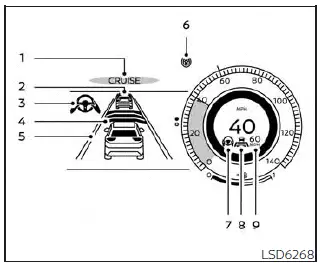
The ProPILOT Assist system display and indicators
-
ProPILOT Assist activation
This indicator appears when the ProPILOT Assist system in the Nissan Kicks has been switched on and is available for operation. Its presence confirms that the system is ready to provide driver-assistance functions when the necessary operating conditions are met. -
Vehicle ahead detection indicator
When Intelligent Cruise Control (ICC) is turned on and actively monitoring traffic, this indicator shows whether the system has detected a vehicle traveling ahead in the same lane. It provides visual confirmation that the Nissan Kicks is tracking a lead vehicle for distance-control operation. -
Steering Assist indicator
This indicator displays the current status of the Steering Assist function through different colors.- Steering Assist indicator (gray): Steering Assist is available and in standby mode, waiting for the necessary operating conditions.
- Steering Assist indicator (green): Steering Assist is actively providing steering support to help keep the Nissan Kicks centered within detected lane boundaries.
-
Set distance indicator
Displays the currently selected following distance used by the Intelligent Cruise Control system when tracking a vehicle ahead. -
Lane marker indicator
Shows whether lane markings are being detected by the ProPILOT Assist system and provides information about Steering Assist availability.- No lane markers displayed: Steering Assist is switched off.
- Lane marker indicator (gray): No lane markings are currently detected by the system.
- Lane marker indicator (green): Lane markings have been detected and Steering Assist is actively supporting lane positioning.
- Lane marker indicator (orange): The system has detected a lane departure condition.
-
ProPILOT Assist status indicator
This indicator communicates the overall operating status of the Nissan Kicks ProPILOT Assist system.- ProPILOT Assist status indicator (white): The system is switched on but remains in standby mode.
- ProPILOT Assist status indicator (blue): ProPILOT Assist is fully active and providing assistance functions.
-
Steering Assist status indicator/warning
Displays the condition of the Steering Assist function using different colors and warning states.- No Steering Assist status indicator displayed: Steering Assist has been turned off.
- Steering Assist indicator (gray): Steering Assist is available but currently on standby.
- Steering Assist indicator (green): Steering Assist is actively assisting with lane centering.
- Steering Assist indicator (orange): A Steering Assist malfunction has been detected.
- Steering Assist status indicator (red): The system has detected that the driver's hands are not on the steering wheel and driver intervention is required.
-
Speed control status indicator/set distance indicator/lane marker indicator
(
 )
)
This display area provides information about the current status of Intelligent Cruise Control, selected following distance, and lead-vehicle detection. The indicator color changes according to the operating condition of the system, while the horizontal bars represent the selected following distance setting.- Speed control status indicator (white): ICC is turned on and waiting in standby mode.
-
Speed control status indicator (green):
ICC vehicle-to-vehicle distance control mode is actively controlling speed and following distance.
- Green vehicle icon displayed: A vehicle traveling ahead has been detected and is being monitored by the system.
- No vehicle icon displayed: No lead vehicle has been detected. In this situation, the Nissan Kicks maintains the speed selected by the driver.
- Speed control status indicator (orange): Indicates that a malfunction has been detected within the Intelligent Cruise Control system.
-
Set vehicle speed indicator
Displays the cruising speed currently selected by the driver and maintained by the Intelligent Cruise Control system whenever operating conditions allow.
Turning the conventional (fixed speed) cruise control mode on
NOTE:
When operating in conventional (fixed speed) cruise control mode, ProPILOT Assist does not provide approach warnings, automatic braking functions, vehicle-to-vehicle distance control, or Steering Assist support. In this mode, the Nissan Kicks simply maintains the speed selected by the driver.
To select conventional (fixed speed) cruise control mode, press and hold the ProPILOT Assist switch for longer than approximately 1.5 seconds. Once activated, the system switches from ProPILOT Assist distance-control operation to traditional cruise control functionality, allowing the Nissan Kicks to maintain a preset cruising speed without adaptive speed adjustments based on surrounding traffic.
Operating ProPILOT Assist Nissan Kicks 2026
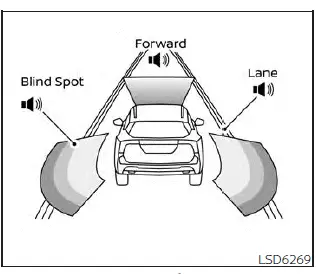
Example
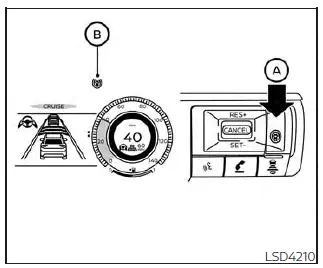
When the driving aids are enabled:
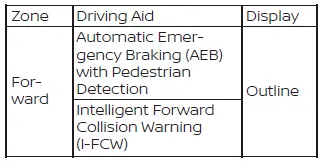
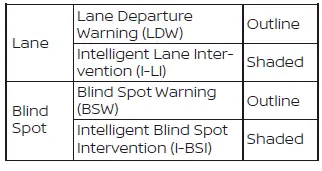
-
Push the ProPILOT Assist switch A. This activates the ProPILOT Assist system and prepares it for operation.
- The ProPILOT Assist status indicator B illuminates in white, confirming that the system is powered on and standing by.
- A status screen appears temporarily in the vehicle information display, providing an overview of the currently enabled driving-assistance features available on the Nissan Kicks.
-
When any of the Warning systems are enabled, the
 symbol is displayed within the corresponding area of the screen.
-
When any of the Intervention systems are enabled, the
 symbol appears in the applicable zone.
- If no system is currently active, the display will show "OFF" in the corresponding section.
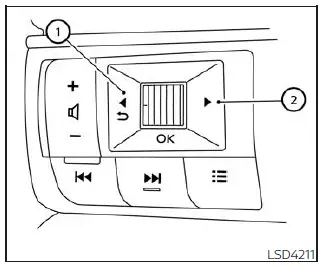
To modify the status of the available driving aids, use the 1
 or 2
or 2
 buttons to navigate through the settings menu displayed in the vehicle information screen.
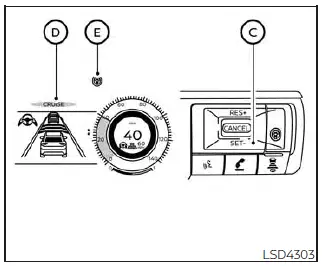
3. Accelerate or decelerate the Nissan Kicks to the desired cruising speed, then press the SET- switch C.
4. Once the speed has been stored, the ProPILOT Assist system automatically begins maintaining the selected speed and, when applicable, manages the distance to the vehicle traveling ahead.
The ProPILOT Assist activation indicator D and the ProPILOT Assist status indicator E illuminate in blue, confirming active operation. If the vehicle ahead is traveling at 20 mph (32 km/h) or less when the SET- switch is pressed, the Nissan Kicks automatically sets the cruising speed to 20 mph (32 km/h).
NOTE:
When the Intelligent Lane Intervention (I-LI) and Intelligent Blind Spot Intervention (I-BSI) systems are enabled through the vehicle information display settings, activating ProPILOT Assist automatically enables those systems as well. If I-LI has been disabled through the settings menu, it will automatically reactivate whenever the Steering Assist function becomes active.
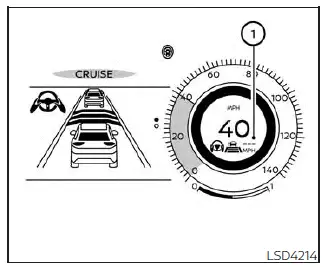
When the SET- switch is pressed under any of the following conditions, ProPILOT Assist cannot be activated and the set vehicle speed indicator 1 flashes for approximately two seconds:
- When driving below 20 mph (32 km/h) and no vehicle ahead has been detected.
- When the shift lever is not in the D (Drive) position or manual shift mode.
- When the parking brake is engaged.
- When the brake pedal is being applied by the driver.
- When the Vehicle Dynamic Control (VDC) system has been turned off.
- When the VDC system, including traction control functions, is actively operating.
- When wheel slip is detected.
- When any vehicle door remains open.
- When the driver's seat belt is not fastened.
- When SNOW mode is selected on AWD-equipped Nissan Kicks models.
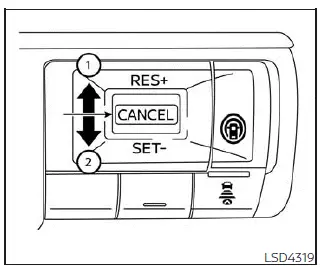
How to change the set vehicle speed
The selected cruising speed can be adjusted at any time while ProPILOT Assist is active.
To increase the cruising speed:
- Press and hold the RES+ switch 1. The set vehicle speed increases by approximately 5 mph (5 km/h) while the switch remains pressed.
- Press and quickly release the RES+ switch 1. Each brief press increases the stored cruising speed by approximately 1 mph (1 km/h), allowing for precise speed adjustments.
To decrease the cruising speed:
-
Push and hold the SET- switch 2.
The selected cruising speed decreases by approximately 5 mph (5 km/h) while the switch remains depressed.
- Press and quickly release the SET- switch 2. Each brief press reduces the set speed by approximately 1 mph (1 km/h).
How to momentarily accelerate or decelerate
- Press the accelerator pedal whenever additional acceleration is required. After releasing the pedal, the Nissan Kicks automatically returns to the previously selected cruising speed.
- Press the brake pedal whenever deceleration is required. Doing so cancels ProPILOT Assist speed control. To return to the previously stored speed, press the RES+ switch after conditions permit.
WARNING
If the accelerator pedal is pressed while approaching a vehicle ahead, the ICC system will not apply the brakes or provide warning chimes and display alerts regarding the closing distance. The driver is fully responsible for controlling vehicle speed and maintaining a safe following distance. Failure to do so could result in a collision causing serious injury or death.
NOTE:
If the Nissan Kicks exceeds the stored cruising speed because the accelerator pedal is pressed or because the vehicle is traveling faster than the selected speed setting, the set vehicle speed indicator will flash to notify the driver of the speed difference.
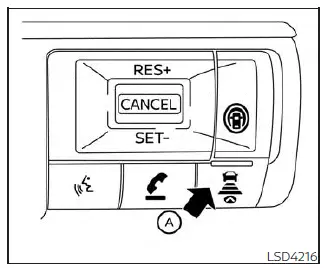
How to change the set distance to the vehicle ahead
The following distance to the vehicle ahead can be adjusted whether the Intelligent Cruise Control system is in standby mode or actively controlling speed.
Each time the DISTANCE switch A is pressed, the selected following distance changes in sequence from Long, to Middle, to Short, and then returns to Long again.
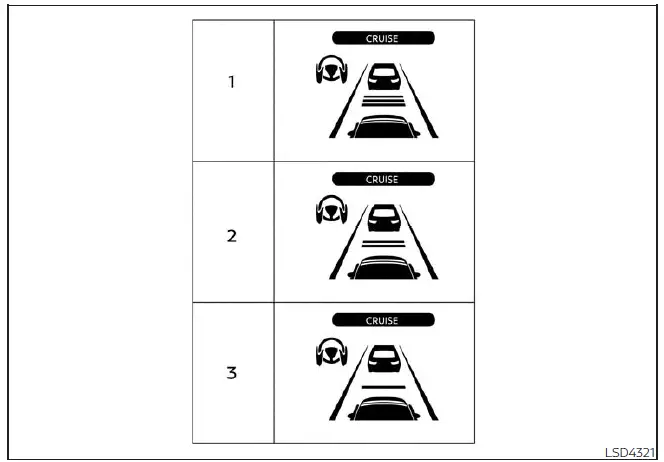
Distance / Approximate distance at 60 mph (100 km/h) [ft (m)]
- Long — 200 ft (60 m)
- Middle — 150 ft (45 m)
- Short — 90 ft (30 m)
- The distance maintained from the vehicle ahead automatically changes according to vehicle speed. As speed increases, the Nissan Kicks automatically maintains a greater following distance to help provide additional reaction time.
- The selected distance setting remains stored even after the engine has been turned off and restarted.
How to enable/disable the Steering Assist Nissan Kicks 2026
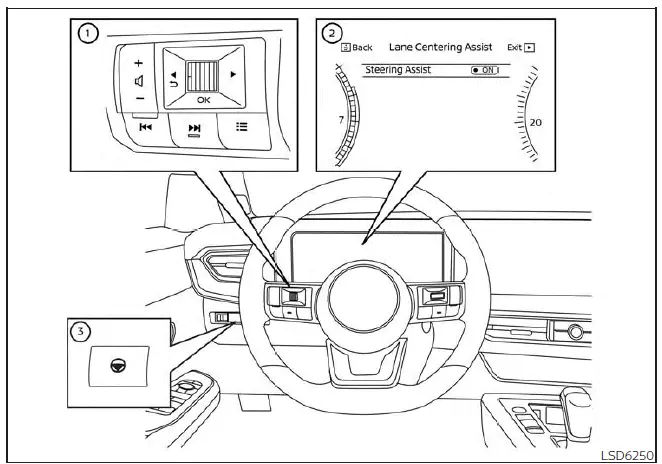
- Steering-wheel-mounted control (left)
- Vehicle information display
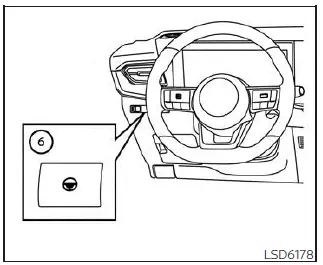
- Steering Assist switch
The Steering Assist feature in the Nissan Kicks can be enabled or disabled using either the dedicated Steering Assist switch or the settings available in the vehicle information display. These options allow the driver to customize the operation of the system according to personal preference and driving conditions.
Steering Assist switch:
To turn the Steering Assist function on or off, press the Steering Assist switch 3 located on the instrument panel. This provides a quick and convenient method for controlling the feature without navigating through menu screens.
NOTE:
- When the Steering Assist switch is used to enable or disable the system, the Nissan Kicks stores the selected setting in memory. The setting remains unchanged even if the ignition switch is turned off and on again. To change the status, the switch must be pressed again.
- The Steering Assist switch directly changes the status of the "Steering Assist" option found in the Settings menu of the vehicle information display.
Setting in the vehicle information display:
1. Press the
 button on steering wheel 1 repeatedly until the "Settings" menu appears in vehicle information display 2.
2. Use scroll dial 1 to highlight "Driver Assistance," then press the OK button 1 to enter the menu.
3. Use scroll dial 1 to select "Lane Centering Assist," and then press the OK button 1 to continue.
4. Use scroll dial 1 to select "Steering Assist," then press the OK button 1 to switch the feature on or off according to your preference.
These menu options allow Nissan Kicks drivers to configure Steering Assist directly through the vehicle information display while maintaining easy access to other driver-assistance settings.
NOTE:
- When the Cruise screen is displayed in the vehicle information display, pressing the OK button on the steering wheel provides direct access to the "Driving Aids" settings screen for quicker adjustment of assistance features.
- Whether Steering Assist is enabled or disabled using the vehicle information display or the dedicated Steering Assist switch, the Nissan Kicks retains the selected setting even after the engine has been restarted.
How to cancel the ProPILOT Assist system
The ProPILOT Assist system can be canceled at any time using one of the following methods:
- Press the CANCEL switch. This immediately suspends ProPILOT Assist operation while allowing the driver to maintain full vehicle control.
- Lightly tap the brake pedal (except when the vehicle is already at a standstill). Applying the brake pedal cancels active system control and returns full speed management to the driver.
- Press the ProPILOT Assist switch to turn the system off completely. When the system is deactivated, the ProPILOT Assist status indicator will turn off.
If ProPILOT Assist is canceled while the Nissan Kicks is stopped, the electronic parking brake is automatically applied to help keep the vehicle stationary.
This automatic function assists in preventing unintended vehicle movement when the system is disengaged at a standstill.
WARNING
To help prevent unexpected vehicle movement or rolling, which could result in serious personal injury, property damage, or a collision, always ensure that the ProPILOT Assist system is switched off before leaving the Nissan Kicks. In addition, press the park button to place the transmission in the P (Park) position and turn the engine off before exiting the vehicle.
Intelligent Cruise Control (ICC) (for vehicles with ProPILOT Assist) Nissan Kicks 2025
WARNING
Failure to follow all warnings, precautions, and operating instructions regarding the Intelligent Cruise Control (ICC) system may result in a collision that could cause serious injury or death.
- The ICC system is designed solely as a driver-assistance feature and should not be considered a collision warning or collision avoidance system. It is primarily intended for highway driving and is not designed for city traffic, intersections, or complex urban driving environments. The driver of the Nissan Kicks must remain attentive, operate the vehicle safely, and maintain full control of steering, braking, and acceleration at all times.
- The capabilities of the ICC system are subject to operational limitations. The system may not function properly under all traffic conditions, weather conditions, road surfaces, or driving environments. Drivers must continuously monitor surrounding traffic, remain alert, keep the Nissan Kicks within the appropriate travel lane, and be prepared to intervene whenever necessary.
- Always obey posted speed limits and traffic regulations. Never set a cruising speed that exceeds legal speed limits or what current driving conditions safely permit.
- The ICC system is not designed to respond to stationary objects or certain slow-moving vehicles. Drivers must remain attentive and ready to apply the brakes whenever conditions require.
-
Always operate the Nissan Kicks carefully and attentively when using Intelligent Cruise Control.
Read and fully understand the Owner's Manual before using the ICC system. To reduce the risk of serious injury or death, never depend on the system to avoid accidents or manage vehicle speed during emergency situations.
Use the ICC system only when road, traffic, and weather conditions are appropriate for its operation.
ICC system operation
The Intelligent Cruise Control system is designed to help maintain a driver-selected distance from a vehicle traveling ahead while automatically adjusting vehicle speed when necessary. When traffic conditions require it, the Nissan Kicks can reduce speed to follow a slower-moving vehicle and maintain the selected following distance.
If the vehicle ahead slows down, the ICC system automatically decelerates the Nissan Kicks as needed. Should the lead vehicle come to a complete stop, the system can gradually slow the vehicle until it reaches a standstill. However, the ICC system is capable of applying only a portion of the vehicle's total braking force and should not be relied upon in situations requiring rapid or emergency braking.
This feature is most effective when traffic flow remains relatively steady or when speed changes occur gradually. If another vehicle suddenly merges into the lane ahead or if a lead vehicle brakes sharply, the distance between vehicles may decrease because the ICC system may not be able to reduce speed quickly enough to maintain the selected gap.
When such situations occur, the Nissan Kicks alerts the driver through an audible warning chime and a flashing system display, indicating that immediate driver action may be required.
The ICC system automatically cancels operation and sounds a warning chime if vehicle speed falls below approximately 15 mph (24 km/h) and no vehicle ahead is detected.
The Intelligent Cruise Control system operates according to the following conditions:
- When no vehicle is detected ahead, the ICC system maintains the speed selected by the driver. The available set-speed range is approximately 20 to 90 mph (32 to 144 km/h), allowing the Nissan Kicks to cruise at a constant speed when traffic conditions permit.
- When a vehicle is detected ahead, the ICC system automatically adjusts speed to maintain the following distance selected by the driver. If the lead vehicle slows or stops, the Nissan Kicks correspondingly reduces speed and can come to a complete stop. Once stopped, the system continues to hold the vehicle in position.
- When the Nissan Kicks remains stopped for less than three seconds and the vehicle ahead begins moving, the ICC system automatically resumes following the lead vehicle without requiring additional driver input.
- When the vehicle remains stationary for more than three seconds and the vehicle ahead starts moving again, press the RES+ switch or lightly depress the accelerator pedal. The ICC system will then resume following the vehicle ahead. If the Nissan Kicks remains stopped for more than approximately three minutes, the ICC system automatically turns off and the electronic parking brake is applied.
- When the vehicle ahead changes to another lane and leaves the radar detection area, the ICC system gradually accelerates the Nissan Kicks back to the previously selected cruising speed and maintains that speed until another vehicle is detected.
- If the vehicle ahead moves into a different lane while the Nissan Kicks is traveling below 20 mph (30 km/h), the ICC system automatically cancels operation and an audible warning chime sounds to notify the driver.
The Intelligent Cruise Control (ICC) system does not regulate vehicle speed or provide warnings when approaching stationary objects or certain slow-moving vehicles. Drivers of the Nissan Kicks must remain attentive and actively monitor traffic conditions, particularly when approaching toll booths, traffic queues, construction zones, or areas of congestion where stopped or slow-moving vehicles may be present.
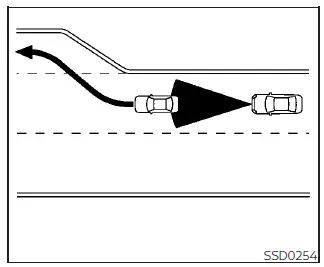
When traveling on a highway with a cruising speed already set, and a slower-moving vehicle is detected ahead, the ICC system automatically adjusts the speed of the Nissan Kicks to maintain the following distance selected by the driver. If the vehicle ahead changes lanes or exits the roadway, the system gradually accelerates back toward the stored cruising speed and continues maintaining that speed until another vehicle is detected.
Because the vehicle may accelerate automatically after the lane ahead becomes clear, drivers should remain aware of surrounding traffic and road conditions and be prepared to intervene whenever necessary.
On winding roads, steep grades, or rolling terrain, the Nissan Kicks may not always be able to maintain the exact selected cruising speed. In these situations, manual speed control by the driver may be required to ensure safe vehicle operation.
Under normal operating conditions, the ICC system continuously adjusts vehicle speed by accelerating or decelerating according to the movement of the vehicle ahead, helping maintain the selected following distance.
If additional acceleration is needed, such as when changing lanes or overtaking another vehicle, depress the accelerator pedal as necessary. Likewise, if sudden braking occurs ahead or another vehicle merges into your lane unexpectedly, apply the brake pedal when required to maintain a safe following distance. The ICC system is intended to assist the driver, but continuous driver attention remains essential.
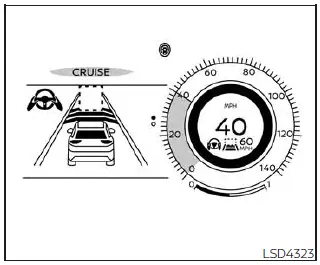
No vehicle detected ahead
When no vehicle is detected in the travel lane ahead, the driver selects the desired cruising speed according to road, traffic, and weather conditions. In this situation, the Nissan Kicks ICC system functions similarly to conventional cruise control by maintaining the selected speed.
The currently selected cruising speed remains visible in the vehicle information display, allowing the driver to confirm the active speed setting at a glance.
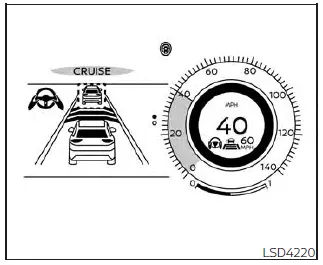
Vehicle detected ahead
When a vehicle traveling ahead is detected within the same lane, the ICC system automatically adjusts the speed of the Nissan Kicks by managing throttle input and applying braking force as necessary. This allows the vehicle to match the pace of slower-moving traffic while maintaining the driver-selected following distance.
As traffic conditions change, the system continuously monitors the speed and position of the lead vehicle and adjusts vehicle speed accordingly to help provide smoother highway driving.
NOTE:
- The vehicle's brake lights illuminate whenever braking force is applied by the ICC system.
- A mechanical or operational sound may occasionally be heard when the ICC system applies the brakes. This is a normal characteristic of system operation and does not indicate a malfunction.
When the ICC system detects a vehicle ahead, the vehicle-ahead detection indicator appears and the speed control
status indicator
 illuminates in green, confirming that vehicle-to-vehicle distance control is actively operating.
Vehicle ahead stops
When the vehicle ahead gradually slows to a stop, the Nissan Kicks also reduces speed and can come to a complete standstill while maintaining the selected following distance.
After the vehicle has stopped, the ICC system automatically applies braking force to keep the Nissan Kicks stationary. While stopped, the "(RES+) Press to start" message appears in the vehicle information display to inform the driver of the available restart procedure.
NOTE:
If the Nissan Kicks remains stopped for less than approximately three seconds, the system can automatically follow the vehicle ahead when it begins moving again.
Vehicle ahead accelerates
- When the Nissan Kicks has been stopped for less than approximately three seconds and the vehicle ahead begins moving, the ICC system automatically resumes forward motion and continues following the lead vehicle.
- When the vehicle has remained stationary for more than approximately three seconds and the vehicle ahead accelerates, press the RES+ switch upward or lightly depress the accelerator pedal. The ICC system will then resume tracking and following the vehicle ahead.
- Always check the surrounding area, traffic conditions, pedestrians, and roadway environment before allowing the vehicle to move forward again.
Vehicle ahead not detected
When the vehicle previously being monitored is no longer detected in the lane ahead, the Intelligent Cruise Control (ICC) system gradually accelerates the Nissan Kicks back to the cruising speed previously selected by the driver. Once the target speed has been reached, the system continues maintaining that speed until another vehicle is detected or driving conditions change.
As soon as the lead vehicle is no longer recognized by the radar and camera systems, the vehicle-ahead detection indicator and the speed control status indicator associated with distance-control operation are turned off.
The ICC system is designed to increase vehicle speed smoothly and progressively as it returns to the stored cruising speed. However, if more rapid acceleration is required, the driver may press the accelerator pedal to increase speed more quickly.
If no vehicle is detected ahead and the Nissan Kicks is traveling below approximately 15 mph (24 km/h), the ICC system automatically cancels operation and returns full speed control to the driver.
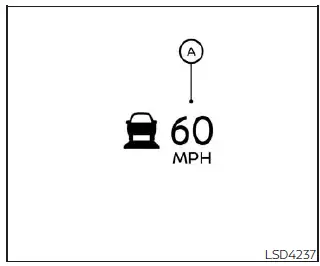
When overtaking another vehicle, the set-speed indicator A flashes whenever the vehicle speed exceeds the speed stored in the ICC system. At the same time, the vehicle-ahead detection indicator turns off once the lane ahead becomes clear and no lead vehicle is detected.
After the accelerator pedal is released, the Nissan Kicks automatically returns to the previously selected cruising speed. Even while Intelligent Cruise Control is active, the driver may use the accelerator pedal whenever additional acceleration is needed for merging, overtaking, or other driving situations.
Cut-in detection
If another vehicle suddenly enters your lane close to the front of your Nissan Kicks, the ICC system may notify the driver by flashing the vehicle-ahead detection indicator. This visual warning is intended to draw attention to changing traffic conditions and encourage the driver to evaluate the situation.
Approach warning
If the Nissan Kicks closes the distance to a vehicle ahead because that vehicle decelerates rapidly, or if another vehicle merges into the lane unexpectedly, the ICC system can warn the driver through an audible chime and a visual alert in the ICC display.
To maintain a safe following distance, immediately reduce speed by applying the brake pedal whenever any of the following occurs:
- The warning chime sounds.
- The vehicle-ahead detection indicator flashes.
- You determine that additional braking is necessary to maintain a safe distance from traffic ahead.
In certain driving situations, the warning chime may not activate even when vehicles are relatively close together. Examples include the following:
- When both vehicles are traveling at approximately the same speed and the gap between them remains unchanged.
- When the vehicle ahead is traveling faster than your Nissan Kicks and the distance between the vehicles is increasing.
- When another vehicle merges into your lane at a close distance.
The warning chime will not sound under the following circumstances:
- When approaching parked vehicles or vehicles moving at very low speeds.
- When the accelerator pedal is being pressed and driver input is overriding normal ICC speed-control operation.
NOTE:
The approach warning chime may occasionally sound, and the system display may flash, when the radar sensor detects objects located beside the vehicle or along the roadside. In some situations, this may cause the ICC system to adjust vehicle speed through acceleration or deceleration.
Such detections are more likely when driving the Nissan Kicks on winding roads, narrow roads, steep grades, or while entering and exiting curves. Under these circumstances, the driver must actively monitor traffic conditions and manually maintain a safe distance from vehicles ahead.
Radar sensor performance may also be influenced by steering inputs, vehicle positioning within the lane, surrounding traffic conditions, or the condition of the vehicle itself, including situations where the vehicle has sustained damage that could affect sensor operation.
Acceleration when passing
When the ICC system is active at speeds above 44 mph (70 km/h) and the Nissan Kicks is following a slower-moving vehicle traveling below the selected cruise speed, activating the left turn signal initiates a passing-assist function.
Once the left turn signal is activated, the ICC system begins increasing vehicle speed to assist with a passing maneuver and gradually reduces the distance to the vehicle ahead. This feature is available only when the left turn signal is used.
As the driver steers into the passing lane, the ICC system continues evaluating traffic conditions. If no vehicle is detected ahead in the new lane, the Nissan Kicks continues accelerating until it reaches the driver-selected cruise speed.
If another vehicle is detected ahead after changing lanes, the ICC system adjusts speed accordingly and accelerates only up to a speed appropriate for following that vehicle while maintaining the selected following distance.
If the Nissan Kicks is not steered into the adjacent left lane to complete a passing maneuver, the temporary acceleration provided by the ICC system will end after a short period and the system will automatically return to maintaining the previously selected following distance. The acceleration assistance can be canceled at any time by pressing the brake pedal or by using the CANCEL switch located on the steering wheel.
WARNING
To help reduce the risk of a collision that could result in serious injury or death, carefully observe the following precautions:
- This feature operates only when the left turn signal is activated. Because the system may briefly accelerate the Nissan Kicks even if a lane change is not completed, drivers should remain attentive in situations that are not related to passing, such as approaching left-side exits, lane splits, or other roadway transitions.
- Before overtaking another vehicle, always verify that the adjacent lane is clear and safe to enter. Traffic conditions can change rapidly during a passing maneuver. The driver must be prepared to steer, brake, or accelerate as necessary and should never rely exclusively on the ICC system to complete a pass safely.
ICC system limitations
WARNING
The following limitations apply to the Intelligent Cruise Control system. Failure to operate the Nissan Kicks with these limitations in mind may increase the risk of an accident resulting in serious injury or death.
- The ICC system is primarily designed for use on relatively straight, dry, open highways with light to moderate traffic. Its use in dense urban traffic, highly congested roadways, or complex driving environments is not recommended.
- The ICC system does not automatically adapt to changing road surface conditions. It is intended for use in smoothly flowing traffic and should not be relied upon on roads with sharp curves, icy surfaces, heavy rain, dense fog, or other conditions that may affect traction or visibility.
- Because the distance-control function has operational limits, drivers must never depend solely on the ICC system. It cannot compensate for inattentive driving, driver distraction, poor judgment, or reduced visibility caused by rain, fog, snow, or other adverse conditions. Always adjust vehicle speed manually by applying the brake pedal when necessary to maintain a safe following distance and proper vehicle control.
- When the ICC system automatically brings the Nissan Kicks to a complete stop, the vehicle may begin moving again automatically if the stop duration is less than approximately three seconds. Drivers should remain prepared to brake whenever necessary.
- Always carefully check surrounding traffic, pedestrians, cyclists, and roadway conditions before allowing the vehicle to move forward again.
- Always monitor vehicle operation and be ready to manually maintain a safe following distance. Under certain driving conditions, the ICC system may not be able to maintain the selected gap to the vehicle ahead or sustain the desired cruising speed.
-
The system may not detect vehicles ahead correctly under certain road, weather, or environmental
conditions. To help avoid accidents, do not use the ICC system under any of the following circumstances:
- On roads with heavy traffic flow, high-speed traffic, or sharp curves.
- On slippery surfaces such as ice, snow, slush, or other low-traction conditions.
- During adverse weather conditions including rain, fog, snow, or similar situations that reduce visibility or sensor performance.
- When rain, snow, ice, mud, or dirt accumulates on the front bumper area surrounding the distance sensor.
- On steep downhill grades where the vehicle may exceed the selected cruising speed and repeated braking could contribute to increased brake temperatures.
- On roads with repeated uphill and downhill sections where frequent speed adjustments are required.
- When traffic conditions make it difficult to maintain a consistent following distance because of frequent acceleration, braking, or stop-and-go traffic.
- In areas where interference from other radar sources could affect system performance.
- In certain traffic or roadway situations, a vehicle, object, roadside structure, or other obstacle may unexpectedly enter the sensor detection zone and trigger automatic speed adjustments or braking responses. Drivers should remain alert at all times and avoid using the ICC system in any environment where its operation is not recommended.
The Intelligent Cruise Control (ICC) system is not capable of detecting every object that may appear in front of the Nissan Kicks. Certain vehicles, road users, and obstacles may fall outside the system's detection capabilities, requiring the driver to remain attentive and prepared to react at all times.
The ICC system may not detect the following objects:
- Stationary vehicles or vehicles moving at very low speeds
- Pedestrians, animals, or other objects located in the roadway
- Oncoming vehicles traveling in the opposite direction within the same roadway area
- Motorcycles traveling offset from the center of the lane rather than directly ahead of the Nissan Kicks
Certain environmental and road conditions can reduce the radar sensor's ability to accurately detect a vehicle ahead, which may affect ICC performance.
- When radar detection is reduced by environmental factors such as rain, snow, fog, dust storms, sandstorms, or road spray generated by surrounding vehicles
- When driving on steep downhill grades or roads with sharp curves that may limit sensor visibility
- When traveling on rough or uneven road surfaces, including dirt roads and heavily damaged pavement
- When dirt, mud, snow, ice, or other materials cover the radar sensor area
- When unusually shaped vehicles, such as vehicle transporters, flatbed trailers, or car carrier trucks, are traveling near the vehicle ahead
- When interference from other radar sources affects sensor operation
- When excessively heavy cargo is loaded in the rear seating area or cargo compartment of the Nissan Kicks, potentially affecting vehicle attitude and sensor performance
The ICC system continuously performs self-monitoring checks to evaluate radar sensor operation. However, these checks are performed within the inherent limitations of the system and do not eliminate the need for driver supervision.
The radar sensor operates within a defined detection zone. For the Nissan Kicks to maintain a selected following distance, the vehicle ahead must remain within this monitored area. Because the detection zone is limited, vehicles may temporarily move outside the monitored region even while remaining in the same lane.
For example, a vehicle traveling near the edge of the lane may not always remain within the optimal detection area. Likewise, motorcycles riding offset from the center of the lane may be more difficult for the system to detect. Vehicles merging into the lane ahead may not be recognized immediately and may only be detected after they have fully entered the lane.
When these situations occur, the ICC system may notify the driver by flashing the system indicator and sounding an audible chime. In such cases, the driver of the Nissan Kicks must manually control vehicle speed and following distance to maintain safe operation.
On Nissan Kicks models equipped with ProPILOT Assist, the ICC system also relies on a multi-sensing front camera in addition to radar technology. Certain conditions can reduce camera performance and delay vehicle detection.
Examples of conditions that may affect camera operation include:
- Poor visibility caused by rain, snow, fog, dust storms, sandstorms, or spray from other vehicles
- A windshield camera area that is fogged, dirty, covered by water droplets, ice, snow, or other contaminants
- Strong light entering the front camera, such as direct sunlight or the high beams of oncoming vehicles
- Sudden and significant changes in lighting conditions, such as entering or exiting tunnels, passing through heavily shaded areas, or lightning flashes during storms
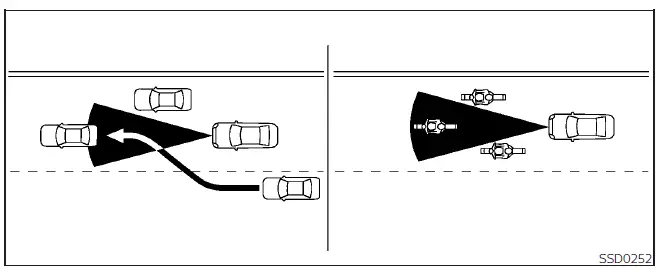
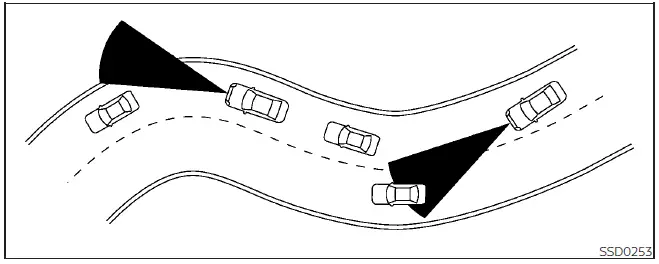
When driving on winding roads, narrow roads, hilly terrain, construction zones, or other complex roadway layouts, the radar sensor may temporarily detect vehicles traveling in adjacent lanes or may fail to detect a vehicle directly ahead for a short period of time.
Under these circumstances, the ICC system may unexpectedly accelerate or decelerate the Nissan Kicks as it interprets changing sensor information. Such behavior can occur even though the vehicle ahead remains present.
Vehicle detection performance may also be influenced by steering inputs, lane position, vehicle attitude, surrounding traffic patterns, or the condition of the vehicle itself.
If any of these situations occur, the ICC system may unexpectedly flash the system indicator and sound a warning chime. When this happens, the driver must immediately assume responsibility for controlling speed and maintaining a safe distance from the vehicle ahead until normal system operation resumes.
System Temporarily Unavailable
Under certain operating conditions, the Intelligent Cruise Control (ICC) system on the Nissan Kicks may become temporarily unavailable. When this occurs, system performance can be limited and the vehicle may not be able to maintain the selected following distance from the vehicle ahead.
In some situations, the ICC system may not immediately cancel operation even though its ability to accurately control speed and following distance has been reduced. Drivers should always remain attentive and prepared to manually control the vehicle whenever necessary.
Condition A
Under any of the following conditions, the ICC system is automatically canceled. An audible chime will sound, and the system cannot be activated until the condition has been corrected:
- Any vehicle door is open.
- The driver's seat belt is not fastened.
- No vehicle ahead is detected while the Nissan Kicks is traveling below approximately 15 mph (24 km/h).
- The vehicle has remained stopped under ICC control for approximately three minutes or longer.
- The shift lever is not in the D (Drive) position or manual shift mode.
- The electronic parking brake is engaged.
- The Vehicle Dynamic Control (VDC) system has been turned off.
- The Automatic Emergency Braking (AEB) with Pedestrian Detection system applies stronger braking intervention.
- The VDC system, including traction control functions, is actively operating.
- SNOW mode has been selected on AWD-equipped Nissan Kicks models.
- Wheel slip is detected.
- The front radar sensor is obstructed by dirt, debris, ice, snow, or another blockage that affects sensor performance.
- The radar signal is temporarily interrupted.
Action to take:
After the condition causing the cancellation has been corrected, switch the ProPILOT Assist system off using the ProPILOT Assist switch. Then turn the system back on to restore normal ICC operation.
NOTE:
When the ICC system is canceled under any of the following conditions while the Nissan Kicks is at a standstill, the electronic parking brake is automatically applied:
- Any door is open.
- The driver's seat belt is not fastened.
- The vehicle has remained stopped under ICC control for approximately three minutes or longer.
- The shift lever is not in the D (Drive) position or manual shift mode.
- The VDC system has been switched off.
- Distance measurement becomes impaired because dirt, debris, ice, snow, or another obstruction interferes with sensor operation.
- The radar signal is temporarily interrupted.
Condition B
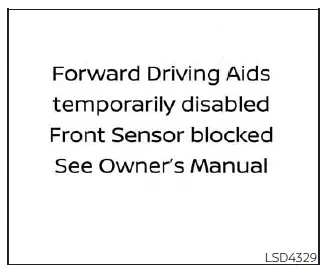
Severe weather conditions such as rain, fog, snow, or similar environmental factors may block the front radar sensor. When this occurs, the ICC system automatically cancels operation, an audible warning chime sounds, and the message "Forward Driving Aids Temporarily Disabled Front Sensor Blocked See Owner's Manual" appears in the vehicle information display.
Action to take:
Once weather conditions improve and the radar sensor is no longer obstructed, the warning message will disappear and normal ICC operation should resume automatically.
If the message "Forward Driving Aids Temporarily Disabled Front Sensor Blocked See Owner's Manual" remains displayed after conditions have improved, the Nissan Kicks should be inspected by a qualified technician. It is recommended that you visit a NISSAN dealer for diagnosis and service.
Condition C
If the radar sensor area located in the front bumper becomes covered with dirt, mud, snow, ice, or any other obstruction, the ICC system will automatically cancel operation to help prevent inaccurate vehicle detection.
When this occurs, a warning chime sounds and the message "Forward Driving Aids Temporarily Disabled Front Sensor Blocked See Owner's Manual" appears in the vehicle information display.
Action to take:
If this warning message appears, safely stop the Nissan Kicks, press the park button to engage the P (Park) position, and switch the engine off.
Inspect and clean the radar sensor area located on the front bumper. If the radar signal interruption was caused by temporary contamination or blockage, restarting the engine after cleaning the sensor area may restore normal system operation.
If the message "Forward Driving Aids Temporarily Disabled Front Sensor Blocked See Owner's Manual" continues to appear after the sensor area has been cleaned and the engine restarted, have the system inspected. It is recommended that you visit a NISSAN dealer for professional diagnosis and service.
Condition D
When driving through environments with limited roadside structures or minimal visual references, such as long bridges, open desert areas, snow-covered fields, or roads running alongside extended walls, the Nissan Kicks ICC system may experience temporary difficulty interpreting radar information. Under these conditions, the system may display the message "Forward Driving Aids Temporarily Disabled Front Sensor Blocked See Owner's Manual" and an audible chime may sound.
Action to take:
Once the vehicle has left the affected area and normal driving conditions have returned, switch the ICC system back on. In most cases, normal operation resumes automatically after the environmental conditions that caused the interruption are no longer present.
ICC system malfunction
If the Intelligent Cruise Control system detects an internal malfunction, it will automatically deactivate to prevent unreliable operation. When this occurs, an audible warning chime sounds and the speed control status warning indicator illuminates in orange within the vehicle information display.
Automatic cancellation helps ensure that the Nissan Kicks does not continue using ICC functions when system performance cannot be guaranteed.
Action to take:
If the warning indicator illuminates, safely stop the vehicle when conditions permit. Turn the engine off, wait briefly, and then restart the engine. After resuming driving, attempt to activate and set the ICC system again.
If the system cannot be activated or if the warning indicator remains illuminated after restarting the vehicle, the ICC system may require inspection. Although the Nissan Kicks can generally continue to be driven normally, the Intelligent Cruise Control system should be checked by a qualified technician. It is recommended that you visit a NISSAN dealer for diagnosis and service.
NOTE:
If the ICC system becomes temporarily unavailable, conventional cruise control mode may still remain available and can be used if driving conditions are appropriate.
ICC sensor maintenance
The radar sensor used by the ICC system is located at the front of the vehicle and plays a critical role in detecting traffic ahead and measuring following distance.
To help ensure proper operation of the Intelligent Cruise Control system on the Nissan Kicks, observe the following maintenance recommendations:
- Always keep the sensor area located in the front bumper or emblem clean and free of dirt, mud, snow, ice, and other contaminants.
- Avoid striking, impacting, or damaging the area surrounding the radar sensor.
- Do not place stickers, decals, transparent films, or accessories near the sensor area, as these may interfere with radar performance and lead to system malfunctions.
- Do not install metallic objects near the radar sensor location, including brush guards or similar accessories, as they may affect sensor operation.
- Do not modify, remove, repair, repaint, or alter the front bumper in a manner that could affect sensor alignment or performance.
Before performing front bumper repairs, modifications, restoration work, or customization on the Nissan Kicks, it is recommended that you consult a NISSAN dealer to help ensure proper sensor operation is maintained.
The front camera sensor used by the ICC and ProPILOT Assist systems is mounted above the interior rearview mirror behind the windshield.
To maintain reliable camera performance and help prevent system malfunctions, follow these guidelines:
- Always keep the windshield clean, especially in the area directly in front of the camera unit.
- Do not attach stickers, transparent films, mounts, or accessories near the camera housing or windshield camera area.
- Avoid placing reflective objects such as mirrors, highly reflective surfaces, or sheets of white paper on the instrument panel. Reflected sunlight may interfere with the camera's ability to recognize lane markings and surrounding traffic conditions.
- Do not strike, modify, or damage the area surrounding the camera unit. Avoid touching the camera lens and do not remove or tamper with the mounting screw located on the camera assembly.
If the camera unit or its surrounding components are damaged as a result of a collision or other impact, it is recommended that the Nissan Kicks be inspected by a NISSAN dealer to verify proper camera alignment and system operation.
Steering Assist Nissan Kicks 2026
WARNING
Failure to follow all warnings, precautions, and instructions regarding the proper use of the Steering Assist system could result in a loss of vehicle control, leading to serious injury or death.
- Steering Assist is not a substitute for attentive and responsible driving. It is not intended to compensate for careless, distracted, fatigued, or inattentive driving behavior. The system may not always provide enough steering assistance to keep the Nissan Kicks centered within the lane and is not designed to prevent a loss of vehicle control. The driver must remain alert, maintain lane position, and retain full control of the vehicle at all times.
- Because the Steering Assist system has operational limitations, it should never be relied upon as the sole means of vehicle control. The system may not function properly in all traffic situations, weather conditions, road environments, or driving scenarios. Drivers must continuously monitor vehicle operation and be prepared to steer manually whenever necessary.
- Steering Assist is designed primarily for use on well-maintained highways and freeways with gentle or moderate curves. To reduce the risk of an accident, the system should not be used on local roads, rural roads, narrow streets, or other non-highway driving environments.
- The Steering Assist system only helps keep the Nissan Kicks positioned near the center of the detected lane. It does not steer to avoid obstacles, road hazards, pedestrians, or vehicles that may suddenly enter your lane.
- The driver is always responsible for maintaining control of the vehicle. Never remove your hands from the steering wheel while driving. Keep both hands on the steering wheel whenever the vehicle is in motion and remain prepared to make steering corrections at any time.
-
Always operate the Nissan Kicks carefully and attentively when using Steering Assist.
Carefully read and understand the Owner's Manual before using this feature. To help avoid serious injury or death, do not depend on Steering Assist to prevent accidents or manage vehicle speed during emergency situations. Use the system only under appropriate traffic, weather, and roadway conditions.
Steering Assist operation
The Steering Assist function works with the vehicle's steering system to help keep the Nissan Kicks positioned near the center of the travel lane while driving. This feature is integrated with the Intelligent Cruise Control (ICC) system and is designed to reduce driver workload during suitable highway driving conditions.
By monitoring lane markings and vehicle position, Steering Assist can provide steering support to help maintain lane centering. However, the driver remains fully responsible for steering the vehicle and maintaining awareness of surrounding traffic conditions.
The Steering Assist system can be activated when all of the following conditions are met:
- The Intelligent Cruise Control (ICC) system is activated and operating.
- Lane markings on both sides of the vehicle are clearly visible and successfully detected by the system.
- A vehicle ahead is detected when the Nissan Kicks is traveling below approximately 37 mph (60 km/h).
- The driver is holding the steering wheel.
- The vehicle is traveling near the center of the lane.
- The turn signals are not being used.
- The windshield wipers are not operating in the high-speed (HI) setting. If high-speed wiper operation is used, the Steering Assist function may be disabled after approximately 10 seconds.
Steering Assist display and indicators
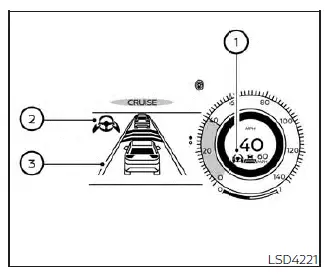
- Steering Assist status indicator/warning
This indicator displays the current operating condition of the Steering Assist system through different colors and warning states.
- Steering Assist indicator (gray): The Steering Assist system is available and in standby mode, waiting for all operating conditions to be met.
- Steering Assist indicator (green): Steering Assist is actively providing steering support and helping keep the Nissan Kicks centered within the detected lane.
- Steering Assist indicator (orange): A malfunction has been detected within the Steering Assist system and service may be required.
- Steering Assist status indicator (red): The system has detected that the driver's hands are not on the steering wheel and driver intervention is required immediately.
The Steering Assist status indicator illuminates or flashes whenever the system detects a Hands Off condition. These visual warnings are designed to remind the driver that active participation is required while the Steering Assist function is operating.
- Steering Assist indicator
This indicator shows the current operating status of the Steering Assist system through different colors displayed in the vehicle information display.
- Steering Assist indicator (gray): The Steering Assist system is in standby mode and ready to operate once all required conditions are met.
- Steering Assist indicator (green): The Steering Assist function is actively providing steering support and helping keep the Nissan Kicks centered within the detected lane.
- Lane marker indicator
This indicator shows whether the system can clearly detect the lane markings on the roadway.
- Lane marker indicator (gray): Lane markings are not currently detected by the system.
- Lane marker indicator (green): Lane markings have been detected and are being used for Steering Assist operation.
- Lane marker indicator (orange): The vehicle is approaching or crossing a lane boundary and lane departure has been detected.
When Steering Assist is actively operating, the Steering Assist status indicator 1, the Steering Assist indicator 2, and the lane marker indicator 3 displayed in the vehicle information display illuminate in green. An audible chime sounds when the Steering Assist function initially becomes active, confirming that the system is providing steering support.
When Steering Assist is deactivated, the Steering Assist status indicator 1, the Steering Assist indicator 2, and the lane marker indicator 3 change to gray. A chime also sounds to notify the driver that active steering assistance is no longer being provided.
Intelligent Lane Intervention (I-LI)
If a curve, strong crosswind, or other driving condition exceeds the capabilities of the Steering Assist system and the Nissan Kicks begins moving toward either side of the lane, the Intelligent Lane Intervention (I-LI) system provides additional assistance.
In these situations, a warning chime sounds, the orange I-LI indicator on the instrument panel flashes, and the steering wheel vibrates to alert the driver. The I-LI system may then briefly apply brake force to help guide the vehicle back toward the center of the lane.
This corrective action works in conjunction with Steering Assist and is intended to provide an additional layer of support when lane departure risk is detected.
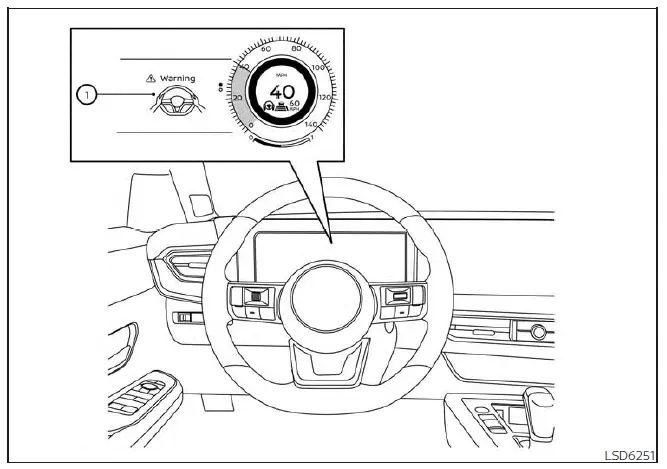
Hands on detection
When Steering Assist is active, the system continuously monitors steering wheel input to verify that the driver remains engaged in controlling the Nissan Kicks.
If steering wheel input is not detected or the driver removes his or her hands from the steering wheel for an extended period, warning 1 appears in the vehicle information display and the Hands OFF warning light illuminates.
If the driver does not respond after the initial warning appears, an audible alert sounds and both the warning message and warning light begin flashing. The system may then briefly apply the brakes to prompt the driver to regain control of the vehicle and resume steering input.
If the driver continues to provide no steering input, ProPILOT Assist activates the hazard warning flashers and gradually slows the Nissan Kicks to a complete stop.
The driver can cancel the automatic deceleration process at any time by steering the vehicle, pressing the brake pedal, applying the accelerator pedal, or operating the ProPILOT Assist switch.
WARNING
Steering Assist is not a hands-free driving system. Always keep your hands on the steering wheel and remain fully attentive while driving. Failure to maintain control of the vehicle could result in a collision causing serious injury or death.
NOTE:
If the driver only lightly rests a hand on the steering wheel rather than maintaining a firm grip, the steering torque sensor may not recognize driver input. As a result, Hands OFF warnings and related alerts may be triggered. Once the driver firmly grips and actively operates the steering wheel again, the warnings will be cleared and normal system monitoring will continue.
Steering Assist limitations
WARNING
-
In the following situations, the front camera may have difficulty correctly identifying lane markings,
or it may incorrectly interpret other road features as lane markers. As a result, the Steering Assist
function on the Nissan Kicks may not operate as intended:
- When driving on roads with multiple parallel lane markings, faded lane lines, poorly painted markings, non-standard lane markings, or lane markers obscured by water, dirt, snow, or other debris.
- When traveling on roads where lane markings are interrupted, broken, or difficult to follow.
- When driving through areas where lane widths expand or narrow significantly.
- When driving in construction zones where multiple lanes, temporary markings, or unclear lane boundaries are present.
- When the roadway contains sharply contrasting visual elements such as shadows, standing water, snow, wheel tracks, pavement seams, road repair markings, or other surface features that could be interpreted as lane markers.
- When traveling on roads where lanes merge, split, or transition into different traffic patterns.
-
Do not use Steering Assist under the following conditions because lane marker detection may be reduced
or unavailable. Failure to account for these limitations could increase the risk of losing vehicle
control and may result in an accident:
- During adverse weather conditions such as rain, fog, snow, dust, or similar visibility-reducing environments.
- When water, snow, sand, mud, or road spray is thrown onto the windshield by surrounding vehicles.
- When dirt, oil, ice, snow, water, or other contaminants are present on the camera unit or windshield area in front of the camera.
- When the camera lens or surrounding windshield area becomes fogged.
- When strong light sources, such as direct sunlight or the high beams of oncoming vehicles, shine directly into the camera.
- When headlight performance is reduced due to dirty lenses or when headlights are not being used in dark conditions, tunnels, or poorly illuminated areas.
- When sudden changes in brightness occur, such as when entering or exiting tunnels, passing beneath bridges, or moving between heavily shaded and brightly lit areas.
- When driving on roads with merging lanes, diverging lanes, temporary construction markings, or altered traffic patterns.
- When lane closures are present because of construction, maintenance work, or road repairs.
- When driving on rough, uneven, or heavily damaged road surfaces, including dirt roads and unpaved sections.
- When driving through sharp bends, winding roads, or complex curves that make lane recognition more difficult.
- When repeatedly traveling over steep uphill and downhill sections that may affect system recognition and vehicle positioning.
-
Do not use Steering Assist under the following conditions because proper system operation cannot be
guaranteed:
- When driving with tires that are not in normal operating condition, including excessively worn tires, incorrect tire pressure, temporary spare tires, tire chains, or non-standard wheel and tire combinations.
- When the Nissan Kicks is equipped with non-original suspension or brake components that may affect vehicle handling characteristics.
- When stickers, mounted accessories, cargo, or other objects obstruct the camera's field of view.
- When excessive cargo weight is loaded in the rear seating area or cargo compartment, potentially affecting vehicle balance and camera alignment.
- When the vehicle's specified load capacity has been exceeded.
- Loud cabin noise, audio systems played at high volume, or other excessive noise sources may interfere with the driver's ability to hear warning chimes and audible alerts generated by the Steering Assist and ProPILOT Assist systems.
- For proper operation of the ProPILOT Assist and Steering Assist systems, the windshield area directly in front of the camera must remain clean, clear, and free from dirt, condensation, ice, snow, stickers, or any other obstruction that could affect camera visibility.
Replace worn or damaged windshield wiper blades promptly. Using properly functioning wiper blades is essential for maintaining a clear field of vision and allowing the camera systems in the Nissan Kicks to operate accurately. Always install wiper blades of the correct size and specification to ensure the windshield remains effectively cleaned during all weather conditions.
For optimal performance, use only Genuine NISSAN wiper blades or equivalent replacements specifically designed for the Nissan Kicks model and model year. Using incorrect or poorly fitting blades may reduce wiping efficiency and could affect camera visibility. It is recommended that you visit a NISSAN dealer to obtain the correct replacement parts for your vehicle.
Steering Assist temporary standby
Automatic standby due to driving operation:
Whenever the driver activates a turn signal, the Steering Assist function is temporarily placed in standby mode. This allows the driver to perform lane changes and other maneuvers without steering intervention from the system. Once the turn signal is canceled and all required operating conditions are met again, Steering Assist automatically resumes operation.
Automatic standby:
In the following situations, a warning chime may sound and the Steering Assist system will temporarily enter standby mode. The feature is designed to automatically reactivate once normal operating conditions return.
- When lane markings on both sides of the vehicle can no longer be clearly detected by the camera system.
- When a vehicle traveling ahead is no longer detected while driving below approximately 37 mph (60 km/h).
-
When strong light enters the camera unit.
Examples include direct sunlight striking the front of the Nissan Kicks during sunrise or sunset, or other intense light sources that temporarily reduce camera visibility.
- When the temperature of the camera unit becomes excessively high and normal operation cannot be maintained.
Steering Assist cancel
Under the following conditions, Steering Assist will cancel operation completely. A warning message is displayed, and both the Steering Assist status indicator and Steering Assist indicator turn off.
- When unusual lane markings appear within the driving lane or when lane markers cannot be reliably identified for an extended period due to road conditions. Examples include snow ruts, reflections from wet pavement, multiple overlapping lane markings, faded markings, or other situations that make lane recognition unreliable.
- When the windshield wipers are operating continuously at the high-speed (HI) setting. Steering Assist is disabled if high-speed wiper operation continues for approximately 10 seconds or longer.
Action to take:
Turn the Intelligent Cruise Control system off using the CANCEL switch. After the conditions causing the cancellation have been corrected and normal operating conditions have returned, activate the ICC system again to restore Steering Assist functionality.
Steering Assist malfunction
If a malfunction is detected within the Steering Assist system, a warning message appears in the vehicle information display and the feature automatically switches off. The Steering Assist warning indicator illuminates in orange, and an audible chime may sound depending on the nature of the fault.
Action to take:
Safely stop the Nissan Kicks when traffic conditions permit. Shift the vehicle into the P (Park) position, turn the engine off, restart the engine, and resume driving. Then attempt to activate the Intelligent Cruise Control system again.
If the orange Steering Assist warning indicator remains illuminated after restarting the vehicle, a system malfunction may be present.
Although the Nissan Kicks can generally continue to be driven under normal conditions, the Steering Assist system should be inspected as soon as possible. It is recommended that you visit a NISSAN dealer for diagnosis and service.
Steering Assist maintenance
The camera sensor used by the Steering Assist system is located above the inside rearview mirror.
To help maintain reliable operation and reduce the possibility of system malfunctions, observe the following maintenance guidelines:
- Always keep the windshield clean, especially in the area directly in front of the camera unit.
- Do not apply stickers, decals, transparent films, or install accessories near the camera assembly or windshield camera area.
- Avoid placing reflective objects such as mirrors, white paper, glossy materials, or similar items on the instrument panel. Reflected sunlight may interfere with the camera's ability to accurately detect lane markings and surrounding road features.
- Do not strike, modify, or damage the area surrounding the camera unit. Avoid touching the camera lens directly and do not remove the mounting screw located on the camera assembly.
If the camera unit is damaged as the result of a collision, impact, or other accident, it is recommended that the Nissan Kicks be inspected by a NISSAN dealer. Proper camera alignment is essential for the correct operation of driver assistance systems, and damage to the camera assembly or its mounting position may affect system performance.
Radio frequency statement
For USA
This device complies with Part 15 of the FCC Rules.
Operation of this equipment is subject to the following two conditions:
1. This device may not cause harmful interference, and
2. This device must accept any interference received, including interference that may cause undesired operation.
Any changes or modifications to this equipment that are not expressly approved by Robert Bosch GmbH may void the user's authority to operate the equipment under FCC regulations.
This equipment has been tested and verified to comply with the limits established for a Class A digital device pursuant to Part 15 of the FCC Rules. These requirements are intended to provide reasonable protection against harmful interference when the equipment is operated in a commercial environment.
The equipment generates, uses, and can radiate radio-frequency energy. If it is not installed and operated according to the applicable instructions, it may cause interference to radio communications.
Operation of this equipment in a residential environment may result in harmful interference. If such interference occurs, the user may be required to correct the condition at his or her own expense.
RF Exposure Information according to Sections 2.1091, 2.1093, and OET Bulletin 65:
Radiofrequency radiation exposure information:
This equipment complies with FCC radio-frequency exposure limits established for an uncontrolled environment.
To satisfy applicable exposure requirements, the equipment should be installed and operated with a minimum separation distance of 20 cm (8 in) between the radiator and the body of the user.
The transmitter must not be co-located with, or operated in conjunction with, any other antenna or transmitter.
For Canada
Legal notice regarding RF equipment: This device contains licence-exempt transmitter(s) and/or receiver(s) that comply with the licence-exempt RSS standards of Innovation, Science and Economic Development Canada.
Operation is subject to the following two conditions:
(1) This device may not cause interference.
(2) This device must accept any interference received, including interference that may cause undesired operation of the device.
L'émetteur/récepteur exempt de licence contenu dans le présent appareil est conforme aux CNR d'Innovation, Sciences et Développement économique Canada applicables aux appareils radio exempts de licence.
L'exploitation de cet appareil est autorisée aux deux conditions suivantes :
(1) L'appareil ne doit pas produire de brouillage.
(2) L'appareil doit accepter tout brouillage radioélectrique subi, même si ce brouillage est susceptible d'en compromettre le fonctionnement.
Conventional (fixed speed) cruise control mode Nissan Kicks crossover
NOTE:
When the Nissan Kicks is operating in conventional (fixed speed) cruise control mode, ProPILOT Assist does not provide approach warnings, automatic braking intervention, or Steering Assist functionality.
This mode allows the driver to maintain a selected cruising speed between 25 and 90 mph (40 and 144 km/h) without continuously pressing the accelerator pedal, helping reduce driver fatigue during extended highway travel.
WARNING
- In conventional (fixed speed) cruise control mode, the system does not monitor vehicles ahead. Because neither vehicle detection nor following-distance control is active, no warning chime will sound if the Nissan Kicks approaches another vehicle too closely.
- Always pay close attention to the distance between your vehicle and surrounding traffic. Failure to maintain a safe following distance could result in a collision.
- Always verify the current cruise control status and settings in the ICC system display before and during operation.
-
Do not use conventional (fixed speed) cruise control under the following driving conditions:
- When it is difficult to maintain a steady vehicle speed.
- In heavy traffic or traffic with frequent speed changes.
- On winding, curving, or hilly roads.
- On slippery road surfaces such as those covered with rain, snow, ice, or slush.
- In areas subject to strong crosswinds or gusty wind conditions.
- Using cruise control under unsuitable conditions could lead to a loss of vehicle control and increase the risk of an accident.
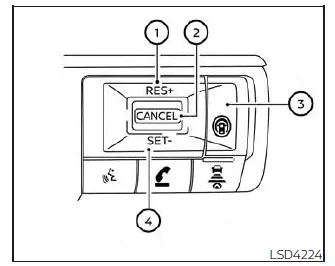
Conventional (fixed speed) cruise control switches
- RES+ switch: Resumes the previously stored speed or increases the set cruising speed in small increments.
- CANCEL switch: Temporarily deactivates cruise control without deleting the stored speed setting.
- ProPILOT Assist switch: Turns the ProPILOT Assist and cruise control systems on or off.
- SET- switch: Sets the desired cruising speed or reduces the stored speed incrementally.
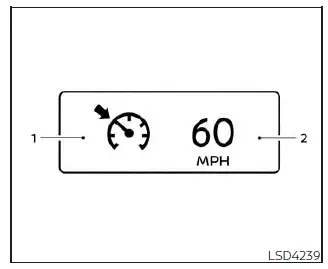
Conventional (fixed speed) cruise control mode display and indicators
Cruise control information is displayed within the vehicle information display, allowing the driver to monitor system status and selected speed settings.
1. Cruise indicator: This indicator displays the current operating status of the cruise control system through different colors.
- Cruise control ON indicator (gray): Indicates that the ProPILOT Assist switch has been turned on and the system is in standby mode.
- Cruise control SET indicator (green): Indicates that a cruising speed has been selected and is currently being maintained.
- Cruise control warning indicator (yellow): Indicates that a malfunction has been detected within the cruise control system.
2. Set vehicle speed indicator: This display shows the currently selected cruise speed. On Canadian Nissan Kicks models, speed values are displayed in km/h.
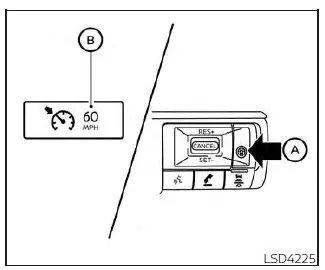
Operating conventional (fixed speed) cruise control mode
To activate conventional (fixed speed) cruise control mode, press and hold the ProPILOT Assist switch A for approximately 1.5 seconds or longer.
When the ProPILOT Assist switch is initially pressed, the ICC system display appears. After holding the switch for more than approximately 1.5 seconds, the ICC distance-control display turns off and the cruise indicator B appears. At this point, the Nissan Kicks is ready for conventional cruise control operation.
Pressing the ProPILOT Assist switch again turns the system completely off. The system also switches off automatically whenever the ignition is placed in the OFF position.
To return to Intelligent Cruise Control operation, briefly press and release the ProPILOT Assist switch. To return to conventional cruise control mode, press and hold the switch again.
CAUTION
To avoid unintentionally activating cruise control, always switch the ProPILOT Assist system off whenever it is not being used.
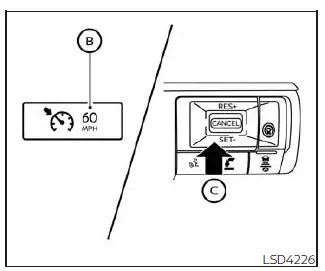
To set a cruising speed, accelerate the Nissan Kicks to the desired speed, then press and release the SET- switch C. The cruise indicator changes to green and the set-speed indicator appears in the display.
After removing your foot from the accelerator pedal, the vehicle automatically maintains the selected speed.
- To overtake another vehicle, press the accelerator pedal as needed. Once the pedal is released, the Nissan Kicks automatically returns to the previously stored cruising speed.
-
The vehicle may not be able to maintain the selected speed while climbing or descending steep grades.
If this occurs, manually control vehicle speed as necessary to maintain safe operation.
To cancel the stored cruising speed, use any of the following methods:
1. Press the CANCEL switch. The vehicle speed indicator and cruise indicator change to gray.
2. Lightly press the brake pedal. The set-speed indicator and cruise indicator change to gray.
3. Turn the ProPILOT Assist system off. Both indicators turn off completely.
To increase the stored cruising speed, use one of the following methods:
1. Press the accelerator pedal until the desired speed is reached, then press and release the SET- switch.
2. Press and hold the RES+ switch. Release it once the desired speed is achieved.
3. Briefly press and release the RES+ switch. Each press increases the set speed by approximately 1 mph (1 km/h).
To reduce the stored cruising speed, use one of the following methods:
1. Lightly apply the brake pedal until the desired speed is reached, then press and release the SET- switch.
2. Press and hold the SET- switch until the vehicle slows to the desired speed, then release the switch.
3. Briefly press and release the SET- switch.
Each press decreases the stored speed by approximately 1 mph (1 km/h).
System Temporarily Unavailable
An audible chime sounds and conventional cruise control is automatically canceled under the following conditions:
- When the shift lever is not in the D (Drive) position.
- When the parking brake is applied.
- When the VDC system, including traction control functions, is actively operating.
- When the Vehicle Dynamic Control (VDC) system has been switched off.
- When wheel slip is detected.
- When vehicle speed decreases below approximately 20 mph (30 km/h).
Warning
If a malfunction occurs within the cruise control system, a warning chime sounds and the cruise indicator changes to yellow.
Action to take:
If the cruise control warning indicator turns yellow, safely park the Nissan Kicks, switch the engine off, restart the vehicle, resume driving, and attempt to set the system again.
If the cruise control system cannot be activated or the warning indicator remains illuminated, a malfunction may be present. Although the vehicle can still be driven under normal conditions, the system should be inspected. It is recommended that you visit a NISSAN dealer for diagnosis and service.