



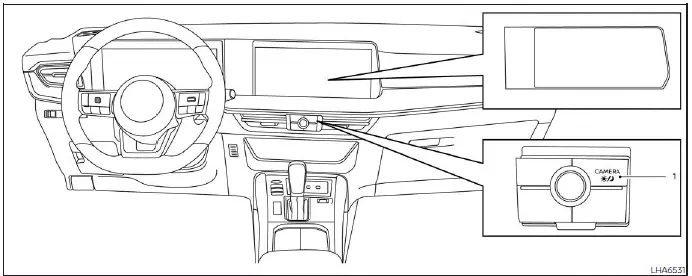
- CAMERA button/
 button
WARNING
- Failure to follow the instructions and safety precautions for the Nissan Kicks Moving Object Detection (MOD) system could result in serious injury or even death.
- The MOD system is intended only as a driving aid and is not a replacement for safe vehicle operation.
Always check your surroundings carefully, use the outside mirrors and rearview mirror, and look around the vehicle before maneuvering. The Nissan Kicks driver remains fully responsible for safe operation at all times.
- The MOD system automatically deactivates at speeds above approximately 5 mph (8 km/h) and becomes active again when vehicle speed drops below this threshold.
- The system is designed to detect moving objects and is not intended to identify stationary obstacles.
The Nissan Kicks Moving Object Detection system helps alert the driver to moving objects around the vehicle when backing out of parking spaces, garages, driveways, or maneuvering at low speeds.
The system uses advanced image-processing technology to analyze camera images displayed on the monitor and identify motion around the vehicle.
MOD system operation
The MOD system activates automatically under the following conditions:
- When the shift lever is moved to the R (Reverse) position.
- When the CAMERA button is pressed and a camera view is displayed.
- When vehicle speed drops below approximately 5 mph (8 km/h) while a camera screen is active.
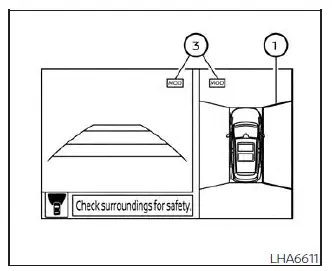
Front and bird's-eye views
The Nissan Kicks MOD system operates under the following conditions when camera views are displayed:
- When the shift lever is in P (Park) or N (Neutral) and the vehicle is stationary, the MOD system can detect moving objects in the bird's-eye view. The system will not operate while the outside mirrors are folding, unfolded, folded inward, or when either front door is open.
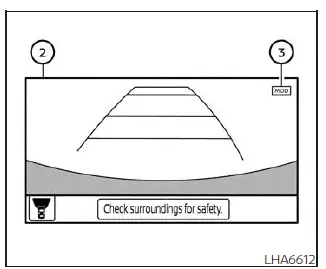
Front-wide view
- When the Nissan Kicks is in D (Drive) and traveling below approximately 5 mph (8 km/h), the MOD system monitors moving objects in the front view.
- When the shift lever is in R (Reverse) and vehicle speed remains below approximately 5 mph (8 km/h), the MOD system monitors moving objects in the rear view. The system will not operate if the liftgate is open.
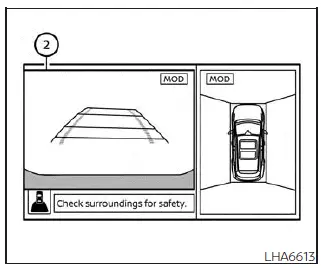
Rear and bird's-eye views
The Nissan Kicks MOD system does not detect moving objects while the front-side camera view is displayed. Therefore, the MOD icon is not shown in this mode.
When the system detects movement near the vehicle, an audible chime sounds in the front or rear view, and a yellow frame appears around the area where movement is detected. The frame remains visible while motion continues to be detected.
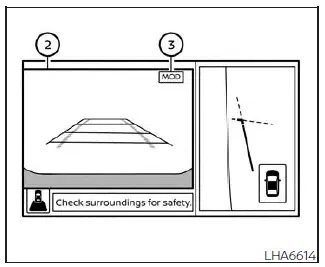
Rear and front-side views
In bird's-eye view mode, yellow frame 1 appears around the camera image where movement is detected, whether in the front, rear, left, or right camera area.
Yellow frame 2 appears in front-view and rear-view modes to indicate the location of detected movement.
A green MOD icon 3 indicates that the Nissan Kicks Moving Object Detection system is active. A gray icon indicates that the system is currently unavailable or inactive.
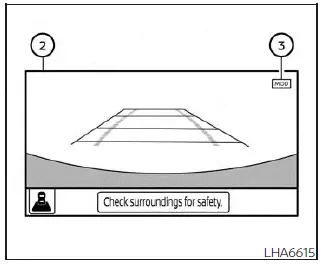
Rear-wide view
If the MOD system has been switched off, icon 3 will not be displayed.
Turning MOD on and off
Some Nissan Kicks models allow the MOD system to be enabled or disabled through the vehicle information display.
To activate or deactivate the MOD system:
1. Use the
 buttons on the steering wheel to select "Settings".
2. Select "Driver Assistance" and press the OK button.
3. Select "Parking Aids".
4. Turn "Moving Object" ON or OFF using the OK button.
MOD system limitations
WARNING
The following limitations apply to the Nissan Kicks Moving Object Detection system. Ignoring these limitations could lead to serious injury or property damage.
- Do not rely on the MOD system while towing a trailer. System performance may be affected.
- High cabin noise levels, such as loud audio playback or open windows, may prevent the driver from hearing warning chimes.
- The performance of the Nissan Kicks MOD system may be reduced in the following situations:
- When there is little contrast between moving objects and the background.
- When flashing or blinking light sources are present.
- When strong sunlight or headlight glare enters the camera lens.
- When a camera is not in its normal position, such as when an outside mirror is folded.
- When dirt, water droplets, ice, or snow cover the camera lens.
- When moving objects remain nearly stationary within the displayed image.
- The system may occasionally interpret rain droplets, exhaust smoke, moving shadows, or similar visual effects as moving objects.
- Detection capability depends on the speed, direction, size, shape, and distance of moving objects.
- If the Nissan Kicks sustains damage near any camera mounting location, camera alignment may change and object detection performance may be reduced.
- At extremely high or low temperatures, display clarity may be reduced. This is considered normal operation.
NOTE:
The blue MOD icon changes to orange under the following conditions:
- When the system detects a malfunction.
- When component temperature becomes excessively high (icon flashes).
- When the rear camera view is partially blocked (icon flashes).
If the orange icon remains illuminated, the Nissan Kicks MOD system should be inspected. It is recommended that you visit a NISSAN dealer for diagnosis and service.
System maintenance
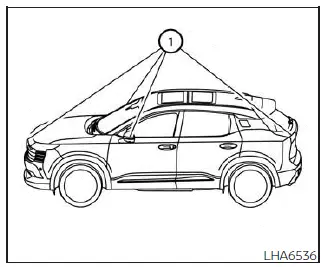
CAUTION
- Do not use alcohol, benzine, thinner, or aggressive chemicals when cleaning the cameras, as they may cause discoloration or damage.
- Avoid striking or damaging the camera units, as image quality and system performance may be affected.
If dirt, rain, snow, mud, or road debris accumulates on any camera 1, the Nissan Kicks MOD system may not function correctly. Clean the cameras carefully using a soft cloth dampened with diluted mild detergent, then wipe dry with a clean cloth.
Vents
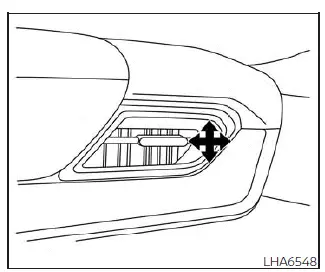
Side vents
The Nissan Kicks side air vents can be adjusted by opening, closing, or rotating the vent assembly to direct airflow where it is needed most for passenger comfort.
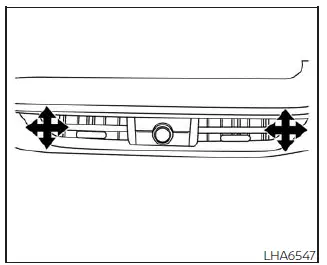
Center vents
Adjust airflow from the center vents by moving the vent sliders and directional vanes. Proper vent positioning can improve cabin comfort and help the Nissan Kicks climate control system distribute air more efficiently throughout the interior.