



WARNING
Failure to follow the warnings and instructions for proper use of the I-BSI system could result in serious injury or death.
- The I-BSI system is not a substitute for attentive driving practices. When changing lanes in your Nissan Kicks, always check the side mirrors, rearview mirror, and surrounding traffic conditions before maneuvering. Never depend exclusively on the I-BSI system to avoid a collision.
- The radar and camera systems have detection limits.
Not every vehicle, object, or road situation can be recognized. Certain traffic, weather, lane marking, or roadway conditions may reduce system performance or prevent proper intervention.
Drivers of the Nissan Kicks must always remain alert and prepared to take immediate corrective action when necessary.
The Intelligent Blind Spot Intervention (I-BSI) system helps notify the driver when another vehicle is traveling in an adjacent lane and can assist in guiding the Nissan Kicks back toward the center of its lane if an unintended lane departure is detected.
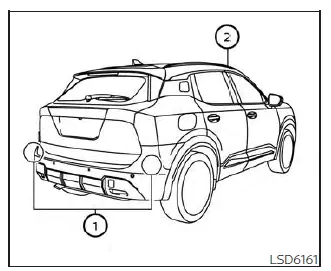
The Nissan Kicks I-BSI system uses radar sensors 1 located near the rear bumper to detect vehicles traveling in adjacent lanes. In addition, a forward-facing camera 2 positioned behind the windshield monitors lane markings and vehicle position within the lane.
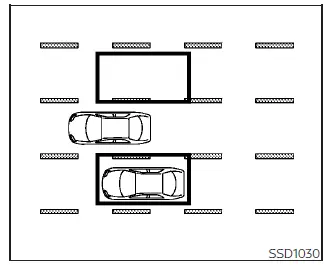
Detection zone
The radar sensors can identify vehicles traveling on either side of the Nissan Kicks within the illustrated monitoring area.
The detection zone begins near the outside mirrors and extends approximately 10 ft (3.0 m) behind the rear bumper, while also covering approximately 10 ft (3.0 m) to either side of the vehicle.
- I-BSI system operation
- I-BSI system limitations
- I-BSI driving situations
- System temporarily unavailable
I-BSI system operation Nissan Kicks Owner's Manual
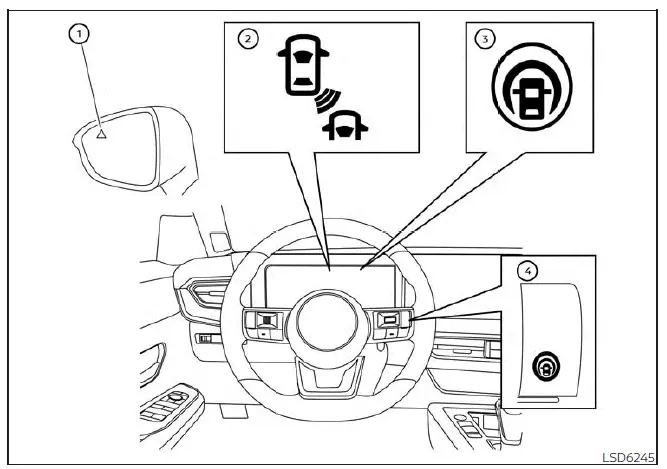
- Side indicator light
- BSW indicator
- Intelligent Blind Spot Intervention (I-BSI) indicator
- ProPILOT Assist switch
The I-BSI system becomes active when the Nissan Kicks is traveling at approximately 37 mph (60 km/h) or higher.
When a vehicle is detected within the blind-spot monitoring area, the side indicator light 1 illuminates.
If the turn signal is activated while another vehicle remains in the detection zone, the system emits two warning chimes and both the side indicator light and BSW indicator light 2 begin flashing.
The side indicator light continues flashing until the detected vehicle exits the monitored area. Indicator brightness is automatically adjusted according to ambient lighting conditions for optimal visibility.
If the I-BSI system is enabled and the Nissan Kicks approaches a lane marker while another vehicle occupies the blind-spot zone, the system sounds three warning chimes while the side indicator light and BSW indicator light 2 flash.
The system can briefly apply braking force to individual wheels to help guide the Nissan Kicks back toward the center of the lane. This intervention function operates regardless of whether the turn signal is being used.
The combination of radar monitoring and lane-position detection provides an additional layer of driver assistance during highway driving and lane-change situations.
NOTE:
- I-BSI warnings and intervention functions are only activated when the side indicator light is already
illuminated as the Nissan Kicks approaches a lane marker.
If another vehicle enters the detection zone after the vehicle has already crossed a lane marker, the system will not provide an intervention warning or braking assistance.
- The I-BSI system generally activates before the Intelligent Lane Intervention (I-LI) system when the Nissan Kicks begins drifting toward a lane boundary.
To activate the I-BSI system, press the ProPILOT Assist switch on the steering wheel after starting the engine. The I-BSI indicator will illuminate, confirming that the system is active.
Press the ProPILOT Assist switch again to deactivate the system.
The I-BSI indicator will turn off when the feature is disabled.
How to enable/disable the I-BSI system
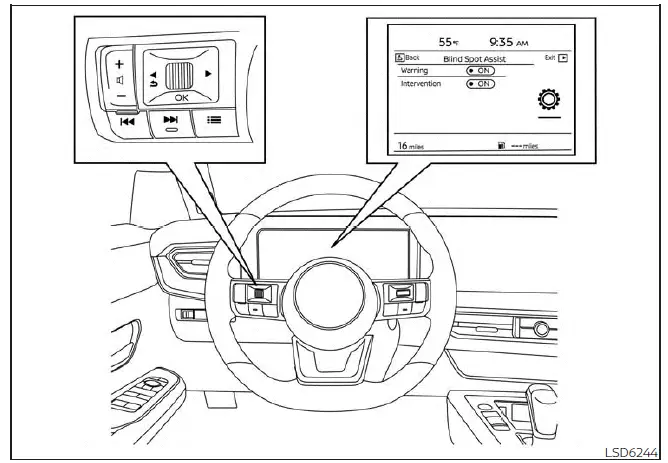
Perform the following procedure to enable or disable the I-BSI system:
1. Press the
 button until
"Settings" displays
in the vehicle information display.
button until
"Settings" displays
in the vehicle information display.
Use the scroll dial to select "Driver Assistance." Then press the OK button.
2. Select "Blind Spot Assist" and press the OK button.
3. Select "Intervention" and use the OK button to turn the system on or off.
4. Push the ProPILOT Assist switch to turn the system on or off.
NOTE:
- Activating the ProPILOT Assist system automatically enables both the I-BSI and I-LI systems.
- The Nissan Kicks stores the current I-BSI setting, so the selected configuration remains active even after the engine is restarted.
I-BSI system limitations Nissan Kicks Owner's Manual
WARNING
The limitations listed below apply to the I-BSI system. Failure to operate the Nissan Kicks with these limitations in mind may result in serious injury or death.
- The I-BSI system cannot detect every vehicle in every situation or under all driving conditions.
- The radar sensors may not detect certain objects or may not activate the I-BSI system when the following
are present:
- Pedestrians, bicycles, or animals.
- Vehicles such as motorcycles, low-height vehicles, or vehicles with high ground clearance.
- Vehicles that are already in the detection zone when the Nissan Kicks accelerates from a stop.
- Oncoming vehicles.
- A vehicle merging into an adjacent lane at approximately the same speed as your vehicle.
- A vehicle approaching rapidly from behind.
- A vehicle that your Nissan Kicks overtakes quickly.
- A vehicle that passes through the detection zone too quickly for stable detection.
- The radar sensor detection zone is based on a standard lane width. When driving in a wider lane, the radar sensors may not detect vehicles in the adjacent lane. When driving in a narrow lane, the sensors may detect vehicles traveling two lanes away.
- The radar sensors are designed to ignore most stationary objects. However, guardrails, walls, foliage, parked vehicles, and similar objects may occasionally be detected. This is considered normal system operation.
- The following conditions may reduce the radar's ability to detect other vehicles:
- Severe weather.
- Road spray.
- Ice, frost, snow, mud, or dirt buildup on the Nissan Kicks near the radar sensor areas.
- Do not attach stickers, including transparent material, install accessories, or apply additional paint near the radar sensors. These conditions may reduce radar detection performance and affect I-BSI operation.
- The camera may not detect lane markers correctly in the following situations, and the I-BSI system may
not operate properly:
- On roads with multiple parallel lane markers, faded markings, unclear paint, yellow lane markings, non-standard lane markings, or lane markers covered with water, dirt, snow, or other materials.
- On roads where old or discontinued lane markings are still visible.
- On roads with sharp curves.
- On roads with strong visual contrasts, such as shadows, snow patches, standing water, wheel ruts, pavement seams, or lines left after road repairs.
- On roads where the travel lane merges, splits, or changes shape.
- When the direction of travel does not align with the lane markers.
- When driving close behind another vehicle that blocks the lane camera unit's detection range.
- When rain, snow, frost, dirt, or another object adheres to the windshield in front of the lane camera unit.
- When the headlights are not bright because of dirty lenses or improper aiming.
- When strong light enters the lane camera unit, such as direct sunlight shining toward the front of the vehicle at sunrise or sunset.
- When brightness changes suddenly, such as when the Nissan Kicks enters or exits a tunnel, passes under a bridge, or moves through a sharply shaded area.
- Do not use or rely on the I-BSI system under the following conditions, because the system may not
function properly:
- During poor weather, such as rain, fog, snow, or similar conditions.
- When driving on slippery roads, including roads covered with ice or snow.
- When driving on winding, rough, or uneven roads.
- When a lane is closed because of road repairs or construction.
- When driving in a temporary or makeshift lane.
- When the lane width is too narrow.
- When driving with abnormal tire conditions, such as worn tires, low tire pressure, a spare tire installed, tire chains fitted, or nonstandard wheels used.
- When the vehicle is equipped with non-original brake parts or suspension components.
- Excessive noise, such as high audio system volume or wind noise from an open window, may interfere with the warning chime and make it difficult to hear.
The I-BSI system works best when the Nissan Kicks has clean radar areas, a clear windshield camera view, properly maintained tires, and visible lane markings. The system can assist during lane-change situations, but the driver must always make the final decision and control the vehicle safely.
I-BSI driving situations Nissan Kicks
Indicator on

Indicator off

Indicator flashing

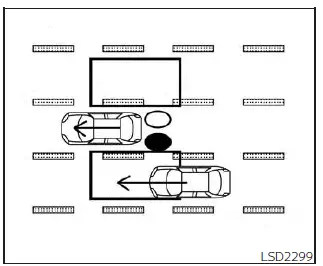
Illustration 1 - Approaching from behind
Another vehicle approaching from behind
Illustration 1: The side indicator light illuminates when another vehicle enters the detection zone from behind in an adjacent lane. This helps alert the Nissan Kicks driver to a vehicle that may be difficult to see during a lane change.
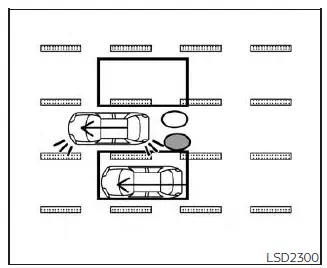
Illustration 2 - Approaching from
behind
Illustration 2: If the driver activates the turn signal while another vehicle is in the detection zone, the system sounds a chime twice, and both the side indicator light and the BSW indicator flash.
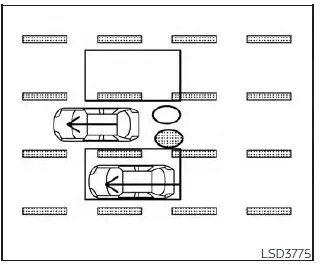
Illustration 3 - Approaching from
behind
Illustration 3: If the I-BSI system is turned on and the Nissan Kicks approaches a lane marker while another vehicle is in the detection zone, the system sounds three chimes, and both the side indicator light and the BSW indicator flash. The I-BSI system then activates briefly to help guide the vehicle back toward the center of the driving lane.
NOTE:
- The radar sensors may not detect vehicles that are approaching very rapidly from behind.
- If the driver activates the turn signal before another vehicle enters the detection zone, the side indicator light and the BSW indicator will flash when the vehicle is detected, but the chime will not sound.
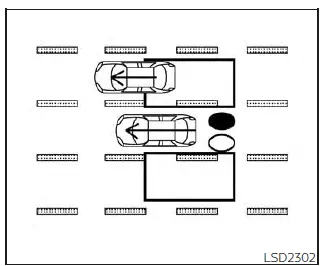
Illustration 4- Overtaking another
vehicle
Overtaking another vehicle
Illustration 4: The side indicator light illuminates if the Nissan Kicks overtakes another vehicle and that vehicle remains in the detection zone for approximately 3 seconds.
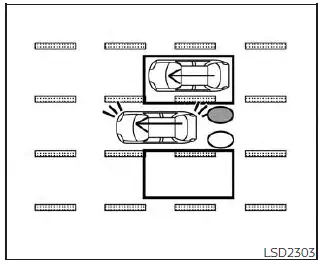
Illustration 5- Overtaking another
vehicle
Illustration 5: If the driver activates the turn signal while another vehicle remains in the detection zone, the system sounds a chime twice, and the side indicator light and BSW indicator flash.
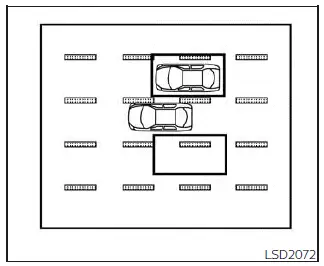
Illustration 6- Overtaking another
vehicle
Illustration 6: If the I-BSI system is on and the Nissan Kicks approaches a lane marker while another vehicle is in the detection zone, the system sounds three chimes, and the side indicator light and BSW indicator flash. The I-BSI system activates to help return the vehicle toward the center of the driving lane.
NOTE:
- When overtaking several vehicles in a row, vehicles after the first one may not be detected if they are traveling close together.
- The radar sensors may not detect slower moving vehicles if the Nissan Kicks passes them quickly.
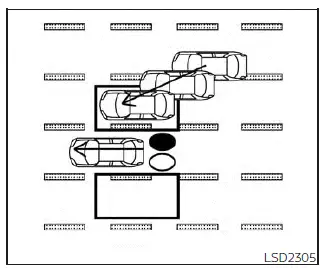
Illustration 7- Entering from the side
Entering from the side
Illustration 7: The side indicator light illuminates when a vehicle enters the detection zone from either side of the Nissan Kicks.
NOTE:
The radar sensors may not detect a vehicle traveling at approximately the same speed as your vehicle when it enters the detection zone.
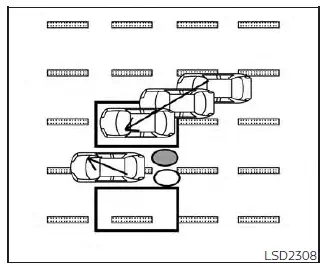
Illustration 8- Entering from the side
Illustration 8: If the driver activates the turn signal while another vehicle is in the detection zone, the side indicator light and BSW indicator flash, and the system sounds a chime twice.
NOTE:
If the driver activates the turn signal before a vehicle enters the detection zone, the side indicator light will flash when another vehicle is detected, but the chime will not sound.
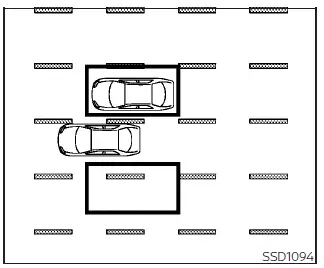
Illustration 9- Entering from the side
Illustration 9: If the I-BSI system is on and the Nissan Kicks approaches the lane marker while another vehicle is in the detection zone, the system sounds three chimes, and the side indicator light and BSW indicator flash. The I-BSI system then activates to help move the vehicle back toward the center of the driving lane.
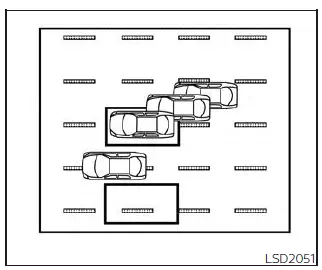
Illustration 10: - Entering from the side
Illustration 10: The I-BSI system will not operate if the Nissan Kicks is already on a lane marker when another vehicle enters the detection zone. In this situation, only the BSW system operates.
NOTE:
- The radar sensors may not detect a vehicle traveling at approximately the same speed as your vehicle when it enters the detection zone.
- I-BSI will not operate or may stop operating, and only a warning chime may sound, under the following
conditions:
- When the brake pedal is depressed.
- When the Nissan Kicks is accelerated during I-BSI system operation.
- When the steering wheel is turned quickly.
- When the ICC, I-FCW, or AEB with Pedestrian Detection warnings sound.
- When the hazard warning flashers are operated.
- When driving through a curve at high speed.
- When the BSW system is turned off.
The I-BSI system in the Nissan Kicks can support safer lane-change awareness, but it depends on radar detection, lane visibility, vehicle speed, and driver input. Always check mirrors, use turn signals, and visually confirm that the lane is clear before moving the vehicle.
System temporarily unavailable Nissan Kicks 2026
Under certain conditions, a chime will sound, a warning message will appear in the vehicle information display, and the I-BSI system in the Nissan Kicks will turn off automatically.
The I-BSI system will remain unavailable until the condition that caused the temporary stop is no longer present.
- "Not available Poor Road Conditions"
- When the VDC system, except the TCS function, or the ABS system is operating.
- "Currently not available"
- When the VDC system is turned off.
- When SNOW mode is selected on AWD models.
- "Unavailable High Cabin Temperature": This may appear if the Nissan Kicks has been parked in direct sunlight under high-temperature conditions, above approximately 104ºF (40ºC).
- "Unavailable Side Radar Obstruction": This appears when blockage of the side radar area is detected.
When these conditions no longer exist, turn the I-BSI system off and then turn it on again to restore operation.
System malfunction
If the I-BSI system malfunctions, it will turn off automatically. A chime will sound, and the "Not available System Malfunction" warning message will appear with the BSW indicator (orange) in the vehicle information display.
Action to take:
Stop the Nissan Kicks in a safe location, place the shift lever in the P (Park) position, turn the engine off, and then restart the engine. If the "Not available System Malfunction" message and the BSW indicator (orange) continue to appear, have the I-BSI system inspected. It is recommended that you visit a certified NISSAN dealer for this service.
System maintenance
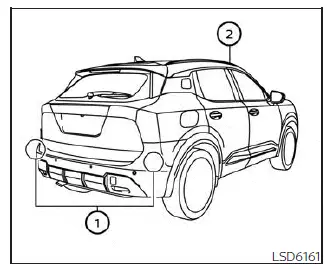
The two radar sensors 1 used by the I-BSI system are located near the rear bumper. Always keep the area around the radar sensors clean and free from obstruction.
Temporary environmental conditions such as splashing water, mist, fog, road spray, or heavy moisture may block the radar sensors.
The sensors may also be obstructed by ice, frost, snow, mud, dirt, or other material covering the sensor area.
Check the radar sensor area regularly and remove any objects or buildup that may block sensor operation.
Do not attach stickers, including transparent material, install accessories, or apply additional paint near the radar sensors.
Do not strike, press, or damage the area around the radar sensors.
If the radar sensor area of the Nissan Kicks is damaged in a collision, it is recommended that you visit a certified NISSAN dealer for inspection and service.
The lane camera unit 2 used by the I-BSI system is located above the inside mirror. To maintain proper I-BSI operation and help prevent system malfunction, follow these precautions:
- Always keep the windshield clean, especially the area in front of the camera unit.
- Do not attach stickers, transparent film, decals, or accessories near the camera unit.
- Do not place reflective materials, such as white paper, glossy objects, or mirrors, on the instrument panel. Reflected sunlight may reduce the camera unit's ability to detect lane markers accurately.
- Do not strike or damage the area around the camera unit. Do not touch the camera lens or remove the screw located on the camera unit. If the camera unit is damaged in an accident, it is recommended that you contact a certified NISSAN dealer.
Clean radar areas, a clear windshield camera view, and undamaged sensor locations help the Nissan Kicks I-BSI system operate more consistently during normal driving.
Radio frequency statement
For USA
CAUTION TO USERS
Changes or modifications not expressly approved by the party responsible for compliance could void the user's authority to operate the equipment.
This device complies with Part 15 of the FCC Rules and with the RSS of the Industry Canada. Operation is subject to the following two conditions:
1. This device may not cause harmful interference, and
2. this device must accept any interference received, including interference that may cause undesired operation.
In order to comply with FCC RF Exposure requirements, this device must be installed to provide at least 20 cm separation from the human body at all times.
For Canada
This device complies with Industry Canada licence-exempt RSS standard(s).
Operation is subject to the following two conditions: (1) this device may not cause interference, and (2) this device must accept any interference, including interference that may cause undesired operation of the device.
Afin de se conformer aux exigences d'exposition RF MIC / FCC / ISED, cet appareil doit etre installe pour foutnir au moins 20 cm de separation du corps humain en tout temps.