



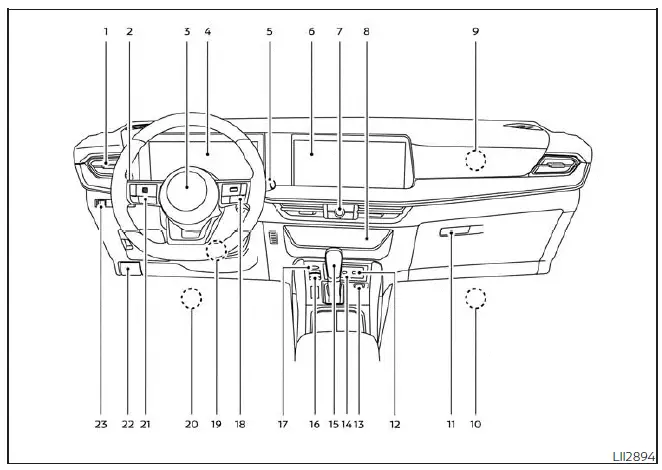
- Vents for directing cabin airflow throughout the Nissan Kicks interior
- Headlight and turn signal switch for exterior lighting and lane-change signaling
- Driver's supplemental air bag
Horn integrated into the steering wheel center pad - Meters and gauges
Warning and indicator lights
Trip computer (if so equipped)
Vehicle information display for important Nissan Kicks driving data and system messages - Wiper and washer switch for windshield cleaning and visibility control
- Center display
Center display controls (if so equipped) for infotainment, camera views and vehicle-related functions - Audio controls
Hazard warning flasher switch
Camera controls (if so equipped) for parking and visibility assistance - Climate controls
Heated seat switches (if so equipped) for added comfort in the Nissan Kicks cabin - Passenger's supplemental air bag built into the instrument panel area
- Front passenger supplemental knee air bag for additional lower-body protection
- Glove box for front passenger-side storage
- USB connection port
AUX jack (if so equipped) for media and device connectivity - Drive Mode Selector for choosing the preferred driving response
- Wireless charger and indicator (if so equipped) for compatible mobile devices
- Shift lever for selecting the driving range
- Electronic parking brake
Automatic brake hold switch for convenient stop-and-go driving - Push-button ignition switch for starting and stopping the Nissan Kicks engine
- Bluetooth Hands-Free Phone System
Intelligent Cruise Control (ICC) switches (if so equipped)
ProPILOT Assist switches (if so equipped) for driver assistance operation - Tilt and telescopic steering wheel lock lever for adjusting the steering wheel position
- Driver supplemental knee air bag positioned below the steering column area
- Steering wheel switches for audio control
Control panel and vehicle information display switches for quick access to common Nissan Kicks settings - Hood release for opening the engine compartment
- Steering Assist Switch (if so equipped)
Heated steering wheel switch (if so equipped) for comfort and driver assistance convenience
* Refer to the separate NissanConnect Owner's Manual (if so equipped).
The Nissan Kicks instrument panel is designed to place key driving controls, comfort features and safety indicators within easy reach of the driver. Before operating the vehicle, take a moment to become familiar with the location of each switch, display and control so you can use the systems confidently and safely.