


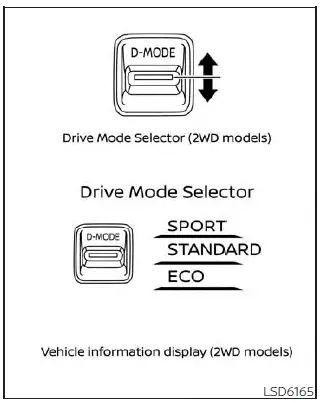
Drive Mode Selector (2WD models)
The Nissan Kicks Drive Mode Selector allows the driver to tailor vehicle behavior to different road conditions and driving preferences. By choosing the appropriate mode, the Nissan Kicks can deliver a balance of efficiency, comfort, responsiveness, and traction.
For 2WD models, the available driving modes are:
2WD: SPORT, STANDARD, and ECO
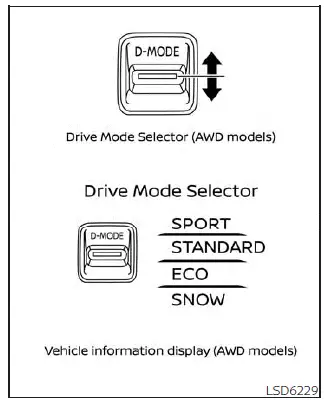
Drive Mode Selector (AWD models)
To change the selected mode on certain Nissan Kicks models, push the Drive Mode Selector upward or downward.
AWD: SPORT, STANDARD, ECO and SNOW
On AWD-equipped Nissan Kicks vehicles, rotate the Drive Mode Selector to the right or left to choose the desired driving mode.
NOTE:
After selecting a new drive mode, the system may require a brief moment before the change is reflected in vehicle operation.
This behavior is normal and does not indicate a system fault.
The currently active mode is shown in the Nissan Kicks vehicle information display. A mode selection list will also appear, allowing the driver to confirm the selected setting.
NOTE:
The mode selection list automatically disappears approximately 5 seconds after a mode is chosen.
The display can also be cleared manually by pressing the scroll dial located on the steering wheel controls.
If the Nissan Kicks does not allow mode changes while the ignition switch is in the ON position, the system should be inspected. It is recommended that you have the vehicle checked by a NISSAN dealer.
NOTE:
The STANDARD mode is automatically selected each time the ignition switch is turned to the ON position.
WARNING
- Do not focus on the Drive Mode Selector or the information display while driving. Always keep your attention on the road and surrounding traffic conditions.
- Avoid aggressive acceleration, sudden steering inputs, or abrupt braking, particularly on wet, icy, or slippery surfaces. Excessive tire slip or skidding may lead to loss of control and increase the risk of an accident.
STANDARD MODE
STANDARD mode is the default operating setting for the Nissan Kicks and is optimized for everyday driving. It provides a balanced combination of throttle response, steering feel, ride comfort, and fuel efficiency suitable for most road conditions.
SPORT mode
- Enhances throttle responsiveness for a more dynamic and engaging driving experience.
- Adjusts steering characteristics to provide slightly heavier steering effort, creating a sportier and more connected feel behind the wheel.
NOTE:
When SPORT mode is active, fuel consumption may increase because engine response is prioritized over efficiency.
SNOW mode (AWD models)
SNOW mode is specifically designed to improve traction and vehicle stability when driving on snow-covered roads, icy surfaces, or other low-grip conditions. This mode helps the Nissan Kicks deliver smoother acceleration and improved control in winter weather.
CAUTION
Do not use SNOW mode on dry, high-traction pavement for extended periods. Doing so may place unnecessary stress on drivetrain components, accelerate tire wear, and reduce overall fuel economy.
When SNOW mode is selected, slight vibrations may occasionally be felt while cornering. This characteristic is normal and does not indicate a malfunction.
ECO mode
ECO mode assists drivers who wish to maximize fuel efficiency. In this mode, the Nissan Kicks adjusts engine response and powertrain behavior to encourage smoother acceleration, more economical cruising, and reduced fuel consumption.
NOTE:
- Selecting ECO mode does not guarantee lower fuel consumption in every situation. Driving style, road conditions, traffic flow, and vehicle load all influence actual fuel economy.
- Using a mode other than ECO may be preferable when stronger acceleration is needed, such as:
- Driving with a full passenger load or heavy cargo.
- Traveling on steep uphill grades.
Operation
Select ECO mode using the Drive Mode Selector. Once activated, the ECO indicator will illuminate in the instrument cluster.
When the accelerator pedal is operated within the efficient driving range, the ECO drive indicator illuminates green. If the accelerator pedal is pressed beyond the economy range, the indicator switches off.
The ECO drive indicator does not illuminate under the following conditions:
- When the shift lever is in the R (Reverse) position.
- When vehicle speed is below 2 mph (3.2 km/h) or above 90 mph (144 km/h).
- When the Intelligent Cruise Control (ICC) system (if equipped) or ProPILOT Assist system (if equipped) is active.
ECO Customize
The Nissan Kicks offers ECO customization settings that allow additional efficiency-focused adjustments beyond the standard powertrain calibration.
When ECO mode is selected, settings related to "Cruise Control", "Idling Stop", and "Air Conditioning" can be optimized to place greater priority on fuel economy.
These settings are available only when ECO mode is active.
- Cruise Control
When enabled, cruising efficiency is improved by reducing acceleration targets compared with normal operating settings. - Idling Stop
When activated, engine stop duration may be extended when the air conditioning system is operating, helping improve fuel economy. - Air Conditioning
When enabled, air conditioning output is moderated to reduce engine load and improve overall efficiency.
NOTE:
When vehicle speed decreases, such as when climbing an incline after traveling on level ground, it may take longer for the Nissan Kicks to return to the previously set cruising speed compared with STANDARD mode.
Tire Pres ECO advice
The "Tire Pres ECO advice" function provides fuel-efficiency guidance whenever low tire pressure is detected.
When enabled, the ECO Drive Report display may show the message "See Tire Pressures". This allows the driver to quickly switch to the tire pressure information screen in the vehicle information display.
Maintaining proper tire pressure is important not only for safety but also for maximizing the fuel economy potential of the Nissan Kicks.
ECO pedal guide function (if so equipped)
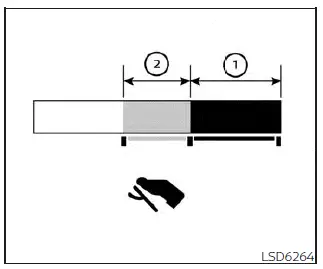
The ECO Pedal Guide can be displayed in the vehicle information display while ECO mode is active. This feature helps drivers maintain more economical driving habits.
When the ECO Pedal Guide bar remains within the dark green zone 1, the Nissan Kicks is operating in an ultra-efficient driving range.
When the bar is displayed within the light green zone 2, the vehicle is being driven within the normal economy range.
If the ECO Pedal Guide bar moves outside the green zones (1 and 2), accelerator pedal input exceeds the recommended economy range.
The ECO Pedal Guide display is not shown when:
- The vehicle speed is below approximately 2 mph (4 km/h).
- The shift lever is in the P (Park), N (Neutral), or R (Reverse) position.
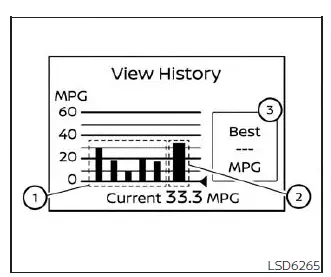
Eco Drive Report (if so equipped)
When the ignition switch is moved to the OFF position, the Nissan Kicks can display an ECO management summary that evaluates recent driving efficiency.
- Previous 5 times (History)
- Current fuel economy
- Best fuel economy
The ECO evaluation result becomes available approximately 30 seconds after the ignition switch is placed in the ON position and the vehicle has traveled at least 1/3 mile (500 m).
- The average fuel economy recorded during the previous five driving sessions is displayed.
- The average fuel economy measured since the last reset is shown.
- The highest fuel economy value achieved in the stored history is displayed.
The ECO Drive Report function can be turned ON or OFF according to driver preference.
Drivers of the Nissan Kicks can use these ECO-related tools to better understand driving habits, improve efficiency, and monitor fuel-saving performance during everyday operation. Efficient acceleration, smooth braking, and maintaining proper tire pressure can further enhance overall fuel economy.