



WARNING
Failure to follow the warnings and instructions for proper use of the BSW system could result in serious injury or death.
- The BSW system is not a substitute for safe lane-changing practices and is not designed to prevent contact with vehicles or objects. Before changing lanes in the Nissan Kicks, always check the side mirrors and rearview mirror, use the turn signal, and look in the direction the vehicle will move to confirm that the lane is clear. Never rely only on the BSW system.
The Blind Spot Warning system in the Nissan Kicks helps alert the driver when another vehicle is detected in an adjacent lane during a lane change situation.
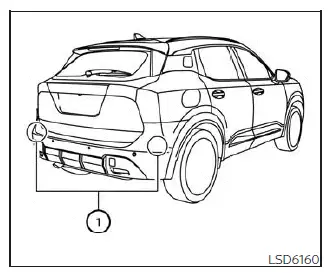
The BSW system uses radar sensors 1 installed near the rear bumper to monitor areas beside and slightly behind the Nissan Kicks.
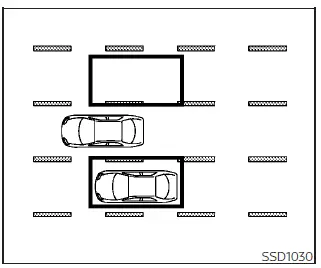
Detection zone
The radar sensors can detect vehicles on either side of your Nissan Kicks within the illustrated detection zone. This zone begins near the outside mirror, extends approximately 10 ft (3.0 m) behind the rear bumper, and reaches approximately 10 ft (3.0 m) sideways.
BSW system operation
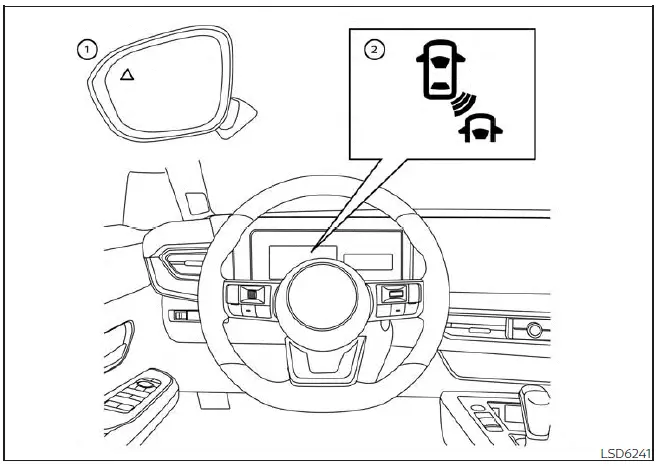
- Side BSW/RCTA Indicator Light
- BSW Indicator or BSW Indicator Light
The BSW system operates when the Nissan Kicks is driven above approximately 20 mph (32 km/h).
If the radar sensors detect another vehicle within the detection zone, the side BSW/RCTA indicator light 1 illuminates. If the driver then activates the turn signal toward that side, the system sounds a chime twice and the side BSW/RCTA indicator light flashes. The indicator continues flashing until the detected vehicle leaves the monitored area.
The side BSW/RCTA indicator light illuminates for a few seconds when the ignition switch is placed in the ON position.
The brightness of the side BSW/RCTA indicator light adjusts automatically according to surrounding light conditions, helping the warning remain visible in both daylight and darker driving environments.
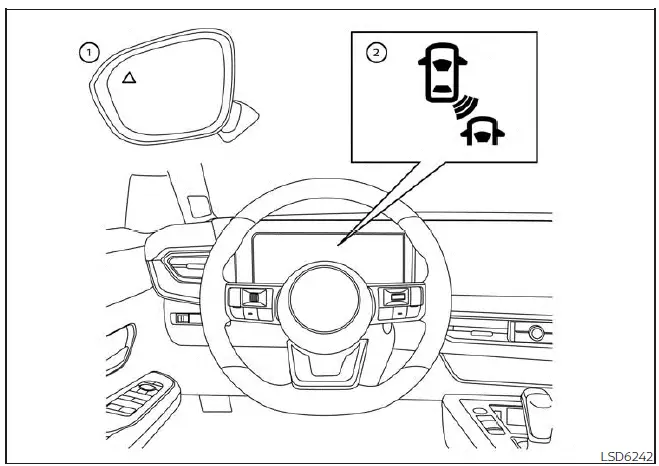
For vehicles with the 12.3 inch (31.2 cm) display
If another vehicle enters the detection zone after the driver has already activated the turn signal, only the side BSW/RCTA indicator light flashes and the chime does not sound.
How to enable/disable the BSW system
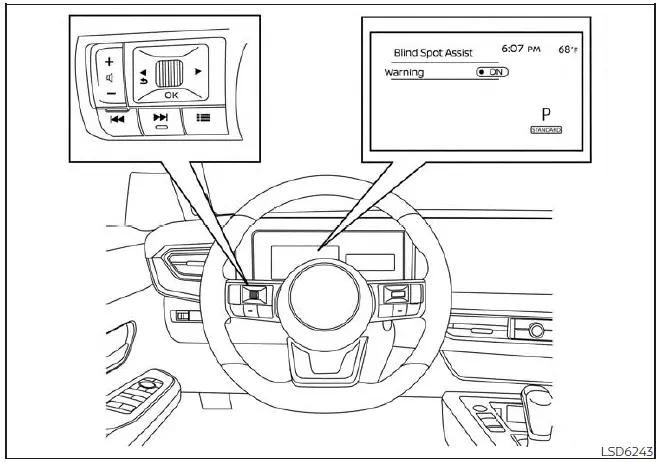
For vehicles with the 7 inch (18 cm) display
Use the following procedure to turn the BSW system on or off.
1. Press the
 button until
"Settings" appears
in the vehicle information display.
button until
"Settings" appears
in the vehicle information display.
Use the
 button to select "Driver
Assistance."
Then press the OK button.
button to select "Driver
Assistance."
Then press the OK button.
2. Select "Blind Spot Assist" and press the OK button.
3. Select "Warning" and press the OK button to turn the system on or off.
NOTE:
- When the BSW system is enabled or disabled, the current setting is retained even after the engine is restarted.
- When the BSW system is turned on, the BSW indicator (white) illuminates in the vehicle information display.
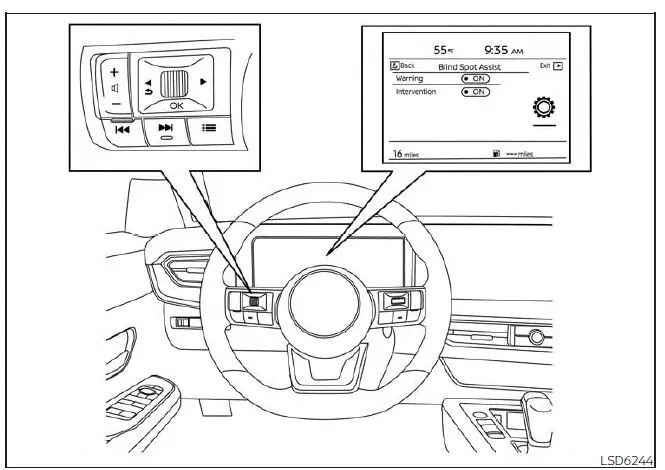
For vehicles with the 12.3 inch (31.2 cm) display
BSW system limitations
WARNING
The following items describe limitations of the BSW system. Failure to operate the vehicle with these limitations in mind could result in serious injury or death.
- The BSW system cannot detect every vehicle in every driving condition.
- The radar sensors may not detect or activate BSW when certain objects or situations are present,
including:
- Pedestrians, bicycles, or animals.
- Motorcycles, low-height vehicles, or vehicles with high ground clearance.
- Oncoming vehicles.
- Vehicles already remaining in the detection zone when the Nissan Kicks accelerates from a stop.
- A vehicle merging into an adjacent lane at nearly the same speed as your vehicle.
- A vehicle approaching rapidly from behind.
- A vehicle that the Nissan Kicks overtakes quickly.
- A vehicle that passes through the detection zone very quickly.
- When several vehicles are overtaken in a row, vehicles after the first may not be detected if they are traveling close together.
- The radar sensor detection zone is designed around a standard lane width. When driving in a wider lane, the sensors may not detect vehicles in the adjacent lane. When driving in a narrow lane, the sensors may detect vehicles traveling two lanes away.
- The radar sensors are designed to ignore most stationary objects. However, guardrails, walls, foliage, parked vehicles, or similar objects may occasionally be detected. This is a normal operating condition.
- The following conditions may reduce radar detection performance:
- Severe weather.
- Road spray.
- Ice, frost, snow, mud, or dirt built up on the vehicle near the radar sensor areas.
- Do not attach stickers, including transparent material, install accessories, or apply additional paint near the radar sensors. These conditions may reduce the ability of the radar to detect other vehicles.
- Excessive noise, such as high audio volume or an open window, may interfere with the warning chime and make it difficult to hear.
The BSW system works best when the rear bumper area is clean and unobstructed. Keeping the radar sensor areas free from dirt, snow, ice, and accessories helps the Nissan Kicks provide more consistent blind spot alerts during daily driving.
BSW driving situations
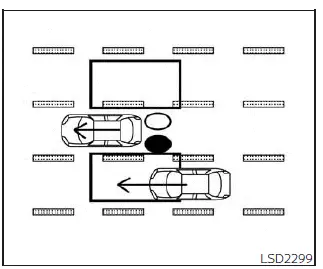
Illustration 1 - Approaching from behind
Indicator on

Indicator off

Indicator flashing

Another vehicle approaching from behind
Illustration 1: The side BSW/RCTA indicator light illuminates when another vehicle enters the detection zone from behind in an adjacent lane. This helps the Nissan Kicks driver notice traffic that may not be fully visible in the side mirror.
NOTE:
- The radar sensors may not detect vehicles that are approaching very rapidly from behind.
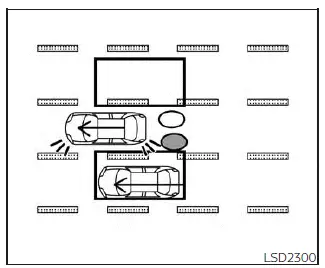
Illustration 2 - Approaching from
behind
Illustration 2: If the driver activates the turn signal while another vehicle is already in the detection zone, the system sounds a chime twice and the side BSW/RCTA indicator light flashes.
NOTE:
- The radar sensors may not detect vehicles that are approaching very rapidly from behind.
- If the turn signal is activated before another vehicle enters the detection zone, the side BSW/RCTA indicator light will flash when the vehicle is detected, but the chime will not sound.
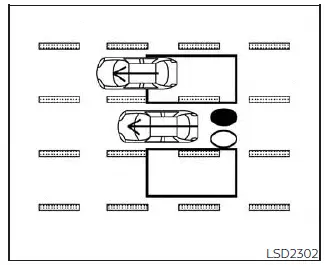
Illustration 3 - Overtaking another
vehicle
Overtaking another vehicle
Illustration 3: The side BSW/RCTA indicator light illuminates if the Nissan Kicks overtakes another vehicle and that vehicle remains in the detection zone for approximately 2 seconds.
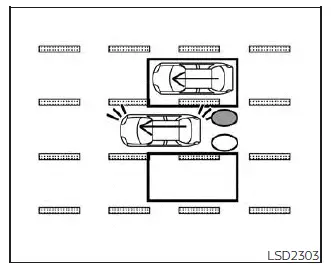
Illustration 4 - Overtaking another
vehicle
Illustration 4: If the driver activates the turn signal while another vehicle is in the detection zone, the system sounds a chime twice and the side BSW/RCTA indicator light flashes.
NOTE:
- When overtaking several vehicles in a row, vehicles after the first may not be detected if they are traveling close together.
- The radar sensors may not detect slower moving vehicles if they are passed quickly.
- If the turn signal is activated before another vehicle enters the detection zone, the side BSW/RCTA indicator light will flash when the other vehicle is detected, but the chime will not sound.
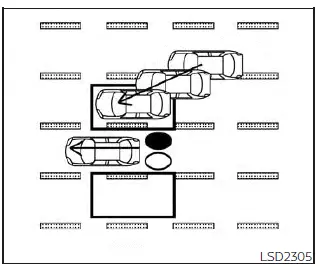
Illustration 5 - Entering from the side
Entering from the side
Illustration 5: The side BSW/RCTA indicator light illuminates when a vehicle enters the detection zone from either side of the Nissan Kicks.
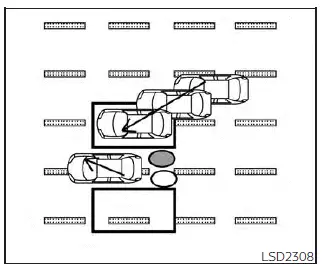
Illustration 6 - Entering from the side
Illustration 6: If the driver activates the turn signal while another vehicle is already within the detection zone, the system sounds a chime twice and the side BSW/RCTA indicator light flashes.
NOTE:
- If the turn signal is activated before a vehicle enters the detection zone, the side BSW/RCTA indicator light will flash when the vehicle is detected, but the chime will not sound.
- The radar sensors may not detect a vehicle traveling at approximately the same speed as the Nissan Kicks when it enters the detection zone.
System temporarily unavailable
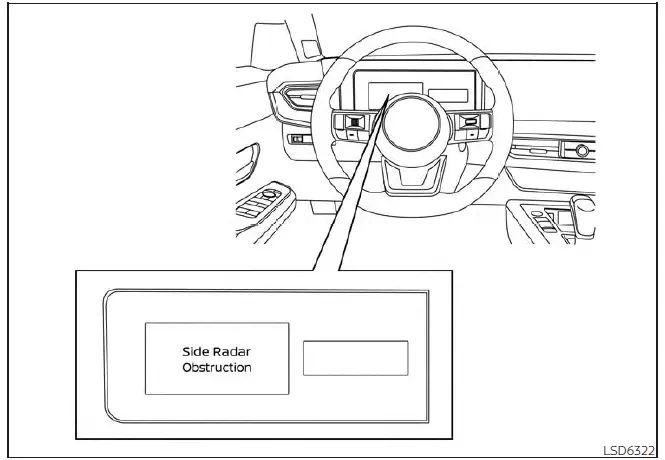
For vehicles with the 7 inch (18 cm) display
When radar blockage is detected, the BSW system turns off automatically. The "Side Radar Obstruction" warning message will appear in the Nissan Kicks vehicle information display.
The system remains unavailable until the obstruction or temporary condition is no longer present.
The radar sensors may be blocked by temporary environmental conditions such as splashing water, road spray, mist, or fog. The blocked condition may also be caused by ice, frost, snow, mud, dirt, or other objects covering the radar sensor area.
Action to take:
When the conditions above are cleared, the system will resume operation automatically.
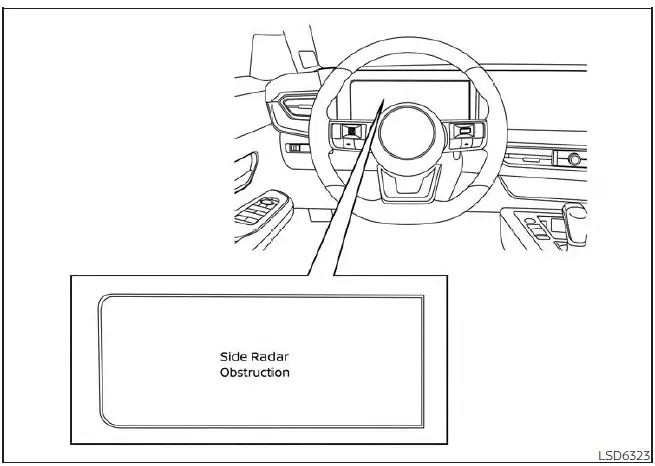
For vehicles with the 12.3 inch (31.2 cm) display
Malfunction
If the BSW system malfunctions, it will turn off automatically. A system malfunction warning message with the BSW indicator (orange) will appear in the vehicle information display.
Action to take:
Stop the Nissan Kicks in a safe location, place the shift lever in the P (Park) position, turn the engine off, and then restart the engine. If the message continues to appear, have the system inspected. It is recommended that you visit a NISSAN dealer for this service.
System maintenance
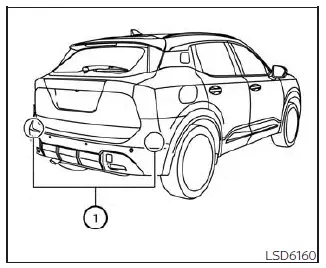
The two radar sensors 1 used by the BSW and RCTA systems are located near the rear bumper. Always keep the area around these radar sensors clean and unobstructed.
Temporary environmental conditions such as splashing water, mist, fog, or road spray may block the radar sensors.
The sensors may also be obstructed by ice, frost, snow, mud, dirt, or other materials attached near the radar sensor areas.
Inspect the rear bumper area and remove anything that may block the radar sensors.
Do not attach stickers, including transparent material, install accessories, or apply additional paint near the radar sensors.
Do not strike or damage the area around the radar sensors. If the radar sensor area of the Nissan Kicks is damaged in a collision, it is recommended that you visit a NISSAN dealer for inspection.
Keeping the rear bumper area clean helps the Nissan Kicks Blind Spot Warning system detect nearby vehicles more consistently, especially in rain, snow, or heavy road spray.
Radio frequency statement
For USA
This device complies with Part 15 of the FCC Rules.
Operation is subject to the following two conditions:
1. This device may not cause harmful interference, and
2. This device must accept any interference received, including interference that may cause undesired operation.
FCC Warning
Changes or modifications not expressly approved by the party responsible for compliance could void the user's authority to operate the equipment.
Radio frequency statement
For USA
This device complies with Part 15 of the FCC Rules.
Operation is subject to the following two conditions:
1. This device may not cause harmful interference, and 2. This device must accept any interference received, including interference that may cause undesired operation.
FCC Warning
Changes or modifications not expressly approved by the party responsible for compliance could void the user's authority to operate the equipment.
Frequency bands: 24.05-24.25GHz
Output power: less than 20 milliwatts
Droit applicable: Canada 310
Le présent appareil est conforme aux CNR d'Industrie Canada applicables aux appareils radio exempts de licence. L'exploitation est autorisée aux deux conditions suivantes:
1. L'appareil ne doit pas produire de brouillage, et
2. L'utilisateur de l'appareil doit accepter tout brouillage radioélectrique subi, même si le brouillage est susceptible d'en compromettre le fonctionnement.
Bandes de fréquences: 24.05-24.25GHz
Puissance émise: Moins de 20 milliwatts