



The automatic brake hold function in the Nissan Kicks keeps braking force applied after the vehicle has come to a complete stop, such as at a traffic light, intersection, or in slow-moving traffic. This allows the driver to release the brake pedal while the vehicle remains stationary. When the accelerator pedal is pressed again, the automatic brake hold function deactivates and the braking force is released smoothly. The operating status of automatic brake hold can be checked on the vehicle information display.
To use the automatic brake hold function, the following conditions must be satisfied:
- The driver's seat belt is fastened.
- The electronic parking brake is released.
- The shift lever is not in the P (Park) position.
- The Nissan Kicks is not stopped on a steep hill.
WARNING
- The automatic brake hold function is not intended to hold the vehicle on steep hills or slippery road surfaces. Do not rely on automatic brake hold when the Nissan Kicks is stopped on a steep grade or on a slick surface, because the vehicle may move unexpectedly.
- An automatic brake hold warning may appear in the vehicle information display, requesting that the driver take control by depressing the brake pedal.
- If automatic brake hold is activated but does not keep the vehicle stopped, press the brake pedal immediately. If the vehicle moves because of road grade, surface condition, or another outside factor, a chime may sound and an automatic brake hold warning may appear in the vehicle information display.
- Deactivate the automatic brake hold function before using a car wash or towing the vehicle.
- When parking, entering or exiting the vehicle, or loading luggage, always place the shift lever in the P (Park) position and apply the parking brake. Failure to do so may allow the Nissan Kicks to move or roll away unexpectedly, causing serious personal injury or property damage.
- If any of the following conditions occur,
the automatic brake hold function may
not operate properly. Have the system
checked promptly. It is recommended
that you visit a NISSAN dealer for this
service. Continuing to use the vehicle
without following these precautions may
allow it to move or roll away unexpectedly,
causing serious personal injury or
property damage.
- A warning message appears in the vehicle information display.
- The indicator light on the automatic brake hold switch does not illuminate when the switch is pushed.
- The automatic brake hold function will not activate if the Slip indicator light, the electronic parking brake warning light, or the master warning light is illuminated and a chassis control system error message appears in the vehicle information display.
- A sound may be heard while the system maintains braking force to keep the vehicle stopped. This is a normal operating characteristic and does not indicate a malfunction.
How to activate/deactivate the automatic brake hold function
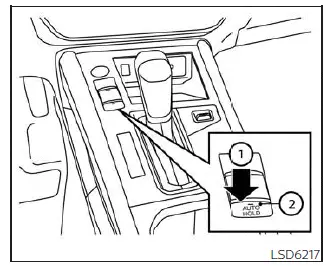
Activation and deactivation of automatic brake hold are performed with the automatic brake hold switch. The Nissan Kicks displays the system condition through the switch indicator and the vehicle information display.
How to activate the automatic brake hold function
1. With the ignition switch in the ON position, push the automatic brake hold switch 1.
The indicator light on the automatic brake hold switch 2 will illuminate.
2. When the automatic brake hold function enters standby mode, the automatic brake hold indicator light (white) illuminates.
To use the automatic brake hold function, the following conditions must be met:
- The driver's seat belt is fastened.
- The electronic parking brake is released.
- The shift lever is not in the P (Park) position.
- The vehicle is not stopped on a steep hill.
NOTE:
The automatic brake hold status is retained when the engine is turned off and then started again, recalling the previous ON or OFF setting.
How to deactivate the automatic brake hold function
When the automatic brake hold function is active, push the automatic brake hold switch to turn off the automatic brake hold indicator light and deactivate the function. If braking force is currently being maintained by automatic brake hold, depress the brake pedal first and then push the automatic brake hold switch.
WARNING
Firmly depress and hold the brake pedal when turning off the automatic brake hold function while braking force is being maintained. Once automatic brake hold is deactivated, the braking force will be released.
If the brake pedal is not held, the vehicle may move or roll away unexpectedly. Failure to prevent vehicle movement may result in serious personal injury or property damage.
How to use the automatic brake hold function
The automatic brake hold function is useful during repeated stops, but the driver must always remain ready to press the brake pedal. Use it only when road and traffic conditions are suitable.
To maintain braking force automatically
With the automatic brake hold function activated and the automatic brake hold indicator light (white) illuminated on the meter, press the brake pedal to bring the Nissan Kicks to a complete stop.
The braking force is then maintained automatically, even after the driver's foot is removed from the brake pedal. While brake hold is active, the automatic brake hold indicator light (green) illuminates on the meter.
To start the vehicle from a standstill
With the shift lever not in P (Park) or N (Neutral), press the accelerator pedal while braking force is being maintained.
The braking force will release automatically, allowing the Nissan Kicks to move forward again.
The automatic brake hold indicator light (white) illuminates, and the automatic brake hold function returns to standby.
Parking
When the shift lever is moved to P (Park) while braking force is being maintained by automatic brake hold, the electronic parking brake is applied automatically and the braking force from automatic brake hold is released. The automatic brake hold indicator light turns off. If the electronic parking brake is applied manually while automatic brake hold is maintaining braking force, the automatic brake hold braking force is released and the indicator light turns off.
NOTE:
- Under the following conditions, the
electronic parking brake will automatically
apply and the braking force from the
automatic brake hold function will be
released:
- The automatic brake hold function has maintained braking force for 3 minutes or longer.
- The shift lever is in the P (Park) position.
- The driver's seat belt is unfastened.
- The ignition switch is placed in the OFF position.
- The parking brake is applied manually.
- A malfunction occurs in the automatic brake hold function.
- If the vehicle stops but braking force is not applied automatically, depress the brake pedal firmly until the automatic brake hold indicator light (green) illuminates.
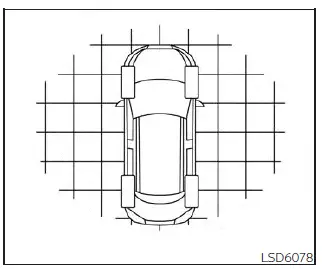
Automatic brake hold function display
The status of the automatic brake hold function is shown by color in the "Chassis Control" mode of the vehicle information display.
Depending on driving conditions and system operation, warnings or indicators related to automatic brake hold may also appear in the vehicle information display of the Nissan Kicks.