Honda Civic manuals

Honda Civic Service Manual: Parking Brake Adjustment (Disc Brake)

1. Vehicle Lift

1.

Raise the vehicle on a lift, and make sure it is securely supported.


2. Rear Wheel

1.

Remove both rear wheels.


3. Center Console Rear Trim

1.

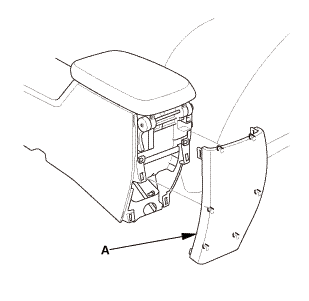
Remove the center console rear trim (A).


4. Parking Brake Adjusting Bolt - Loosen


1.

Release the parking brake lever fully.


2.

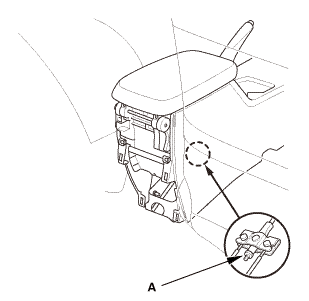
Loosen the adjusting nut (A).


1. Rear Brake Caliper Lever - Contact Check (Disc Brake)

1.

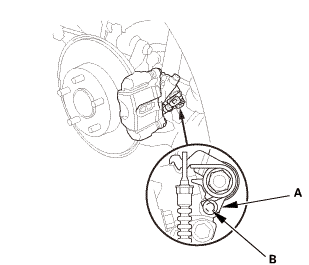
Make sure the lever (A) on the rear brake caliper contacts the stop pin (B).


NOTE: The lever will only contact the stop pin when the parking brake adjusting nut is loosened.


1. Rear Wheel

15mmumum

1.

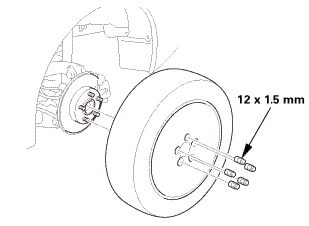
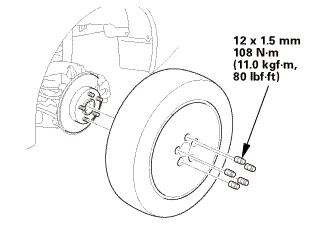
Install both rear wheels.


NOTE: Before installing the wheel, clean the mating surfaces between the brake disc or the brake drum and the inside of the wheel.


1. Parking Brake - Adjustment (Disc Brake)

1.

Pull the parking brake lever 1 click.


2.

Tighten the parking brake adjusting nut until the parking brakes drag slightly when the rear wheels are turned.


3.

Release the parking brake lever fully.


4.

Check that the parking brakes do not drag when the rear wheels are turned.


5.

Readjust if necessary.


6.

Make sure the parking brake lever is within the specified number of clicks (Except Si: 8 to 10 clicks, Si: 8 to 9 clicks).


1. Center Console Rear Trim

1.

Install the center console rear trim (A).


Parking Brake Adjustment (Disc Brake)
...

Parking Brake Cable Removal and Installation (Disc Brake)
...

See also:

Honda Civic Owners Manual. Caller's ID Information
You can select a caller's information to be displayed when you have an incoming call.  Press the button or the button.  Rotate to select Phone Setup, then press .  Rotate to select Caller ID Info, then press .  Rotate to select a mode you want, ...

Nissan Kicks - OM - Seats - Wheels and tires - Audio system -
© 2016-2026 Copyright www.hocivic.com

0.0069