
Honda Civic Owners Manual: Displaying the Maintenance Minder Information
Maintenance items, which should be serviced at the same time that you replace the engine oil, appear on the driver information interface.
You can view them on the Maintenance Minder screen at any time.
- Turn the ignition switch to ON
 *1.
*1. - Press the
 button
several times until
button
several times until  is
displayed.
is
displayed. - Press ENTER to go to the Maintenance Minder screen. The engine oil life appears on the driver information interface along with maintenance items due soon.
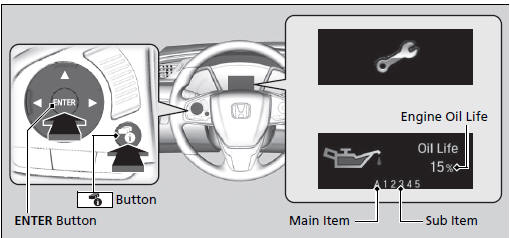
*1: Models with the smart entry system have an ENGINE START/STOP button instead of an ignition switch.
|
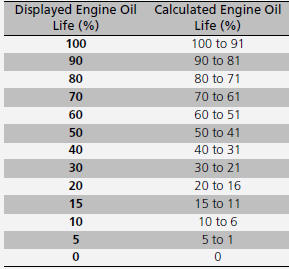
Displaying the Maintenance Minder Information Based on the engine operating conditions and oil age, the remaining engine oil life is calculated and displayed as a percentage.
There is a list of maintenance main and sub items you can view on the driver information interface. |

 Maintenance Minder Messages on the Driver Information Interface
The system message indicator ( )
comes on along with the Maintenance Minder message. ...
See also:
Honda Civic Service Manual. Side Impact Sensor (Second) Removal and Installation (2-door)
7521C3 LEFT REAR
7521C4 RIGHT REAR
Removal
NOTE: SRS components are located in this area. Review the SRS
component locations and the precautions and procedures before doing
repairs or service.
1.
Battery Termina ...
